
celld
Run denoland celld — self-hosted Durable Objects — with fleet state on RustFS.
This guide connects celld — the self-hosted, distributed Durable Objects runtime from Denoland — to RustFS as its fleet bucket. You will run celld diagnose against a RustFS bucket (including the conditional-write probe), deploy a Counter worker, mutate Durable Object state over HTTP, restart celld, and confirm the state survives. The workflow was verified with celld v0.6.2 against rustfs/rustfs-x86-musl:v2.3.1.
You need the celld binary, esbuild (for bundling), and Node.js to drive the deployed worker.
Architecture
celld keeps only a local WAL. Every committed SQLite write is captured in LTX format and uploaded to the fleet bucket; a conditional bucket write (put-if-not-exists) assigns node ownership. The bucket is the source of truth — nodes can crash or restart without losing Durable Object state.
Install celld
curl -sLo /tmp/celld.gz \
  https://github.com/denoland/celld/releases/download/v0.6.2/celld-x86_64-unknown-linux-gnu.gz
gunzip /tmp/celld.gz && chmod +x /tmp/celld
mv /tmp/celld /usr/local/bin/celld
celld --versioncelld 0.6.2Install esbuild as well — celld deploy bundles workers with it:
npm install -g esbuildDiagnose the bucket
celld diagnose probes the bucket including the conditional write that celld requires for ownership fencing:
export S3_ENDPOINT=http://<your-rustfs-endpoint>:9000
export AWS_REGION=us-east-1
export AWS_ACCESS_KEY_ID=<your-access-key>
export AWS_SECRET_ACCESS_KEY=<your-secret-key>

rc mb rustfs/celld-demo
celld diagnose --bucket s3://celld-demook listen 127.0.0.1:18080: bind check; diagnose does not serve
ok bucket s3://celld-demo
ok bucket conditional write: create, reject-create, update, reject-stale
ok fleet: 0 node lease(s) enumeratedok bucket conditional write is the important line — RustFS supports put-if-not-exists natively, so no fallback storage is needed.
Start a node
A non-loopback --listen requires an explicit --internal-listen:
nohup celld --bucket s3://celld-demo \
  --listen 0.0.0.0:18080 \
  --internal-listen 0.0.0.0:9099 \
--advertise 127.0.0.1:9099 > /opt/celld/celld.out 2>&1 &INFO celld: host runtime initialized event="host_runtime" worker_count=4
INFO celld::fleet: no deployment yet; run `celld deploy` ...Deploy the Counter worker
Use the counter example from the celld repository — a Durable Object that increments n in SQLite storage on every request:
curl -sLo /tmp/celld.zip https://codeload.github.com/denoland/celld/zip/refs/tags/v0.6.2
unzip /tmp/celld.zip -d /opt/celld
cd /opt/celld/celld-0.6.2/examples/counter
celld deploy . --bucket s3://celld-demoUploaded counter (0.02 sec)
s3://celld-demo/deploy/counter/bf5806589892a6cc
Current Version ID: bf5806589892a6ccMutate Durable Object state
Each request routes to the Counter Durable Object, which reads n from storage, increments, and writes it back:
curl -s "http://127.0.0.1:18080/?name=rustfs"
curl -s "http://127.0.0.1:18080/?name=rustfs"
curl -s "http://127.0.0.1:18080/?name=rustfs"{"n":1,"url":"http://127.0.0.1:18080/?name=rustfs"}
{"n":2,"url":"http://127.0.0.1:18080/?name=rustfs"}
{"n":3,"url":"http://127.0.0.1:18080/?name=rustfs"}Restart celld and verify persistence
Kill the node, start it again, and hit the same URL — the counter continues from where it stopped, because the state was in RustFS the whole time:
pkill -f "celld --bucket"
nohup celld --bucket s3://celld-demo \
  --listen 0.0.0.0:18080 --internal-listen 0.0.0.0:9099 \
  --advertise 127.0.0.1:9099 > /opt/celld/celld2.out 2>&1 &
sleep 8
curl -s "http://127.0.0.1:18080/?name=rustfs"{"n":4,"url":"http://127.0.0.1:18080/?name=rustfs"}List the bucket — the fleet state is all there:
rc ls rustfs/celld-demo/ -r | head -5cells/Counter:f2806128.../ltx/e1/0000/0000000000000001-0000000000000001.ltx
cells/Counter:f2806128.../own.json
deploy/counter/bf5806589892a6cc/index.js
deploy/counter/current.json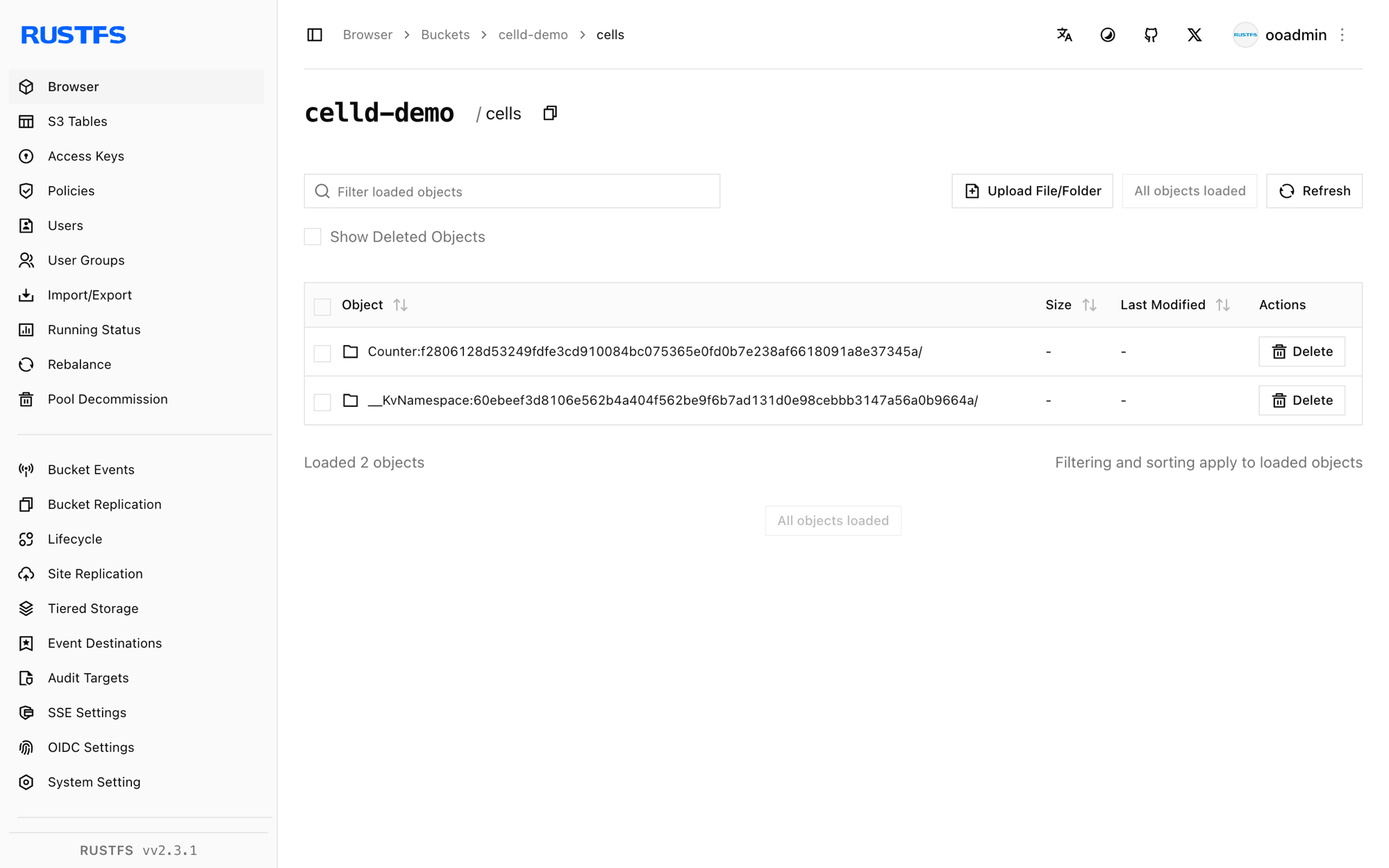
Stop or reset
pkill -f "celld --bucket"
rc rm rustfs/celld-demo/ --recursive --force
Troubleshooting
bind --listen 127.0.0.0.1:8080 ... Address already in use
Port 8080 is commonly taken (a local GitLab registry or dev server). Move the Worker listener: --listen 0.0.0.0:18080.
a non-loopback --listen requires an explicit --internal-listen
Binding a public interface requires a separate peer listener: add --internal-listen 0.0.0.0:9099 --advertise 127.0.0.1:9099.
esbuild not found
celld deploy bundles the worker with esbuild. Install it globally (npm install -g esbuild) or point CELLD_ESBUILD at the binary.
celld deploy on the example prints unknown command init for argo at runtime
That means the executor container/pod is running an argo CLI binary instead of argoexec — a sign the wrong image was tagged as the executor in your cluster setup, unrelated to celld itself. On a plain host (no cluster) this does not occur.
Next steps
- Compare with the Cloudflare Durable Objects documentation — celld runs the same programming model on your own bucket.
- Create dedicated production credentials with Access Key Management.
- Follow the celld README for multi-node fleets: point a second node at the same bucket and let conditional writes elect the owner.