
OpenSearch
Snapshot OpenSearch indices to RustFS with the repository-s3 plugin.
This guide connects OpenSearch — the open-source search and analytics suite derived from Elasticsearch — to RustFS through the repository-s3 plugin. You will register an S3 snapshot repository backed by a RustFS bucket, take a snapshot of an index, and restore it. The workflow was verified with opensearchproject/opensearch:3.8.0 and the bundled repository-s3 plugin against rustfs/rustfs-x86-musl:v2.3.1.
You need Docker, or an OpenSearch node where you can install plugins and edit configuration. This deployment is intended for local integration testing, not production.
Architecture
The repository-s3 plugin writes snapshots as shard archives plus metadata blobs in the bucket. Registration is cluster-wide, so every node needs the plugin and the same client configuration.
Run OpenSearch
Start a single node with security disabled and a small heap:
docker run -d --name opensearch --network oo-rustfs_default -p 9200:9200 \
  -e discovery.type=single-node \
  -e OPENSEARCH_JAVA_OPTS="-Xms512m -Xmx512m" \
  -e DISABLE_SECURITY_PLUGIN=true \
  opensearchproject/opensearch:3.8.0
The node is ready when curl http://localhost:9200 returns the cluster header (allow one to two minutes).
Install the repository-s3 plugin
The S3 repository plugin is not preloaded. Install it and restart the node:
docker exec opensearch bin/opensearch-plugin install --batch repository-s3
docker restart opensearch
Configure the S3 client
Credentials are secure settings: they belong in the OpenSearch keystore, not in the repository request or opensearch.yml. Create the keystore entries, replacing all connection placeholders:
docker exec opensearch sh -c \
  "printf '<your-access-key>' | bin/opensearch-keystore create 2>/dev/null; \
   printf '<your-access-key>' | bin/opensearch-keystore add -f -x s3.client.default.access_key; \
   printf '<your-secret-key>' | bin/opensearch-keystore add -f -x s3.client.default.secret_key"
Add the non-secure client settings to config/opensearch.yml:
network.host: 0.0.0.0
plugins.security.disabled: true
s3.client.default.endpoint: http://<your-rustfs-endpoint>:9000
s3.client.default.protocol: http
s3.client.default.path_style_access: "true"
Restart the node once more so it reads both the keystore and the new settings:
docker restart opensearchCreate the bucket while the node boots:
rc mb rustfs/opensearch-snapshotsRegister the repository and snapshot
Create a test index with a document, then register the repository:
curl -sX PUT http://localhost:9200/rustfs-demo -H "Content-Type: application/json" \
  -d '{"settings":{"number_of_shards":1}}'

curl -sX PUT http://localhost:9200/rustfs-demo/_doc/1 -H "Content-Type: application/json" \
  -d '{"product":"rustfs","via":"opensearch-snapshot"}'

curl -sX PUT "http://localhost:9200/_snapshot/rustfs-repo" -H "Content-Type: application/json" \
  -d '{"type":"s3","settings":{"bucket":"opensearch-snapshots","region":"us-east-1","server_side_encryption_type":"bucket_default"}}'
The server_side_encryption_type: bucket_default setting matters: without it the plugin requests SSE-S3, which a self-hosted RustFS without a server-side encryption master key rejects.
Take a snapshot and wait for completion:
curl -sX PUT "http://localhost:9200/_snapshot/rustfs-repo/snapshot-1?wait_for_completion=true" \
-H "Content-Type: application/json" -d '{"indices":"rustfs-demo"}'{"snapshot":{"snapshot":"snapshot-1","state":"SUCCESS","indices":["rustfs-demo"],...}}Verify objects and restore
List the bucket:
rc ls rustfs/opensearch-snapshots/ -rindex-0
index.latest
indices/5x1bwsWaSv2XINIbeoe-RQ/0/__GgxvoCw-TKuMMAYBq5Khag
indices/5x1bwsWaSv2XINIbeoe-RQ/0/snap-kRgFBiuyQIyPo3_-CMp7Hw.dat
meta-kRgFBiuyQIyPo3_-CMp7Hw.dat
snap-kRgFBiuyQIyPo3_-CMp7Hw.datDelete the index and restore it from the snapshot:
curl -sX DELETE http://localhost:9200/rustfs-demo
curl -sX POST "http://localhost:9200/_snapshot/rustfs-repo/snapshot-1/_restore?wait_for_completion=true"
curl -s http://localhost:9200/rustfs-demo/_doc/1
{"_index":"rustfs-demo","_id":"1","found":true,"_source":{"product":"rustfs","via":"opensearch-snapshot"}}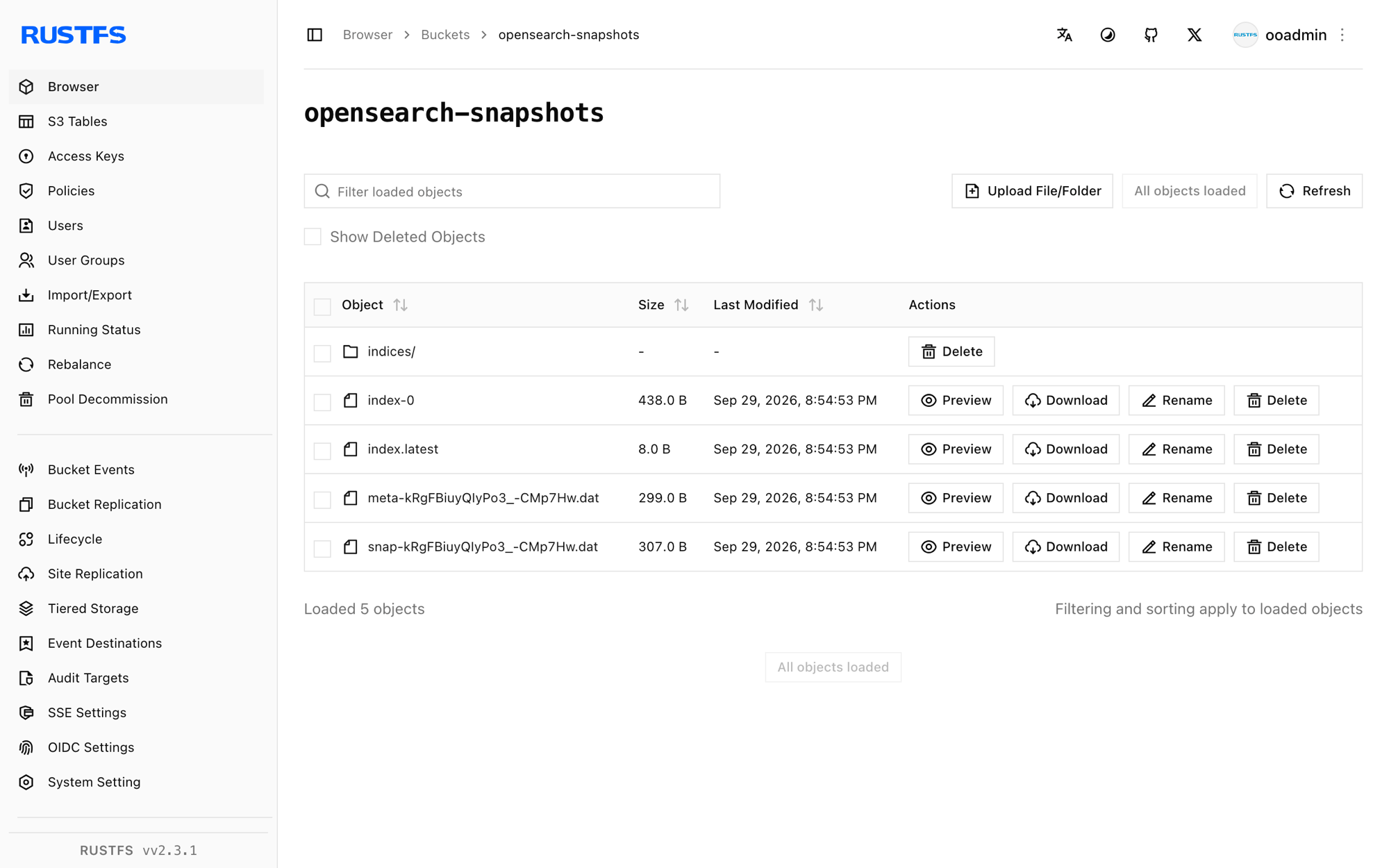
Stop or reset
To tear down the demo while keeping the bucket objects:
docker rm -f opensearchTo delete the stored snapshots:
rc rm rustfs/opensearch-snapshots/ --recursive --forceTroubleshooting
Setting [access_key] is insecure, but property [allow_insecure_settings] is not set
Inline credentials in the repository request are rejected. Store them in the keystore as shown in step 3 — access_key and secret_key are secure settings in OpenSearch.
SSE-S3 requires RUSTFS_SSE_S3_MASTER_KEY ... (Status Code: 400)
The plugin encrypts uploads with SSE-S3 by default. Register the repository with "server_side_encryption_type": "bucket_default" so no encryption header is sent, as in step 4.
unknown setting [s3.client.default.access_key] at startup
The settings reference the repository-s3 plugin. If the node fails to start with them present, the plugin is not installed in that container — repeat step 2 (a fresh container loses plugins installed with docker exec).
Repository verification fails with path is not accessible
The node cannot reach the bucket: check that s3.client.default.endpoint is reachable from the container, path_style_access is "true", and the keystore credentials were loaded (they are read at startup — restart after adding them).
Next steps
- Review S3 compatibility notes before adopting additional OpenSearch repositories.
- Create dedicated production credentials with Access Key Management.
- Follow the OpenSearch snapshots documentation to automate snapshots with Snapshot Management (SM) policies.