
SFTPGo
Serve RustFS buckets over SFTP with SFTPGo.
This guide connects SFTPGo — the full-featured SFTP/WebDAV/FTP server — to RustFS as a per-user S3 backend. You will create an SFTP user whose home directory is a RustFS bucket prefix, upload files over SFTP, and verify the objects in the bucket. The workflow was verified with SFTPGo 2.7.6 against rustfs/rustfs-x86-musl:v2.3.1.
You need Docker and an SFTP client (sftp ships with OpenSSH).
Architecture
SFTPGo maps the user's virtual paths onto bucket prefixes. Files uploaded over SFTP become objects under the configured key_prefix — nothing is stored on the SFTPGo host itself.
Run SFTPGo
docker run -d --name sftpgo --hostname sftpgo --network oo-rustfs_default \
  -p 2022:2022 -p 8080:8080 \
  -e SFTPGO_COMMON__TEMP_PATH=/tmp \
  drakkan/sftpgo:latest
SFTPGO_COMMON__TEMP_PATH matters: for S3 backends SFTPGo streams uploads through a local pipe file, and the default temp path may not exist or be writable.
Create the admin user
The image does not create the admin automatically. Open http://localhost:8080/web/admin/setup once and submit the form, or drive it with curl:
FORM=$(curl -s -c /tmp/sg-cookie.txt http://localhost:8080/web/admin/setup)
FT=$(echo "$FORM" | grep -oE "name=\"_form_token\" value=\"[^\"]+\"" | sed "s/.*value=\"//;s/\"//")
curl -s -b /tmp/sg-cookie.txt -X POST http://localhost:8080/web/admin/setup \
  --data-urlencode "username=admin" \
  --data-urlencode "password=<admin-password>" \
  --data-urlencode "confirm_password=<admin-password>" \
  --data-urlencode "_form_token=$FT" \
-o /dev/null -w "setup: %{http_code}\n"setup: 302Create an S3-backed user
Get an API token and create the user. Three details matter: home_dir must be an existing writable directory inside the container (/tmp works), force_path_style must be true for RustFS, and access_secret is a KMS object — pass the secret inside {"status": "Plain", "payload": ...}:
{
  "username": "demo",
  "password": "<user-password>",
  "home_dir": "/tmp",
  "status": 1,
  "permissions": { "/": ["*"] },
  "filesystem": {
    "provider": 1,
    "s3config": {
      "bucket": "sftpgo-demo",
      "region": "us-east-1",
      "access_key": "<your-access-key>",
      "access_secret": { "status": "Plain", "payload": "<your-secret-key>" },
      "endpoint": "http://<your-rustfs-endpoint>:9000",
      "key_prefix": "home/demo/",
      "force_path_style": true
    }
  }
}TOKEN=$(curl -s "http://localhost:8080/api/v2/token" -u "admin:<admin-password>" \
| python3 -c "import json,sys; print(json.load(sys.stdin)['access_token'])")
curl -s -X POST http://localhost:8080/api/v2/users \
-H "Authorization: Bearer $TOKEN" -H "Content-Type: application/json" \
--data-binary @sftpgo-user.json -o /dev/null -w "create-user: %{http_code}\n"create-user: 201Upload and read files over SFTP
printf "uploaded via sftpgo to rustfs\n" > /tmp/sftp-test.txt
printf "up1\n" > /tmp/sftp-batch.txt
echo "put /tmp/sftp-test.txt" >> /tmp/sftp-batch.txt
echo "ls" >> /tmp/sftp-batch.txt

sshpass -p <user-password> sftp \
  -o StrictHostKeyChecking=no -o UserKnownHostsFile=/dev/null -P 2022 \
demo@localhost < /tmp/sftp-batch.txtsftp> put /tmp/sftp-test.txt
Uploading /tmp/sftp-test.txt to /sftp-test.txt
sftp> ls
sftp-big.bin sftp-test.txtVerify objects in RustFS
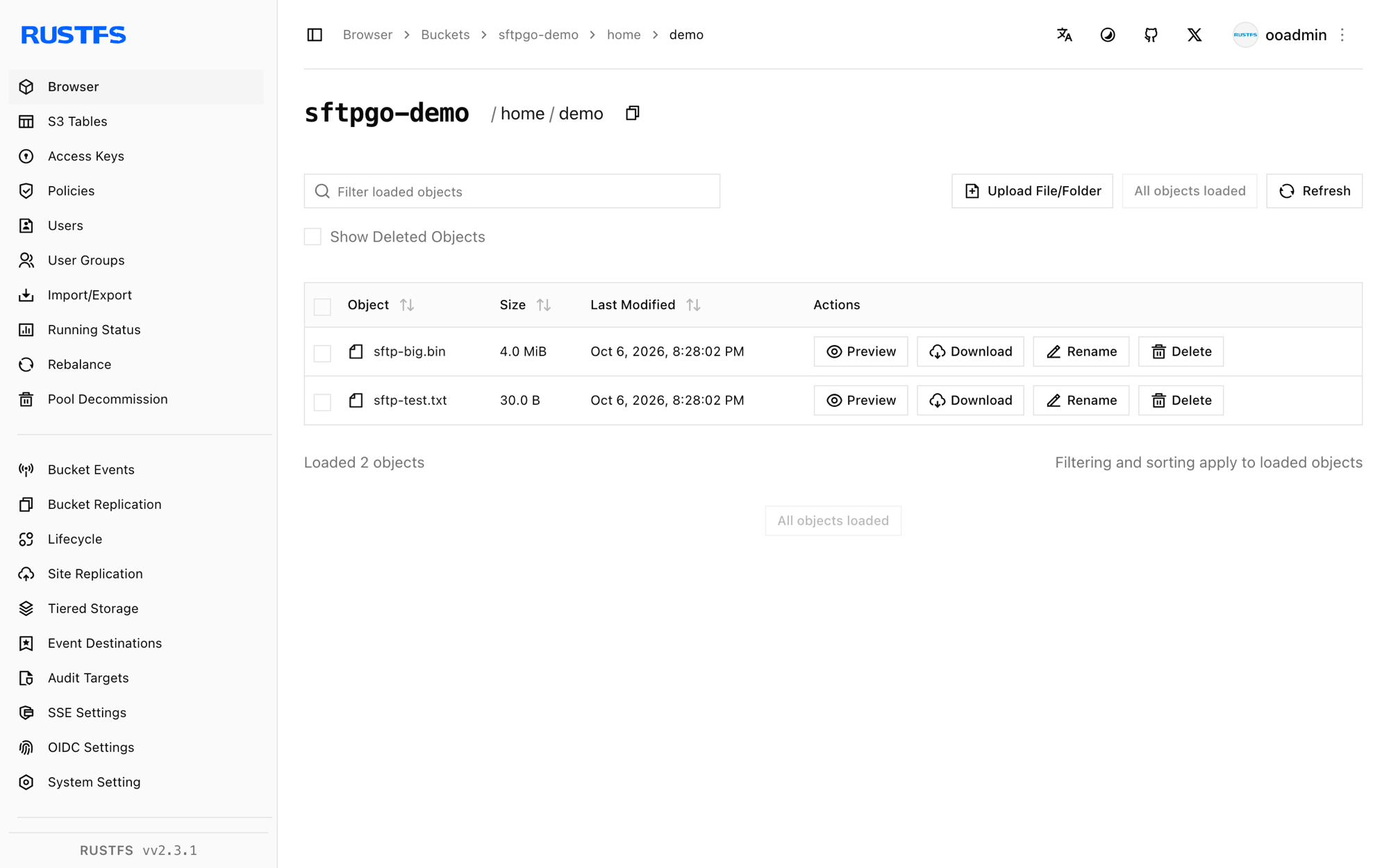
rc ls rustfs/sftpgo-demo/home/demo/ -r
rc cat rustfs/sftpgo-demo/home/demo/sftp-test.txt[2026-10-06 12:28:02] 4 MiB home/demo/sftp-big.bin
[2026-10-06 12:28:02] 30 B home/demo/sftp-test.txt
uploaded via sftpgo to rustfsThe object key is the user's virtual path under key_prefix — a plain mapping.
Stop or reset
docker rm -f sftpgo
rc rm rustfs/sftpgo-demo/ --recursive --force
Troubleshooting
create resource error / InvalidAccessKeyId on upload
Check three things in order: force_path_style must be true (SFTPGo's AWS SDK defaults to virtual-host addressing, which breaks IP endpoints), access_secret must use the KMS-object form, and home_dir must point at a writable directory (SFTPGo pipes S3 uploads through it).
unknown command init / admin login rejected
The admin account only exists after the web setup form is submitted once. Repeat step 2; do not reuse an old browser cookie jar.
API returns 405 Method Not allowed for the token
The token endpoint only accepts GET with basic auth: GET /api/v2/token.
Next steps
- Review S3 compatibility notes before adopting additional SFTPGo backends.
- Create dedicated production credentials with Access Key Management.
- Follow the SFTPGo documentation to add WebDAV/FTP listeners, per-user quotas, and two-factor auth on top of the same bucket.