
Kopia
Back up files to RustFS with Kopia's S3 repository backend.
This guide connects Kopia — the open-source backup and restore tool — to RustFS as an S3 repository. You will create a repository in a RustFS bucket, take a snapshot of a directory, restore it into an empty directory, and compare checksums. The workflow was verified with kopia/kopia:0.18.1 and rustfs/rustfs-x86-musl:v2.3.1.
You need Docker. This deployment is intended for local integration testing, not production.
Architecture
Kopia stores the repository format files and deduplicated, encrypted content blocks in the bucket. Restores read the blocks back and reassemble the original files, so the checksum of every restored file must match the source.
Create the repository
Create the bucket first, then initialize the Kopia repository inside it. The endpoint is a bare host:port (no scheme); --disable-tls switches the client to plain HTTP:
rc alias set rustfs http://<your-rustfs-endpoint>:9000 <your-access-key> <your-secret-key>
rc mb rustfs/kopia-backups

docker run --rm --network oo-rustfs_default kopia/kopia:0.18.1 repository create s3 \
  --bucket kopia-backups \
  --access-key <your-access-key> \
  --secret-access-key <your-secret-key> \
  --endpoint <your-rustfs-endpoint>:9000 \
  --region us-east-1 \
  --disable-tls \
  --password <your-kopia-password> \
  --override-username demo --override-hostname workstation
Kopia validates the provider by reading and writing through the S3 API before it reports success.
Connect, snapshot, and restore
Run the following commands from the directory holding your repository.config (created by the previous step). Kopia reads the connection settings from that file, so the S3 flags are only needed once:
export KOPIA_PASSWORD=<your-kopia-password>
export KOPIA_CONFIG_PATH=/config/repository.config

alias kopia='docker run --rm --network oo-rustfs_default \
  -e KOPIA_PASSWORD -e KOPIA_CONFIG_PATH \
  -v "$PWD/config:/config" \
  -v "$PWD/source:/source:ro" \
  -v "$PWD/restore:/restore" kopia/kopia:0.18.1'

kopia repository connect s3 \
  --bucket kopia-backups \
  --access-key <your-access-key> \
  --secret-access-key <your-secret-key> \
  --endpoint <your-rustfs-endpoint>:9000 \
  --region us-east-1 --disable-tls \
  --override-username demo --override-hostname workstation

kopia snapshot create /source
kopia snapshot list
Restore the snapshot into an empty directory and compare checksums with the source. The snapshot ID is the ka... identifier printed by snapshot list:
kopia restore <snapshot-id> /restore

sha256sum source/blob.bin restore/blob.bin
bec4530e2798465b... source/blob.bin
bec4530e2798465b... restore/blob.binVerify objects in RustFS
List the bucket:
rc ls rustfs/kopia-backups/ -rThe output shows the repository format files plus the packed content blocks written by the snapshot:
kopia.blobcfg
kopia.repository
p0000.../...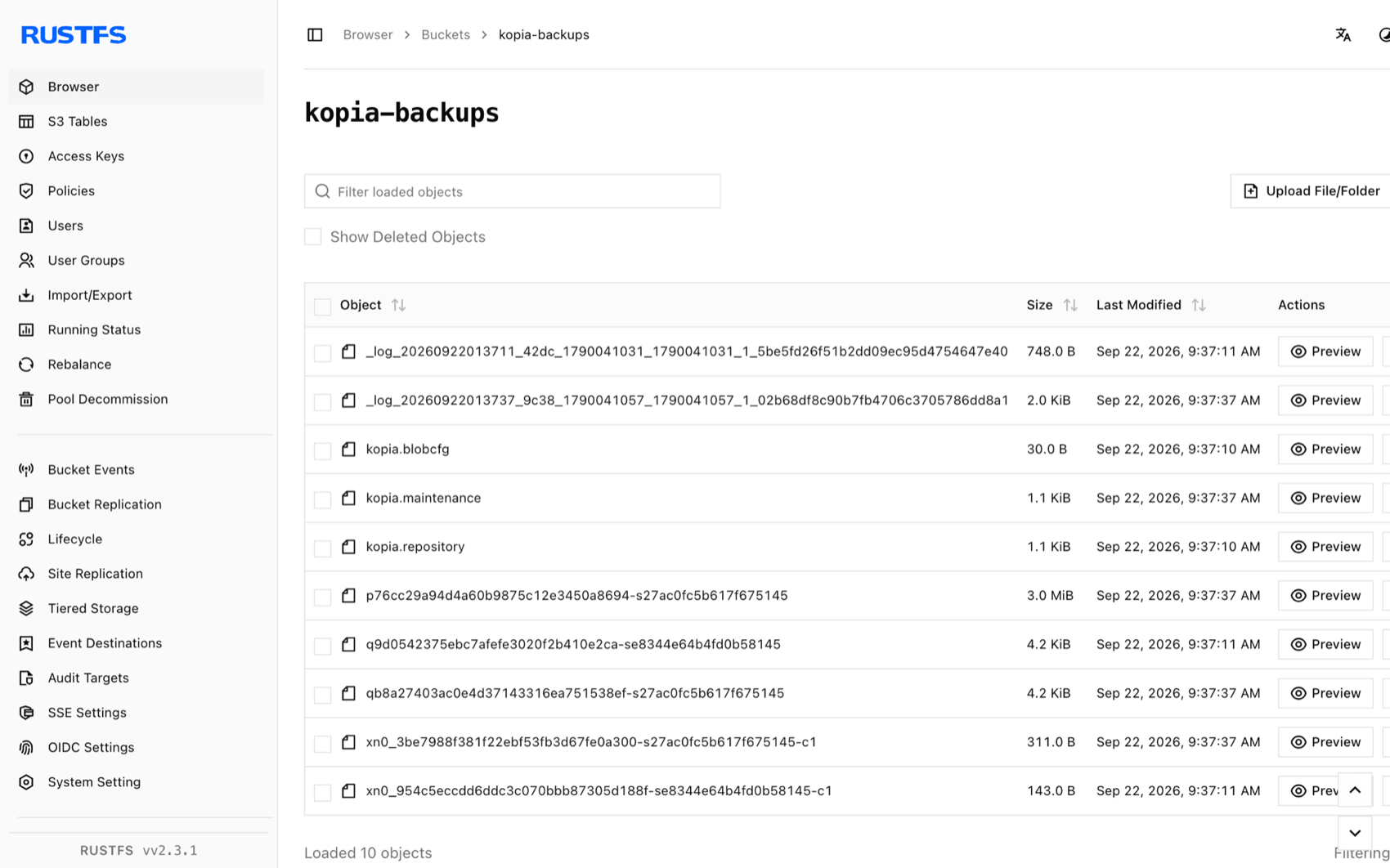
Stop or reset
Kopia is a client-side tool and holds no running state. To delete the repository and all snapshots, remove the bucket:
rc rb rustfs/kopia-backups --forceTroubleshooting
Endpoint url cannot have fully qualified paths
The endpoint must be a bare host:port value without a scheme or path — Kopia builds the object URLs itself.
server gave HTTP response to HTTPS client
Without --disable-tls, Kopia speaks HTTPS. RustFS without TLS needs the --disable-tls flag on both repository create s3 and repository connect s3.
can't connect to storage with a DNS error
The S3 client is using virtual-hosted addressing. Keep the endpoint as a bare host:port value; Kopia uses path-style requests for endpoints given in that form.
Next steps
- Review S3 compatibility notes before adopting additional Kopia operations.
- Create dedicated production credentials with Access Key Management.
- Follow the Kopia repository documentation to add policies, retention, and scheduled snapshots.