
Apache Hudi
Write Apache Hudi tables to RustFS through Spark and the s3a connector.
This guide connects Apache Hudi — the transactional data lake platform — to RustFS as its copy-on-write table store. You will run Spark with the Hudi bundle, write a table to the s3a:// location inside a RustFS bucket, read it back, and verify the table files. The workflow was verified with apache/spark:3.5.6, hudi-spark3.5-bundle_2.12:0.15.0, hadoop-aws:3.3.4, and rustfs/rustfs-x86-musl:v2.3.1.
You need Docker. This deployment is intended for local integration testing, not production.
Architecture
Hudi stores the .hoodie/ timeline, commit files, and Parquet data blocks under the table path in the bucket. Reads resolve the latest table snapshot from the timeline, so every write and query goes through the S3 API.
Run the Spark write
Hudi requires the Kryo serializer and the s3a credentials as Hadoop properties. The following spark-shell session creates a non-partitioned table in my-bucket — replace all connection placeholders:
import org.apache.spark.sql.SaveMode

val df = Seq((1, "a"), (2, "b"), (3, "c")).toDF("id", "name")
df.write.format("hudi")
  .option("hoodie.table.name", "events")
  .option("hoodie.datasource.write.recordkey.field", "id")
  .option("hoodie.datasource.write.precombine.field", "name")
  .option("hoodie.datasource.write.partitionpath.field", "")
  .mode(SaveMode.Overwrite)
  .save("s3a://my-bucket/hudi-demo/events")

val back = spark.read.format("hudi").load("s3a://my-bucket/hudi-demo/events")
back.select("id", "name").show()
docker run --rm --network oo-rustfs_default \
-v "$PWD/hudi_test.scala":/tmp/hudi_test.scala \
apache/spark:3.5.6 /opt/spark/bin/spark-shell \
--packages org.apache.hudi:hudi-spark3.5-bundle_2.12:0.15.0,org.apache.hadoop:hadoop-aws:3.3.4 \
--conf spark.serializer=org.apache.spark.serializer.KryoSerializer \
--conf spark.hadoop.fs.s3a.endpoint=http://rustfs:9000 \
--conf spark.hadoop.fs.s3a.path.style.access=true \
--conf spark.hadoop.fs.s3a.access.key=<your-access-key> \
--conf spark.hadoop.fs.s3a.secret.key=<your-secret-key> \
--conf spark.hadoop.fs.s3a.region=us-east-1 \
--conf spark.jars.ivy=/tmp/.ivy2 \
--conf spark.sql.shuffle.partitions=2 \
-i /tmp/hudi_test.scalaThe --packages flags download the Hudi bundle and the s3a connector on first run. The spark.jars.ivy setting avoids Ivy cache permission errors in the container. The read-back show() prints the three rows:
+---+----+
|  2|   b|
|  3|   c|
|  1|   a|
+---+----+
Verify objects in RustFS
List the table prefix:
rc ls rustfs/my-bucket/hudi-demo/ -rThe Hudi table layout appears under the table path — the .hoodie/ timeline with the commit file, plus the Parquet data block:
hudi-demo/events/.hoodie/20260922015803291.commit
hudi-demo/events/.hoodie/20260922015803291.commit.requested
hudi-demo/events/<partition>/<filegroup>/<parquet-block>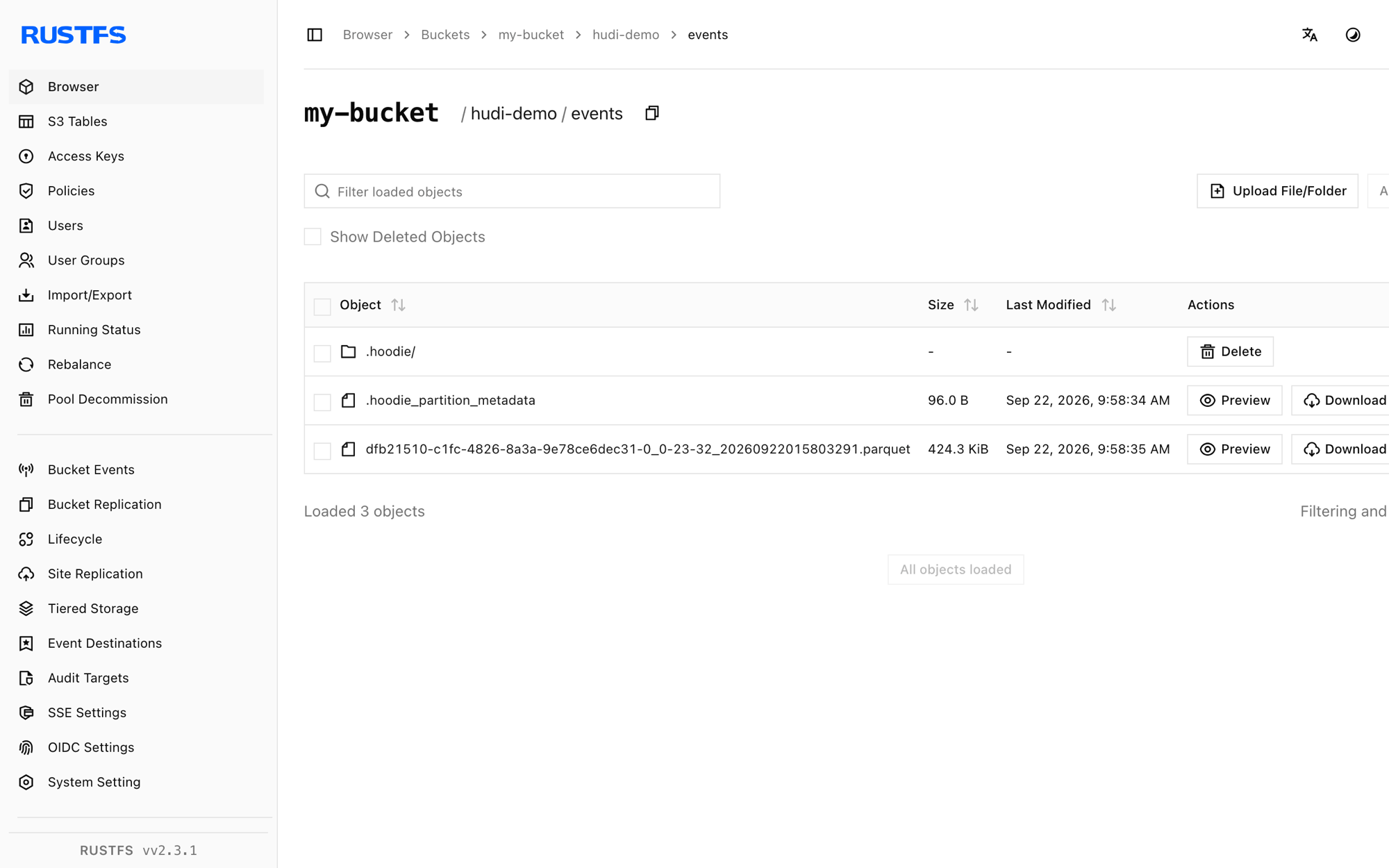
Stop or reset
Spark runs as a one-shot client and holds no state. To delete the demo table:
rc rm rustfs/my-bucket/hudi-demo/ --recursive --forceTroubleshooting
hoodie only support org.apache.spark.serializer.KryoSerializer as spark.serializer
Hudi rejects the default Spark serializer. Pass --conf spark.serializer=org.apache.spark.serializer.KryoSerializer as shown above.
Partition-path field has to be non-empty or keygenerator class errors
For a non-partitioned table, keep the default key generator (do not set hoodie.datasource.write.keygenerator.class) and set hoodie.datasource.write.partitionpath.field to the empty string.
NoSuchMethodError or ClassNotFoundException in the Hudi write
The Spark and Hudi bundle versions must match: hudi-spark3.5-bundle_2.12 goes with Spark 3.5.x, and the bundled Hadoop client must be compatible with hadoop-aws:3.3.4.
Next steps
- Review S3 compatibility notes before adopting additional Hudi operations.
- Create dedicated production credentials with Access Key Management.
- Follow the Hudi Spark guide to add upserts, compaction, and query integrations on the same table.