
Thanos
Run Thanos with RustFS as the S3 object storage backend for Prometheus blocks, deployed with Docker Compose.
This guide connects Thanos — the highly available Prometheus setup with long-term storage — to RustFS as its object store. You will run Prometheus with a Thanos sidecar that uploads TSDB blocks to RustFS, then query the historical data back through a Store Gateway and a Query frontend. The workflow was verified with thanosio/thanos:v0.37.2, prom/prometheus:v2.53.1, and rustfs/rustfs-x86-musl:v2.3.1.
You need Docker with the Compose plugin. This deployment is intended for local integration testing, not production.
Architecture
The sidecar watches the Prometheus TSDB directory and uploads every two-hour block to the thanos-data bucket in RustFS. The Store Gateway reads the same bucket and answers queries about historical blocks, so Query resolves both live data through the sidecar and old data through the Store Gateway.
Create the project files
Create a working directory:
mkdir rustfs-thanos
cd rustfs-thanos
Create an environment file and replace both credential placeholders:
RUSTFS_ACCESS_KEY=<your-access-key>
RUSTFS_SECRET_KEY=<your-secret-key>
Use dedicated credentials for the thanos-data bucket. Do not commit .env to source control.
Create the Prometheus configuration with an external label — Thanos requires it to deduplicate blocks:
global:
  scrape_interval: 5s
  external_labels:
    monitor: rustfs-demo

scrape_configs:
  - job_name: prometheus
    static_configs:
      - targets: ["localhost:9090"]
  - job_name: rustfs
    metrics_path: /metrics
    static_configs:
      - targets: ["rustfs:9000"]
Create the Thanos object store configuration:
type: S3
config:
  bucket: thanos-data
  endpoint: rustfs:9000
  access_key: ${RUSTFS_ACCESS_KEY}
  secret_key: ${RUSTFS_SECRET_KEY}
  insecure: true
Thanos does not interpolate .env files itself. Before starting the stack, replace the placeholders with the same values you set in .env:
sed -i.bak "s|\${RUSTFS_ACCESS_KEY}|$(grep RUSTFS_ACCESS_KEY .env | cut -d= -f2)|;s|\${RUSTFS_SECRET_KEY}|$(grep RUSTFS_SECRET_KEY .env | cut -d= -f2)|" bucket.ymlCreate the Compose file:
services:
  rustfs:
    image: rustfs/rustfs-x86-musl:v2.3.1
    environment:
      RUSTFS_ACCESS_KEY: ${RUSTFS_ACCESS_KEY}
      RUSTFS_SECRET_KEY: ${RUSTFS_SECRET_KEY}
      RUSTFS_VOLUMES: /data
      RUSTFS_ADDRESS: ":9000"
      RUSTFS_CONSOLE_ADDRESS: ":9001"
      RUSTFS_CONSOLE_ENABLE: "true"
    volumes:
      - rustfs-data:/data
    ports:
      - "9000:9000"
      - "9001:9001"
    healthcheck:
      test: ["CMD", "curl", "-sf", "http://127.0.0.1:9000/health"]
      interval: 10s
      timeout: 5s
      retries: 6
      start_period: 10s
    networks:
      - thanos

  create-bucket:
    image: rustfs/rc:latest
    depends_on:
      rustfs:
        condition: service_healthy
    environment:
      RUSTFS_ACCESS_KEY: ${RUSTFS_ACCESS_KEY}
      RUSTFS_SECRET_KEY: ${RUSTFS_SECRET_KEY}
    entrypoint:
      - /bin/sh
      - -c
      - |
        /usr/bin/rc alias set rustfs http://rustfs:9000 "$${RUSTFS_ACCESS_KEY}" "$${RUSTFS_SECRET_KEY}"
        /usr/bin/rc mb --ignore-existing rustfs/thanos-data
    networks:
      - thanos

  prometheus:
    image: prom/prometheus:v2.53.1
    command:
      - --config.file=/etc/prometheus/prometheus.yml
      - --storage.tsdb.path=/prometheus
      - --storage.tsdb.min-block-duration=2h
      - --storage.tsdb.max-block-duration=2h
      - --web.enable-lifecycle
    volumes:
      - ./prometheus.yml:/etc/prometheus/prometheus.yml:ro
      - prom-data:/prometheus
    ports:
      - "9090:9090"
    networks:
      - thanos

  sidecar:
    image: thanosio/thanos:v0.37.2
    command:
      - sidecar
      - --tsdb.path=/prometheus
      - --prometheus.url=http://prometheus:9090
      - --objstore.config-file=/etc/thanos/bucket.yml
    volumes:
      - ./bucket.yml:/etc/thanos/bucket.yml:ro
      - prom-data:/prometheus
    depends_on:
      create-bucket:
        condition: service_completed_successfully
    networks:
      - thanos

  store:
    image: thanosio/thanos:v0.37.2
    command:
      - store
      - --objstore.config-file=/etc/thanos/bucket.yml
      - --data-dir=/data
    volumes:
      - ./bucket.yml:/etc/thanos/bucket.yml:ro
      - store-data:/data
    depends_on:
      create-bucket:
        condition: service_completed_successfully
    networks:
      - thanos

  query:
    image: thanosio/thanos:v0.37.2
    command:
      - query
      - --http-address=0.0.0.0:9090
      - --store=sidecar:10901
      - --store=store:10901
    ports:
      - "9091:9090"
    depends_on:
      - sidecar
      - store
    networks:
      - thanos

networks:
  thanos:

volumes:
  rustfs-data:
  prom-data:
  store-data:
The --storage.tsdb.min-block-duration and --storage.tsdb.max-block-duration flags disable Prometheus compaction. The sidecar refuses to ship blocks from a compacting TSDB because the local blocks would no longer match the uploaded ones.
Validate and start the deployment
Resolve the Compose file before starting containers:
docker compose configStart the stack and wait until the sidecar reports itself ready:
docker compose up -d
docker compose logs sidecar | grep -m1 "status=ready"
Check that the sidecar picked up the Prometheus external labels:
docker compose logs sidecar | grep "external labels"The Thanos Query UI answers on http://localhost:9091, and the RustFS Console runs at http://localhost:9001.
Upload a block to RustFS
The sidecar uploads a block when Prometheus compacts one, which happens at a two-hour block boundary. To produce a block immediately, snapshot the TSDB through the admin API — with compaction disabled, the sidecar ships the head-block snapshot directly:
curl -s -XPOST http://localhost:9090/api/v1/admin/tsdb/snapshot | head -c 200Wait for the upload, then check the shipper state inside Prometheus:
sleep 60
docker compose exec prometheus cat /prometheus/thanos.shipper.json
The uploaded list should contain a block ID:
{
	"version": 1,
	"uploaded": [
		"01M31EPTZC5E0SETZTP0SPFY79"
	]
}
Query historical data from RustFS
The Store Gateway periodically syncs the bucket. Confirm it downloaded the uploaded block:
docker compose logs store | grep "loaded new block"Query a series through the Query frontend over the block's time range:
START=$(date -u -d '2 hours ago' +%s)
END=$(date -u +%s)
curl -s "http://localhost:9091/api/v1/query_range?query=up%7Bjob%3D%22prometheus%22%7D&start=$START&end=$END&step=30" | head -c 300
The Store Gateway serves the response from the blocks it downloaded from RustFS, while the sidecar answers for the live head — both paths resolve through the same Query endpoint.
Verify objects in RustFS
List the bucket:
docker compose exec rustfs /usr/bin/rc ls local/thanos-data/ -rEach block is stored as three objects — the chunk files, the index, and meta.json:
01M31EPTZC5E0SETZTP0SPFY79/chunks/000001
01M31EPTZC5E0SETZTP0SPFY79/index
01M31EPTZC5E0SETZTP0SPFY79/meta.json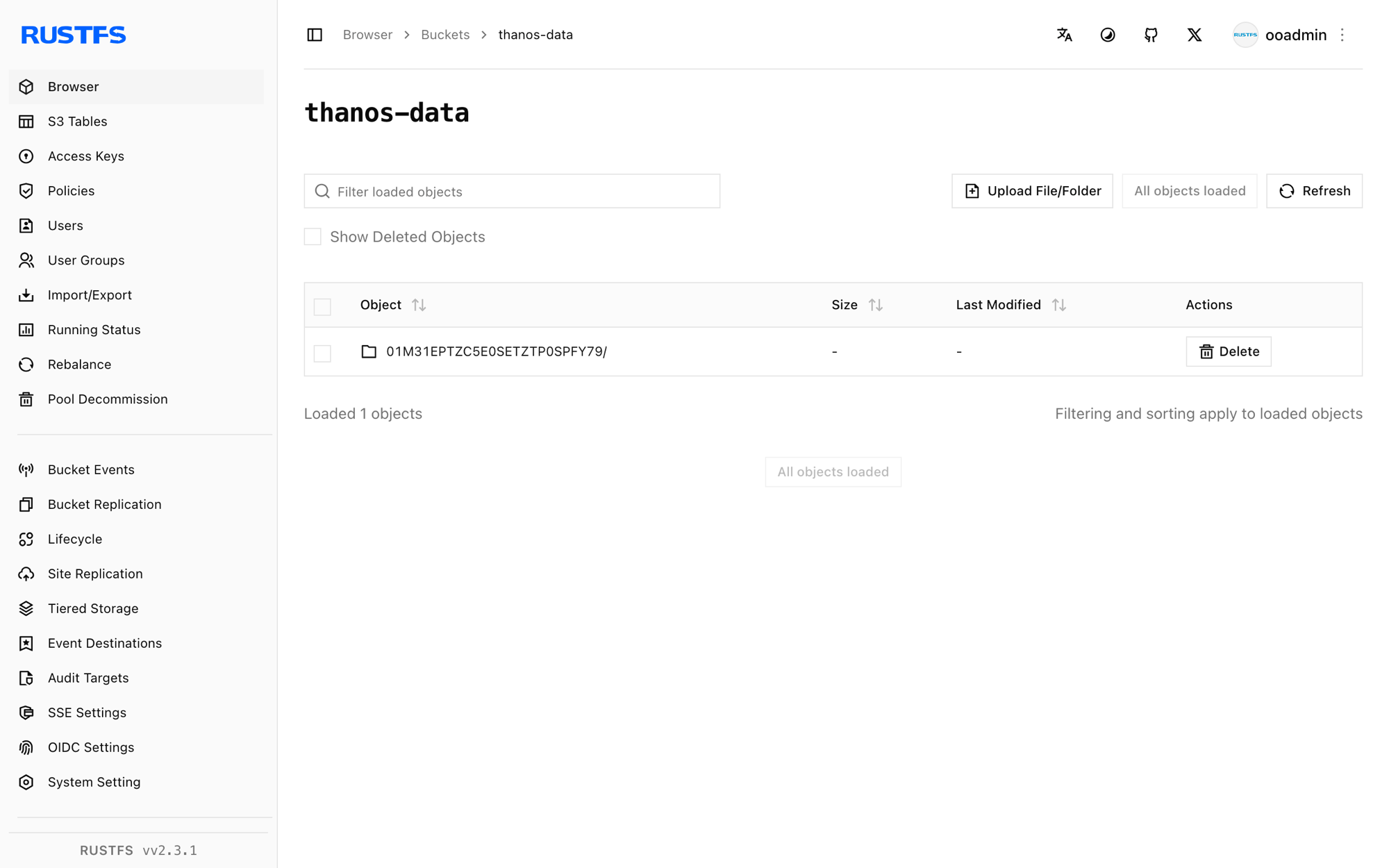
Stop or reset the deployment
Stop the containers while keeping all data:
docker compose downThe RustFS volume keeps the uploaded blocks, so the Store Gateway serves historical queries again after a restart. To delete everything, including the blocks in RustFS, add --volumes.
Troubleshooting
The sidecar logs Compaction needs to be disabled
Prometheus must run with --storage.tsdb.min-block-duration equal to --storage.tsdb.max-block-duration — set both to 2h as shown in the Compose file. Otherwise the sidecar cannot guarantee that local blocks stay unchanged and refuses to upload.
The specified bucket does not exist
Thanos does not create buckets. Check that the create-bucket service completed successfully:
docker compose logs create-bucketQueries return no historical data
Confirm that the Store Gateway has loaded at least one block (docker compose logs store | grep "loaded new block") and that your query time range falls inside the uploaded block's window — check the block's meta.json in the RustFS Console for minTime and maxTime.
Next steps
- Review S3 compatibility notes before adopting additional Thanos components.
- Create dedicated production credentials with Access Key Management.
- Follow the Thanos documentation to add Compactor, Ruler, or Receive for a production topology.