
VictoriaMetrics
Back up VictoriaMetrics snapshots to RustFS with vmbackup.
This guide connects VictoriaMetrics — the Prometheus-compatible time-series database — to RustFS through vmbackup and vmrestore. You will run a single-node instance, import metrics, create an instant snapshot, back it up to a RustFS bucket, and restore the data into a fresh directory. The workflow was verified with victoria-metrics, vmbackup, and vmrestore v1.x images against rustfs/rustfs-x86-musl:v2.3.1.
You need Docker. This deployment is intended for local integration testing, not production.
Architecture
vmbackup uploads a consistent point-in-time snapshot of the storage directory to any S3-compatible endpoint. vmrestore reverses the process, producing a data directory a VictoriaMetrics instance can open directly.
Run VictoriaMetrics
Create the bucket and start a single-node instance:
rc mb rustfs/vm-backups

docker run -d --name vm --network oo-rustfs_default -p 8428:8428 \
  -v vm-data:/storage \
  victoriametrics/victoria-metrics:latest \
  -storageDataPath=/storage -retentionPeriod=100y
Import metrics
Write a couple of samples through the Prometheus import API:
echo "vm_demo_metric 123" | curl -s --data-binary @- http://localhost:8428/api/v1/import/prometheus
echo "vm_demo_metric 456" | curl -s --data-binary @- http://localhost:8428/api/v1/import/prometheus
The endpoint answers 204 No Content. Confirm the data is queryable:
curl -s "http://localhost:8428/api/v1/export?match[]=vm_demo_metric"{"metric":{"__name__":"vm_demo_metric"},"values":[123,456],"timestamps":[1790680894604,1790680894619]}Create a snapshot
Ask VictoriaMetrics for a consistent snapshot:
curl -s http://localhost:8428/snapshot/create{"status":"ok","snapshot":"20260929112134-18D9C6C76704F913"}Back the snapshot up to RustFS
Run vmbackup against the same storage volume, replacing the credential placeholders. The snapshot name comes from step 3:
docker run --rm --network oo-rustfs_default \
  -e AWS_ACCESS_KEY_ID=<your-access-key> \
  -e AWS_SECRET_ACCESS_KEY=<your-secret-key> \
  --volumes-from vm \
  victoriametrics/vmbackup:latest \
  -storageDataPath=/storage \
  -snapshotName=20260929112134-18D9C6C76704F913 \
  -dst=s3://vm-backups/demo \
  -customS3Endpoint=http://<your-rustfs-endpoint>:9000
backup ... to S3{bucket: "vm-backups", dir: "demo/"} is complete; uploaded 760 bytes-customS3Endpoint redirects the AWS SDK to RustFS; custom endpoints are addressed with path-style requests automatically. Set AWS_EC2_METADATA_DISABLED=true on hosts without an EC2 metadata service to skip credential lookup delays.
Verify and restore
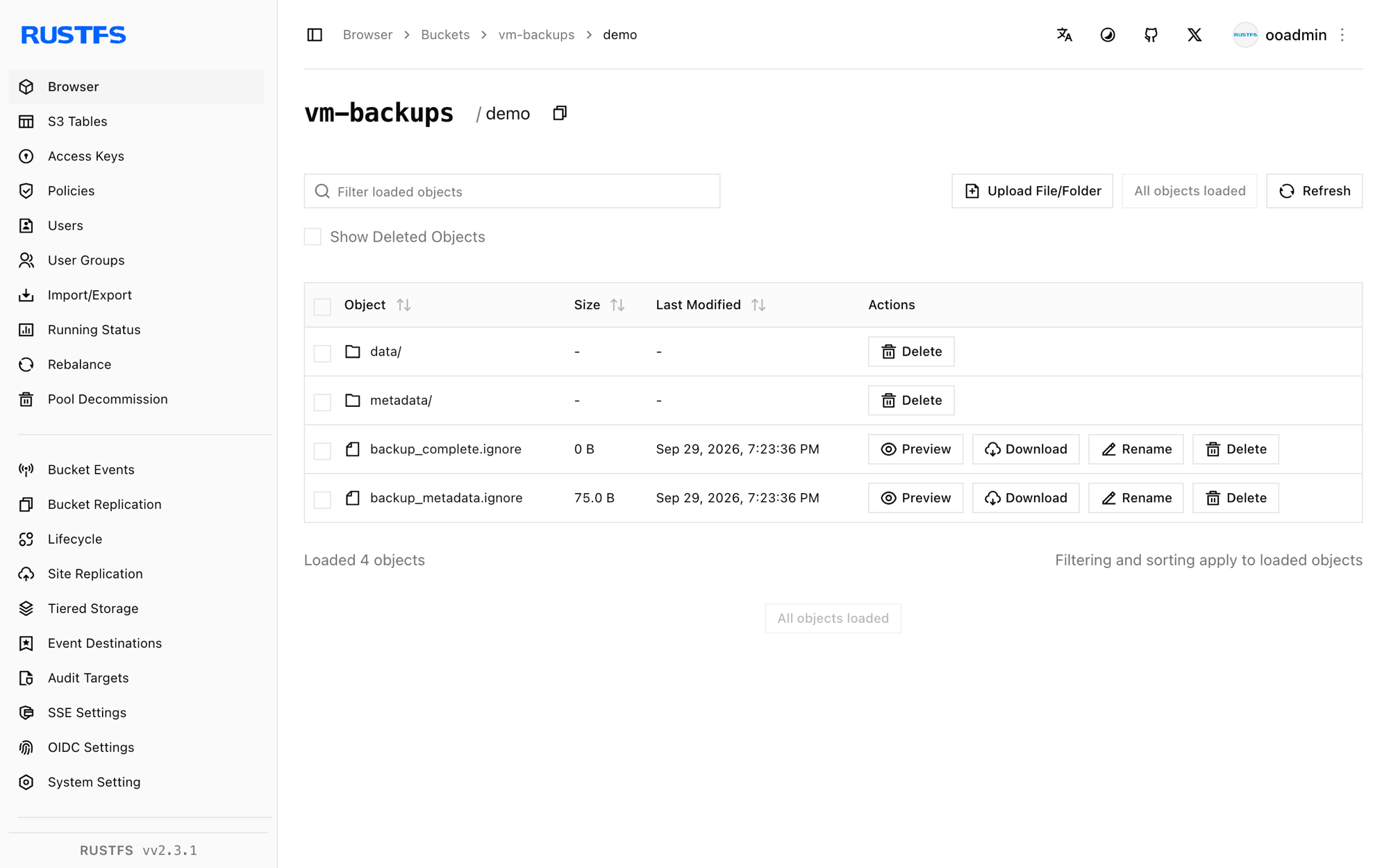
List the bucket prefix:
rc ls rustfs/vm-backups/demo/backup_complete.ignore
backup_metadata.ignore
data/
metadata/backup_complete.ignore marks a complete backup. Restore it into a fresh directory:
docker run --rm --network oo-rustfs_default \
  -e AWS_ACCESS_KEY_ID=<your-access-key> \
  -e AWS_SECRET_ACCESS_KEY=<your-secret-key> \
  -v /opt/vm-restore:/restore \
  victoriametrics/vmrestore:latest \
  -src=s3://vm-backups/demo \
  -storageDataPath=/restore \
  -customS3Endpoint=http://<your-rustfs-endpoint>:9000
restored 760 bytes from backup in 0.055 secondsThe restored directory contains data/, metadata/, and a lock file — exactly what a VictoriaMetrics instance expects at -storageDataPath.
Stop or reset
To tear down the demo while keeping the bucket objects:
docker rm -f vm
docker volume rm vm-data
To delete the stored backups:
rc rm rustfs/vm-backups/ --recursive --forceTroubleshooting
vmbackup hangs at startup or fails to find credentials
The AWS SDK probes the EC2 metadata service when environment credentials are absent. On machines without IMDS, export AWS_EC2_METADATA_DISABLED=true next to the key variables.
Backup parts re-upload on every run
vmbackup performs incremental backups by comparing local and remote file hashes. Restoring to a fresh directory and running vmbackup from there re-uploads everything; keep the original data directory for incremental runs.
Query returns nothing right after import
Imports are accepted asynchronously and the instant query endpoint can lag on a busy single node. Verify with /api/v1/export (or wait a few seconds) before creating the snapshot.
Next steps
- Review S3 compatibility notes before adopting additional VictoriaMetrics components.
- Create dedicated production credentials with Access Key Management.
- Follow the vmbackup documentation to schedule backups and prune old snapshots.