
Nextcloud
Use RustFS as S3 external storage for Nextcloud files.
This guide connects Nextcloud — the self-hosted content collaboration platform — to RustFS through its External Storage app with the S3 backend. You will enable files_external, mount a RustFS bucket into every user's files view, and upload a file through WebDAV that lands directly in the bucket. The workflow was verified with nextcloud:32.0.15 (SQLite, single container) against rustfs/rustfs-x86-musl:v2.3.1.
You need Docker, or an existing Nextcloud instance with occ access. This deployment is intended for local integration testing, not production.
Architecture
Nextcloud proxies file operations on the mount point to the S3 backend. Objects are stored under their mount-relative paths, so the bucket mirrors the names users see.
Install Nextcloud
Run Nextcloud with an admin account, replacing all connection placeholders. SQLite keeps the test self-contained; use MariaDB or PostgreSQL in production:
docker run -d --name nextcloud --network oo-rustfs_default -p 8080:80 \
  -e NEXTCLOUD_ADMIN_USER=<admin-user> \
  -e NEXTCLOUD_ADMIN_PASSWORD=<admin-password> \
  nextcloud:32.0.15
If the web UI still shows the installer after startup, finish it manually:
docker exec -u www-data nextcloud php occ maintenance:install \
  --admin-user <admin-user> --admin-password <admin-password>
Enable the External Storage app
The files_external app ships with Nextcloud but starts disabled, and its occ commands only exist once the app is enabled:
docker exec -u www-data nextcloud php occ app:enable files_externalfiles_external 1.24.1 enabledMount the RustFS bucket
Create an external storage of backend type amazons3 with the amazons3::accesskey authentication backend. Replace all connection placeholders:
docker exec -u www-data nextcloud php occ files_external:create \
  /rustfs amazons3 amazons3::accesskey \
  --user <admin-user> \
  --config bucket=<your-bucket> \
  --config hostname=<your-rustfs-endpoint> \
  --config port=9000 \
  --config use_ssl=false \
  --config use_path_style=true \
  --config key=<your-access-key> \
  --config secret=<your-secret-key>
Storage created with id 1The mount point /rustfs appears in the files view of the given user. use_path_style=true is required for a non-AWS endpoint. Check the connection before using it:
docker exec -u www-data nextcloud php occ files_external:verify 1 - status: ok
- code: 0Upload a file and verify
Upload through the WebDAV endpoint, which writes through the external storage:
echo "nextcloud writes to rustfs" > /tmp/nc-demo.txt

curl -u <admin-user>:<admin-password> \
  -T /tmp/nc-demo.txt \
  http://localhost:8080/remote.php/dav/files/<admin-user>/rustfs/nc-demo.txt \
-o /dev/null -w "%{http_code}\n"201Read it back through the same path, then confirm the object in RustFS:
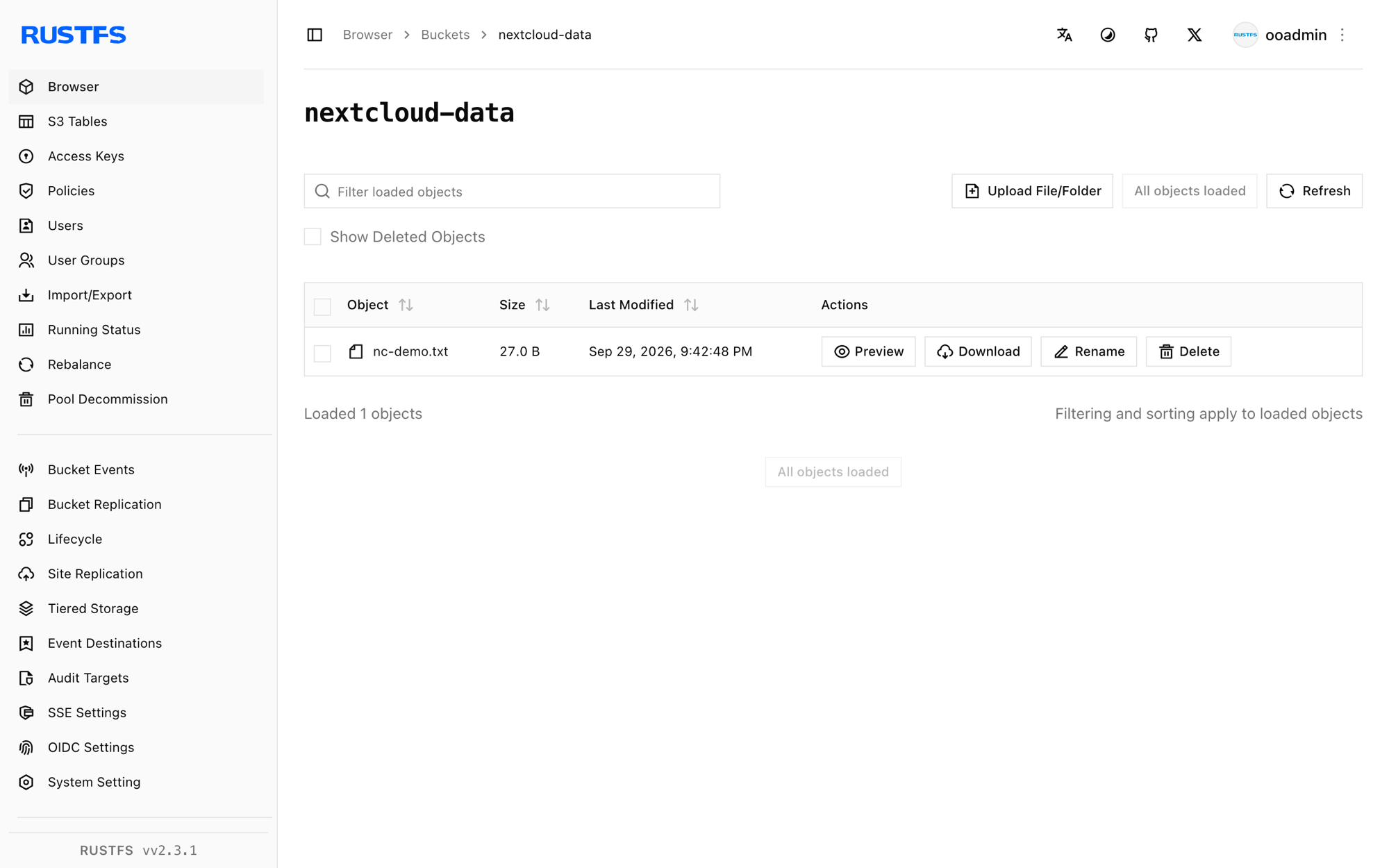
rc ls rustfs/<your-bucket>/ -r[2026-09-29 13:42:48] 27 B nc-demo.txtThe object key equals the path inside the mount, so files uploaded through Nextcloud can also be read directly with any S3 client.
Stop or reset
To remove the mount without touching the bucket:
docker exec -u www-data nextcloud php occ files_external:delete 1To delete the bucket contents:
rc rm rustfs/<your-bucket>/ --recursive --forceTroubleshooting
There are no commands defined in the "files_external" namespace
The app is not enabled yet. Run occ app:enable files_external first; the occ files_external:* commands only register afterwards.
Not enough arguments (missing: "authentication_backend")
files_external:create takes the storage backend and the authentication backend as two separate arguments: amazons3 amazons3::accesskey. The backend identifiers are listed by occ files_external:backends.
Mount shows but is empty, or uploads fail
Confirm hostname is reachable from the Nextcloud container (use the container network name, not localhost), use_path_style is true, and the bucket exists. occ files_external:verify <id> reports the exact connection error.
Next steps
- Review S3 compatibility notes before adopting additional external storage backends.
- Create dedicated production credentials with Access Key Management.
- Follow the Nextcloud external storage documentation to share the mount with groups and enable versioning.