
Harbor
Store container images pushed to Harbor in RustFS object storage through the registry S3 storage driver, deployed with Docker Compose.
This guide connects Harbor — the CNCF graduated cloud native registry — to RustFS. Harbor persists image layers, manifests, and other OCI artifacts through its embedded registry component, which implements the S3 storage driver of the distribution project. You will run that registry component against RustFS with Docker Compose, push an image, pull it back, and verify the objects in RustFS. The same storage settings apply to a full Harbor deployment. The workflow was verified with goharbor/registry-photon:v2.12.2 and rustfs/rustfs-x86-musl:v2.3.1.
You need Docker with the Compose plugin. This deployment is intended for local integration testing, not production.
Architecture
The registry stores every blob, manifest, and repository link under docker/registry/v2/ in the bucket through the S3 storage driver. The driver settings regionendpoint, secure: false, and skipverify: true point the AWS S3 client used by the driver at the RustFS endpoint with path-style addressing over plain HTTP.
Create the project files
Create a working directory:
mkdir rustfs-harbor
cd rustfs-harbor
Create an environment file and replace both credential placeholders:
RUSTFS_ACCESS_KEY=<your-access-key>
RUSTFS_SECRET_KEY=<your-secret-key>
Use dedicated credentials for the bucket. Do not commit .env to source control.
Create the registry configuration that Harbor uses for its registry component:
version: 0.1
log:
  level: info
storage:
  s3:
    accesskey: <your-access-key>
    secretkey: <your-secret-key>
    region: us-east-1
    regionendpoint: http://rustfs:9000
    bucket: my-bucket
    secure: false
    skipverify: true
  delete:
    enabled: true
  redirect:
    disable: true
http:
  addr: 0.0.0.0:5000
health:
  storagedriver:
    enabled: true
    interval: 10s
    threshold: 3
regionendpoint routes the driver to RustFS instead of AWS, secure: false selects plain HTTP inside the Compose network, and redirect.disable: true makes the registry serve blobs itself — Harbor sets the same option for backends without redirect support.
Create the Compose file:
services:
  rustfs:
    image: rustfs/rustfs-x86-musl:v2.3.1
    environment:
      RUSTFS_ACCESS_KEY: ${RUSTFS_ACCESS_KEY}
      RUSTFS_SECRET_KEY: ${RUSTFS_SECRET_KEY}
      RUSTFS_VOLUMES: /data
      RUSTFS_ADDRESS: ":9000"
      RUSTFS_CONSOLE_ADDRESS: ":9001"
      RUSTFS_CONSOLE_ENABLE: "true"
    volumes:
      - rustfs-data:/data
    ports:
      - "9000:9000"
      - "9001:9001"
    healthcheck:
      test: ["CMD", "curl", "-sf", "http://127.0.0.1:9000/health"]
      interval: 10s
      timeout: 5s
      retries: 6
      start_period: 10s
    networks:
      - registry

  create-bucket:
    image: rustfs/rc:latest
    depends_on:
      rustfs:
        condition: service_healthy
    environment:
      RUSTFS_ACCESS_KEY: ${RUSTFS_ACCESS_KEY}
      RUSTFS_SECRET_KEY: ${RUSTFS_SECRET_KEY}
    entrypoint:
      - /bin/sh
      - -c
      - |
        until /usr/bin/rc alias set rustfs http://rustfs:9000 "$${RUSTFS_ACCESS_KEY}" "$${RUSTFS_SECRET_KEY}"; do
          echo "Waiting for RustFS..."
          sleep 2
        done
        /usr/bin/rc ls rustfs/my-bucket >/dev/null 2>&1 || /usr/bin/rc mb rustfs/my-bucket
    networks:
      - registry

  registry:
    image: goharbor/registry-photon:v2.12.2
    volumes:
      - ./config.yml:/etc/registry/config.yml:ro
    ports:
      - "5000:5000"
    depends_on:
      create-bucket:
        condition: service_completed_successfully
    networks:
      - registry

networks:
  registry:

volumes:
  rustfs-data:
The rc image provides the official RustFS command-line client. The initializer checks for my-bucket before creating it, so repeated starts do not delete existing artifacts.
Start the deployment
Resolve the Compose file before starting containers:
docker compose configStart the services and wait for the bucket initializer to finish:
docker compose up -d
docker compose ps -a
The registry API should answer with an empty catalog:
curl -s http://localhost:5000/v2/_catalog{"repositories":[]}Push an image
Pull a small image, retag it for the local registry, and push it:
docker pull busybox:latest
docker tag busybox:latest localhost:5000/demo/app:v1
docker push localhost:5000/demo/app:v1
v1: digest: sha256:1cfa4e2b09e127b9c4ed43578d3f3c18e7d44ea47b9ea98475c0cbe9086525f8 size: 527Pull the image back
Remove the local tags and pull the image from the registry — the layers now come from RustFS:
docker rmi localhost:5000/demo/app:v1
docker pull localhost:5000/demo/app:v1localhost:5000/demo/app:v1Verify objects in RustFS
List the repository prefix through the bucket-initializer image:
docker compose run --rm --entrypoint /bin/sh create-bucket -c \
  '/usr/bin/rc alias set rustfs http://rustfs:9000 "$RUSTFS_ACCESS_KEY" "$RUSTFS_SECRET_KEY" >/dev/null && /usr/bin/rc ls rustfs/my-bucket/docker/registry/v2/repositories/demo --recursive'
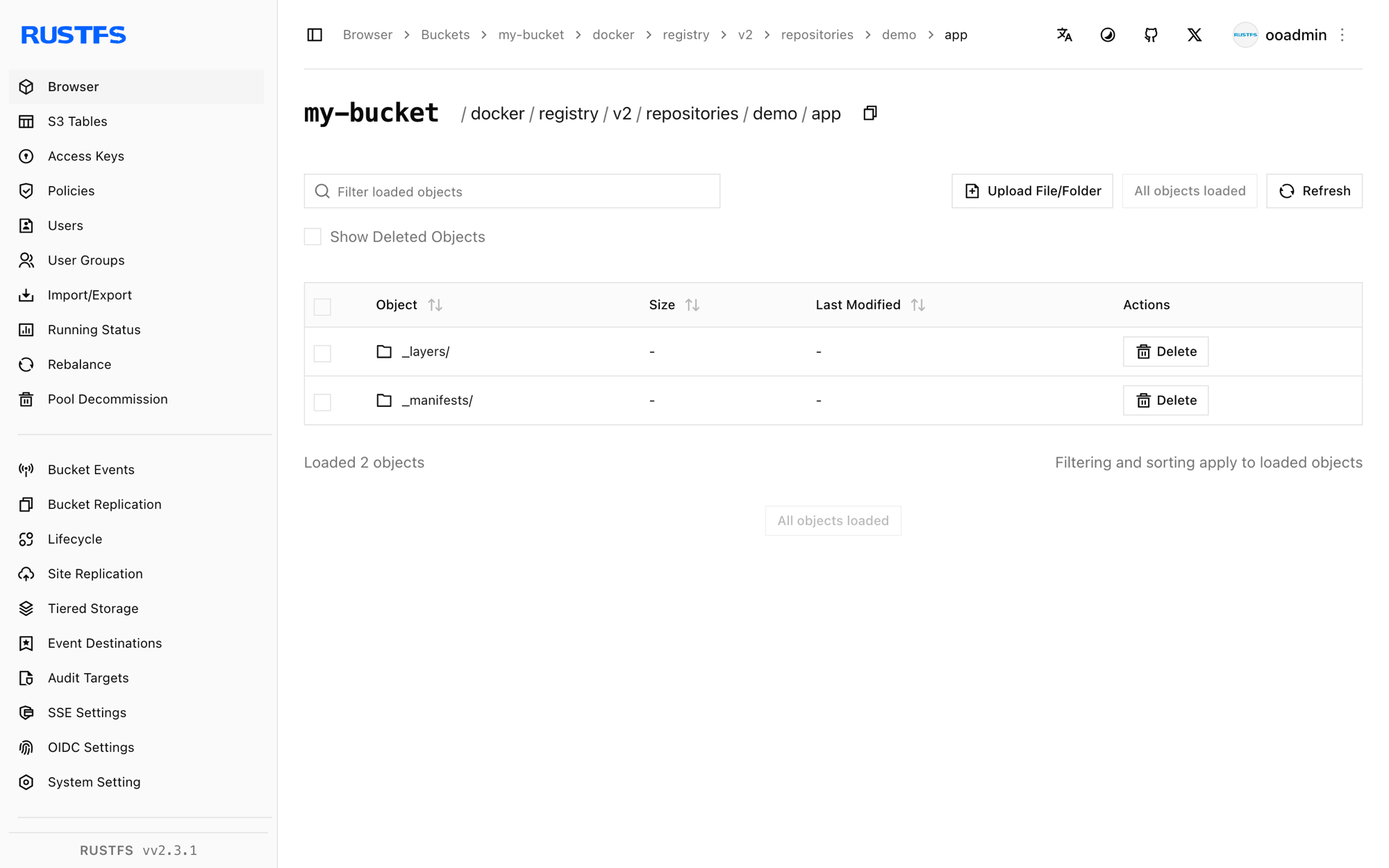
[2026-09-20 12:11:25] 71 B docker/registry/v2/repositories/demo/app/_layers/sha256/b05093807bb0294152bb9cf86d64da722732dddaf7f8882fa1f120477dbc4db3/link
[2026-09-20 12:11:25] 71 B docker/registry/v2/repositories/demo/app/_layers/sha256/c6348fa86ba0fb2108c9334f5fe913ddc6d853313e655891f133a0127c30099f/link
[2026-09-20 12:11:25] 71 B docker/registry/v2/repositories/demo/app/_manifests/revisions/sha256/1cfa4e2b09e127b9c4ed43578d3f3c18e7d44ea47b9ea98475c0cbe9086525f8/link
[2026-09-20 12:11:25] 71 B docker/registry/v2/repositories/demo/app/_manifests/tags/v1/current/link
[2026-09-20 12:11:25] 71 B docker/registry/v2/repositories/demo/app/_manifests/tags/v1/index/sha256/1cfa4e2b09e127b9c4ed43578d3f3c18e7d44ea47b9ea98475c0cbe9086525f8/linkThe blob payloads themselves live under docker/registry/v2/blobs/. You can also browse the prefix in the RustFS Console at http://localhost:9001/rustfs/console/:
Use RustFS in a full Harbor deployment
The registry component verified above is the same component a full Harbor deployment runs, so the storage settings carry over directly.
For the Helm chart, set the S3 options under persistence.imageChartStorage:
persistence:
  imageChartStorage:
    type: s3
    disableredirect: true
    s3:
      region: us-east-1
      bucket: my-bucket
      accesskey: <your-access-key>
      secretkey: <your-secret-key>
      regionendpoint: http://rustfs:9000
      secure: false
      skipverify: true
For the Harbor installer behind a harbor.yml file, place the same driver keys under storage_service.s3. Both files accept the storage driver options documented by the distribution project, which is the configuration surface verified in this guide.
Stop or reset the stack
Stop the containers while keeping the RustFS data volume:
docker compose downTo delete the stored artifacts and start from an empty RustFS volume, explicitly include --volumes:
docker compose down --volumesTroubleshooting
The registry fails to start or reports a storage error
Check the registry logs for the S3 driver message:
docker compose logs registryregionendpoint must be reachable from the registry container. Inside the Compose network use http://rustfs:9000; from a process on the host, use http://localhost:9000.
TLS or certificate errors with a plain-HTTP endpoint
secure: false selects plain HTTP for the RustFS endpoint. Without it, the driver attempts HTTPS and fails with a connection or certificate error. For a TLS endpoint with a self-signed certificate, keep secure: true, set skipverify: true, and provide the CA bundle through the ca_bundle option that Harbor exposes in harbor.yml.
AccessDenied or 403 responses
Confirm the credentials in config.yml match the RustFS credentials and that the create-bucket service completed successfully:
docker compose logs create-bucketThe push succeeds but objects do not appear in the expected prefix
The driver writes below docker/registry/v2/ inside the bucket. List the whole bucket recursively to locate the repository tree before assuming a configuration problem.
Next steps
- Review S3 compatibility notes before adopting additional S3 operations.
- Create dedicated production credentials with Access Key Management.
- Follow the Harbor documentation to configure a full Harbor deployment with replication, vulnerability scanning, and RBAC.