
lakeFS
以 RustFS 作为 lakeFS 的 S3 blockstore,构建带版本管理的数据湖。
本指南将 Git 式数据湖版本管理层 lakeFS 连接到 RustFS 作为其 S3 blockstore。你将启动 lakeFS,创建存储命名空间指向 RustFS 存储桶的仓库,提交一个对象,并验证 lakeFS 的元数据和数据文件存放在 RustFS 中。整个流程使用 treeverse/lakefs:1.58.0 和 rustfs/rustfs-x86-musl:v2.3.1 验证通过。
你需要安装 Docker。本部署用于本地集成测试,不适用于生产环境。
架构
lakeFS 把仓库元数据和已提交的数据文件按存储命名空间存入 blockstore。桶内是一个 repo/ 前缀,包含 _lakefs/ 元数据和 data/ 对象,全部通过 S3 API 读写。
创建项目文件
先创建存储桶,再创建 lakeFS 配置:
rc alias set rustfs http://<your-rustfs-endpoint>:9000 <your-access-key> <your-secret-key>
rc mb rustfs/lakefs-datadatabase:
type: local
local:
path: /lakefs/data
blockstore:
type: s3
s3:
endpoint: http://rustfs:9000
region: us-east-1
force_path_style: true
auth:
encrypt:
secret_key: change-me-to-a-random-string
gateways:
s3:
domain_name: rustfs-gateway.local
logging:
format: text
level: infoforce_path_style: true 是必需的——缺少它 lakeFS 会把 lakefs-data.<主机名> 当作主机名,所有请求都会因 DNS 错误失败。凭证通过标准的 AWS_ACCESS_KEY_ID 和 AWS_SECRET_ACCESS_KEY 环境变量提供。
创建服务凭证与初始管理员用户的环境文件,并替换占位符:
AWS_ACCESS_KEY_ID=<your-access-key>
AWS_SECRET_ACCESS_KEY=<your-secret-key>
LAKEFS_INSTALLATION_USER_NAME=admin
LAKEFS_INSTALLATION_ACCESS_KEY_ID=<your-lakefs-access-key>
LAKEFS_INSTALLATION_SECRET_ACCESS_KEY=<your-lakefs-secret-key>
LAKEFS_STATS_ENABLED=false
启动 lakeFS
docker run -d --name lakefs --network oo-rustfs_default \
  -p 8000:8000 \
  -v "$PWD/config.yaml":/etc/lakefs/config.yaml:ro \
  --env-file .env \
  treeverse/lakefs:1.58.0 run
等待 http://localhost:8000/api/healthcheck 返回 200,然后创建存储命名空间位于桶内的仓库:
curl -s -u <your-lakefs-access-key>:<your-lakefs-secret-key> \
  -X POST http://localhost:8000/api/v1/repositories \
  -H "Content-Type: application/json" \
  -d '{"name": "rustfs-demo", "storage_namespace": "s3://lakefs-data/repo"}'
提交一个对象
向 main 分支上传文件并提交:
echo "hello from lakefs on rustfs" > hello.txt

curl -s -u <your-lakefs-access-key>:<your-lakefs-secret-key> \
  -X POST "http://localhost:8000/api/v1/repositories/rustfs-demo/branches/main/objects?path=hello.txt" \
  --data-binary @hello.txt

curl -s -u <your-lakefs-access-key>:<your-lakefs-secret-key> \
  -X POST "http://localhost:8000/api/v1/repositories/rustfs-demo/branches/main/commits" \
  -H "Content-Type: application/json" \
  -d '{"message": "add hello"}'
通过分支 ref 读回对象——响应体就是已提交的内容:
curl -s -u <your-lakefs-access-key>:<your-lakefs-secret-key> \
  "http://localhost:8000/api/v1/repositories/rustfs-demo/refs/main/objects?path=hello.txt"
在 RustFS 中验证对象
列出存储桶:
rc ls rustfs/lakefs-data/ -r输出显示仓库前缀下的 lakeFS 元数据对象和已提交数据文件:
repo/_lakefs/19b2b26e37cb20fc6763c527f88eb5151891b04a2c8c9ddd32870c5c3f353281
repo/data/fueia10jdra000e1c480/daots7ojdra000e1c490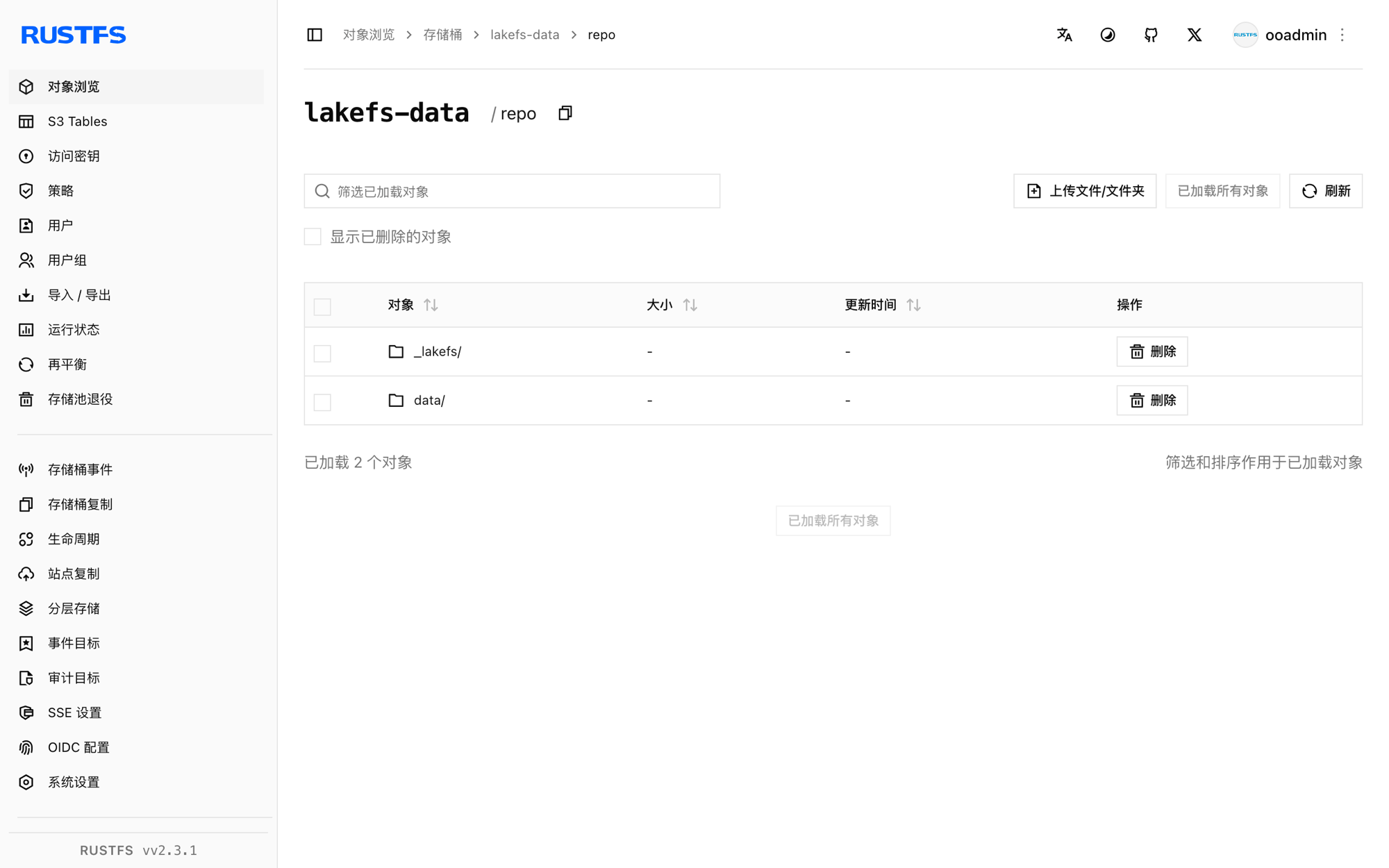
停止或重置部署
停止 lakeFS 并保留数据:
docker rm -f lakefs仓库元数据和数据保留在 lakefs-data 存储桶中,以相同配置重启 lakeFS 即可恢复仓库。若要删除全部内容,请移除存储桶:
rc rb rustfs/lakefs-data --force故障排查
failed to create repository: failed to access storage 并伴随 DNS 错误
lakeFS 正在使用 virtual-hosted 寻址。在 blockstore.s3 下设置 force_path_style: true——1.x 配置 schema 会拒绝旧的 path_style 键。
missing required keys: [auth.encrypt.secret_key]
lakeFS 1.x 要求本地数据库的加密密钥。按上文配置添加 auth.encrypt.secret_key 段。
mkdir /lakefs: permission denied
容器以非 root 用户运行,无法创建数据库目录。本地测试可加 -u 0 运行,或在配置路径上挂载可写目录。
后续步骤
- 在采用更多 lakeFS 操作之前,请查阅 S3 兼容性说明。
- 通过访问密钥管理创建专用的生产凭证。
- 按照 lakeFS S3 blockstore 文档配置 S3 网关,让讲 S3 协议的工具直接接入。