
Cortex
以 RustFS 作为 Cortex 的 S3 兼容 blocks、ruler 与 alertmanager 存储后端。
本指南将 Cortex——可水平扩展的 Prometheus 兼容指标后端——通过其原生 S3 存储连接到 RustFS。你将以单二进制模式运行 Cortex,把 blocks、ruler 与 alertmanager 存储全部指向一个 RustFS 存储桶,通过 remote write 推送指标,保存一个规则组,并验证桶内对象。整个流程使用 cortexproject/cortex:v1.21.1 和 rustfs/rustfs-x86-musl:v2.3.1 验证通过。
你需要安装 Docker。本部署用于本地集成测试,不适用于生产环境。
架构
Cortex 将所有 TSDB 块、ruler 规则组和 alertmanager 配置存放在对象存储中。把 s3 后端指向 RustFS 后,该存储桶就是所有租户数据的唯一事实来源。
创建 Cortex 配置
创建配置文件,并替换全部连接占位符:
target: all
auth_enabled: false

server:
  http_listen_port: 9009

distributor:
  shard_by_all_labels: true
  pool:
    health_check_ingesters: true

ingester:
  lifecycler:
    min_ready_duration: 0s
    final_sleep: 0s
    num_tokens: 512
    ring:
      kvstore:
        store: inmemory
      replication_factor: 1

blocks_storage:
  backend: s3
  s3: &s3
    endpoint: <your-rustfs-endpoint>:9000
    region: us-east-1
    bucket_name: cortex
    access_key_id: <your-access-key>
    secret_access_key: <your-secret-key>
    insecure: true
    bucket_lookup_type: path
  tsdb:
    dir: /data/tsdb
    block_ranges_period: [15m]
    ship_interval: 30s
  bucket_store:
    sync_dir: /data/tsdb-sync
    bucket_index:
      enabled: true

compactor:
  data_dir: /data/compactor
  sharding_ring:
    kvstore:
      store: inmemory

ruler:
  enable_api: true
  rule_path: /data/ruler

ruler_storage:
  backend: s3
  s3:
    <<: *s3

alertmanager:
  external_url: /alertmanager
  enable_api: true
  data_dir: /data/alertmanager

alertmanager_storage:
  backend: s3
  s3:
    <<: *s3
Cortex 的桶字段名为 bucket_name,路径风格寻址通过 bucket_lookup_type: path 控制。insecure: true 允许使用纯 HTTP 端点。block_ranges_period 与 ship_interval 的取值缩短了切块周期,便于测试快速产出对象;生产环境请保持默认值。
运行 Cortex
创建存储桶,并在与 RustFS 同一 Docker 网络中启动 Cortex:
rc mb rustfs/cortex

docker run -d --name cortex --network oo-rustfs_default -p 9009:9009 \
  -v "$PWD/cortex.yaml":/etc/cortex/cortex.yaml:ro \
  -v /opt/cortex/data:/data \
  cortexproject/cortex:v1.21.1 -config.file=/etc/cortex/cortex.yaml
ts=... caller=cortex.go:469 level=info msg="Cortex started"推送指标与规则
启动一个抓取自身并向 Cortex remote write 的 Prometheus:
global:
  scrape_interval: 5s
scrape_configs:
  - job_name: self
    static_configs:
      - targets: ["localhost:9090"]
remote_write:
  - url: http://cortex:9009/api/v1/push
docker run -d --name prom-writer --network oo-rustfs_default \
-v "$PWD/prometheus.yml":/etc/prometheus/prometheus.yml:ro \
prom/prometheus:latest --config.file=/etc/prometheus/prometheus.yml通过 ruler API 保存一个规则组:
cat > rules.yaml << "EOF"
name: rustfs-demo
rules:
  - alert: RustFSAlwaysFiring
    expr: vector(1)
    labels:
      severity: demo
    annotations:
      summary: "demo alert stored in RustFS"
EOF

curl -s -o /dev/null -w "%{http_code}\n" \
  -X POST http://localhost:9009/api/v1/rules/rustfs-demo \
--data-binary @rules.yaml -H "Content-Type: application/yaml"202查询已写入的序列:
curl -s "http://localhost:9009/prometheus/api/v1/query?query=up"{"status":"success","data":{"resultType":"vector","result":[{"metric":{"__name__":"up",...},"value":[...,"1"]}]}}验证 RustFS 中的对象
列出桶内前缀:
rc ls rustfs/cortex/ -rruler 配置立即落盘,ingester 上传了两个 TSDB 块(每个包含 chunks、index 与 meta.json):
fake/01M35WE4B1G6RRKHRV0HSGADY1/chunks/000001
fake/01M35WE4B1G6RRKHRV0HSGADY1/index
fake/01M35WE4B1G6RRKHRV0HSGADY1/meta.json
fake/01M35WWS2YCC7FBK1JSBKFQGRP/chunks/000001
fake/01M35WWS2YCC7FBK1JSBKFQGRP/index
fake/01M35WWS2YCC7FBK1JSBKFQGRP/meta.json
rules/fake/cnVzdGZzLWRlbW8=/cnVzdGZzLWRlbW8=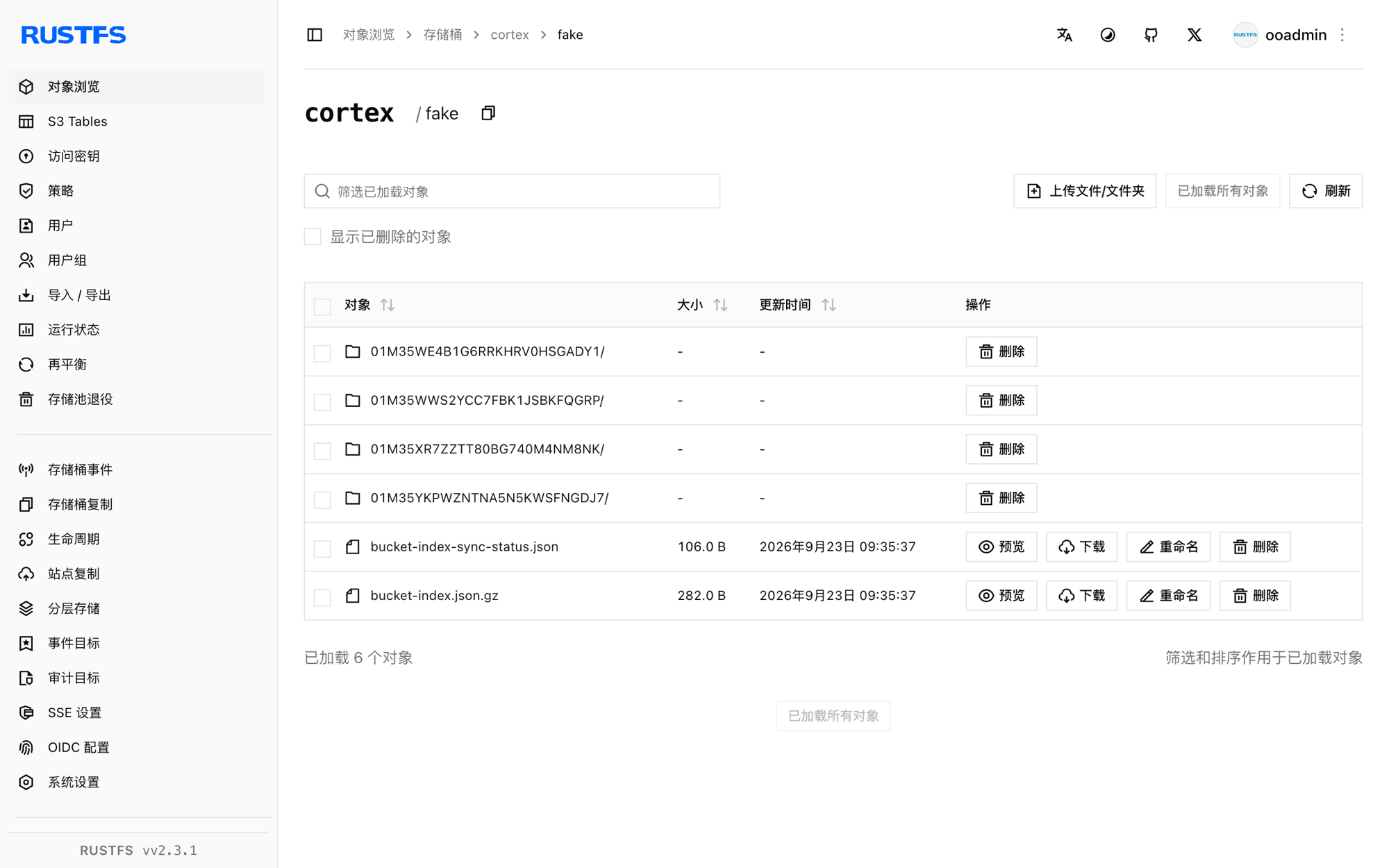
停止或重置
保留桶内对象、仅拆除演示环境:
docker rm -f cortex prom-writer删除已存储的数据:
rc rm rustfs/cortex/ --recursive --force故障排查
field bucket not found in type s3.Config
Cortex 使用 bucket_name 而不是 bucket。路径风格寻址通过 bucket_lookup_type: path 设置——Thanos 使用的 force_path_style 键在 Cortex 中不存在。
块一直没有出现在桶里
ingester 只会在 head 达到 block_ranges_period 边界(默认 2h)完成压缩后才上传块。测试时可设置较小周期(如 [15m]),并配合 ship_interval: 30s,等待一个周期即可。
Unauthorized 或桶列表为空
确认每一个使用该桶的 s3 配置块都带有 access_key_id 与 secret_access_key,且 insecure: true 与纯 HTTP 端点相匹配。