
Bucket Quota
Configure, inspect, and verify hard storage quotas for individual RustFS buckets.
RustFS bucket quotas limit the total object data stored in an individual bucket. Use a quota to prevent one workload from consuming more than its assigned capacity while allowing other buckets to use the remaining storage.
Overview
RustFS currently supports hard, byte-based quotas. Before accepting a write, RustFS compares the bucket's current usage plus the requested object size with the configured limit. A write that would exceed the limit is rejected with InvalidRequest and a Bucket quota exceeded message.
Quota checks cover these operations:
| Operation | Quota behavior |
|---|---|
| Upload an object | Rejects the upload when current usage plus the object size exceeds the limit. |
| Complete a multipart upload | Checks the completed object size before committing the upload. |
| Copy an object into the bucket | Checks the source object size against the destination bucket quota. |
| Delete an object | Always allowed so that you can recover capacity. |
The quota applies to object data, not the number of objects or request rate. A bucket without a configured limit is unlimited.
Replacement uploads
The quota check reserves the full incoming object size against the bucket's current usage. Replacing an existing key can therefore require enough headroom for the complete replacement object.
Configure in the Console
- Sign in to the RustFS Console and open Browser.
- Find the bucket and select Settings.
- Under Capacity & Metadata, find Bucket Quota and select Edit.
- Enable Bucket Quota.
- Enter the quota size and select MiB, GiB, TiB, or PiB.
- Select Save Quota.
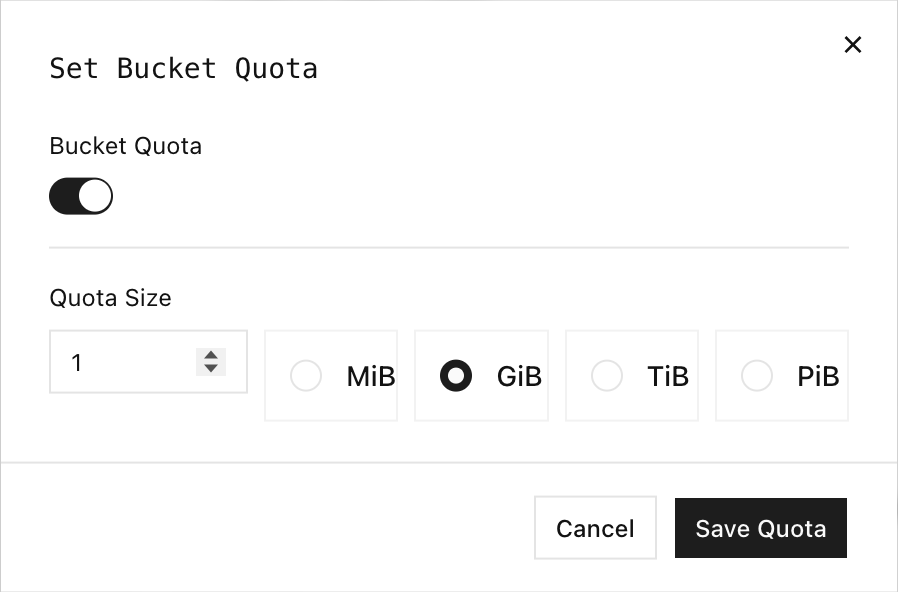
To remove the limit, open the dialog again, disable Bucket Quota, and save the change.
Use rc
Configure an alias for your RustFS deployment:
rc alias set rustfs http://localhost:9000 \
	<your-access-key> <your-secret-key> \
	--region us-east-1 --bucket-lookup path
Replace localhost with the RustFS server address when rc runs on another host.
Permissions
Quota operations require these policy actions:
| Operation | Required action |
|---|---|
| Set or clear a quota | admin:SetBucketQuota |
| Read quota configuration or statistics | s3:GetBucketQuota |
| Check whether a proposed operation fits | s3:GetBucketQuota |
The root credential has these permissions. For delegated administration, attach only the actions needed for the workflow.
Set a quota
Set a 1 GiB hard quota. rc accepts byte values or units such as 1G, 500M, and 10KB:
rc bucket quota set rustfs/my-bucket 1GThe response includes the configured limit and current usage:
Bucket: my-bucket
Quota: 1 GiB
Usage: 0 B
Type:  HARD
Read the quota
rc bucket quota info rustfs/my-bucketUse --json when another tool needs to process the result:
rc bucket quota info rustfs/my-bucket --jsonWhen no limit is configured, the human-readable output reports Quota: unlimited.
Configuration propagation
A query issued immediately after setting or clearing a quota can briefly return the previous state. Query the quota again and confirm the expected value before starting the verification workflow.
Clear a quota
Remove the limit without deleting objects:
rc bucket quota clear rustfs/my-bucket
rc bucket quota info rustfs/my-bucket
The bucket becomes unlimited after the configuration change is applied.
Advanced quota checks
rc 0.1.29 does not expose commands for detailed usage statistics or advisory checks for proposed writes. Use the RustFS Admin API for these operations. Requests must use AWS Signature Version 4 with an active RustFS credential.
The examples use these shell variables:
export RUSTFS_ENDPOINT=http://localhost:9000
export RUSTFS_ACCESS_KEY=<your-access-key>
export RUSTFS_SECRET_KEY=<your-secret-key>
export BUCKET_NAME=my-bucket
Protect credentials
Environment variables are convenient for local testing but may be visible to processes running as the same operating-system user. Use your platform's secret manager or a restricted credentials file in production.
Read detailed usage statistics
Use the statistics endpoint to retrieve the limit, current usage, remaining bytes, and percentage used:
curl --fail-with-body \
	--aws-sigv4 "aws:amz:us-east-1:s3" \
	--user "${RUSTFS_ACCESS_KEY}:${RUSTFS_SECRET_KEY}" \
	"${RUSTFS_ENDPOINT}/rustfs/admin/v3/quota-stats/${BUCKET_NAME}"
{
"bucket": "my-bucket",
"quota_limit": 1073741824,
"current_usage": 1048576,
"remaining_quota": 1072693248,
"usage_percentage": 0.09765625
}Usage values come from RustFS data-usage accounting. Allow time for that view to reflect very recent changes before using the statistics response for external billing or orchestration.
Check a proposed upload
Check whether a 64 MiB upload would fit without writing an object:
curl --fail-with-body \
	--aws-sigv4 "aws:amz:us-east-1:s3" \
	--user "${RUSTFS_ACCESS_KEY}:${RUSTFS_SECRET_KEY}" \
	--request POST \
	--header "Content-Type: application/json" \
	--data '{"operation_type":"PUT","operation_size":67108864}' \
	"${RUSTFS_ENDPOINT}/rustfs/admin/v3/quota-check/${BUCKET_NAME}"
The allowed field reports the decision. This check is advisory: another write can consume capacity before the planned upload starts, so the actual upload remains authoritative.
Verification
Set a small test quota, upload an object that fits, and then attempt to upload an object that exceeds the remaining capacity:
rc bucket quota set rustfs/my-bucket 1M

dd if=/dev/zero of=/tmp/quota-small.bin bs=1024 count=256
dd if=/dev/zero of=/tmp/quota-large.bin bs=1048576 count=2

rc object copy /tmp/quota-small.bin rustfs/my-bucket/hello.bin
rc object copy /tmp/quota-large.bin rustfs/my-bucket/too-large.bin
The 256 KiB object succeeds. The 2 MiB object exceeds the 1 MiB bucket quota, so rc exits with an error and RustFS does not create too-large.bin.
Delete the first object and clear the test quota:
rc object remove rustfs/my-bucket/hello.bin --force
rc bucket quota clear rustfs/my-bucket
rc bucket quota info rustfs/my-bucket
Confirm that the final query reports Quota: unlimited.
If quota enforcement cannot read or parse its internal configuration, RustFS logs Bucket quota check degraded to allow and permits the write. Monitor for this warning because it means quota enforcement is temporarily unavailable.