
Object Lock
Protect versioned objects from deletion with retention periods and legal holds.
RustFS Object Lock applies write-once, read-many protection to individual object versions. Use retention periods for time-bound protection and Legal Hold for protection without a predefined expiration date.
Overview
Object Lock requires bucket versioning and must be enabled when the bucket is created. Each overwrite creates a new version; retention and Legal Hold protect a specific version rather than the object key as a whole.
| Protection | Behavior |
|---|---|
GOVERNANCE retention | Blocks deletion and retention shortening unless the caller has bypass permission and explicitly requests a bypass. Retention can be extended without bypass. |
COMPLIANCE retention | Blocks deletion even with governance bypass. The date can be extended but not shortened. |
| Legal Hold | Blocks deletion until the hold is set to OFF. It has no expiration date and governance bypass does not override it. |
Deleting a key without a version ID creates a delete marker. The protected version remains stored and can still be retrieved by version ID.
Plan retention before enabling it
COMPLIANCE retention cannot be bypassed or shortened before its retain-until date. Test policies in a non-production bucket and verify time synchronization, permissions, lifecycle rules, replication, and backup procedures before protecting production data.
Configure in the Console
- Sign in to the RustFS Console and open Buckets.
- Select Create Bucket and enter the bucket name.
- Enable Object Lock. The Console also enables Version because Object Lock requires versioning.
- To apply retention automatically to new object versions, enable Retention.
- Select COMPLIANCE or GOVERNANCE, enter the validity, and select Day or Year.
- Select Create.
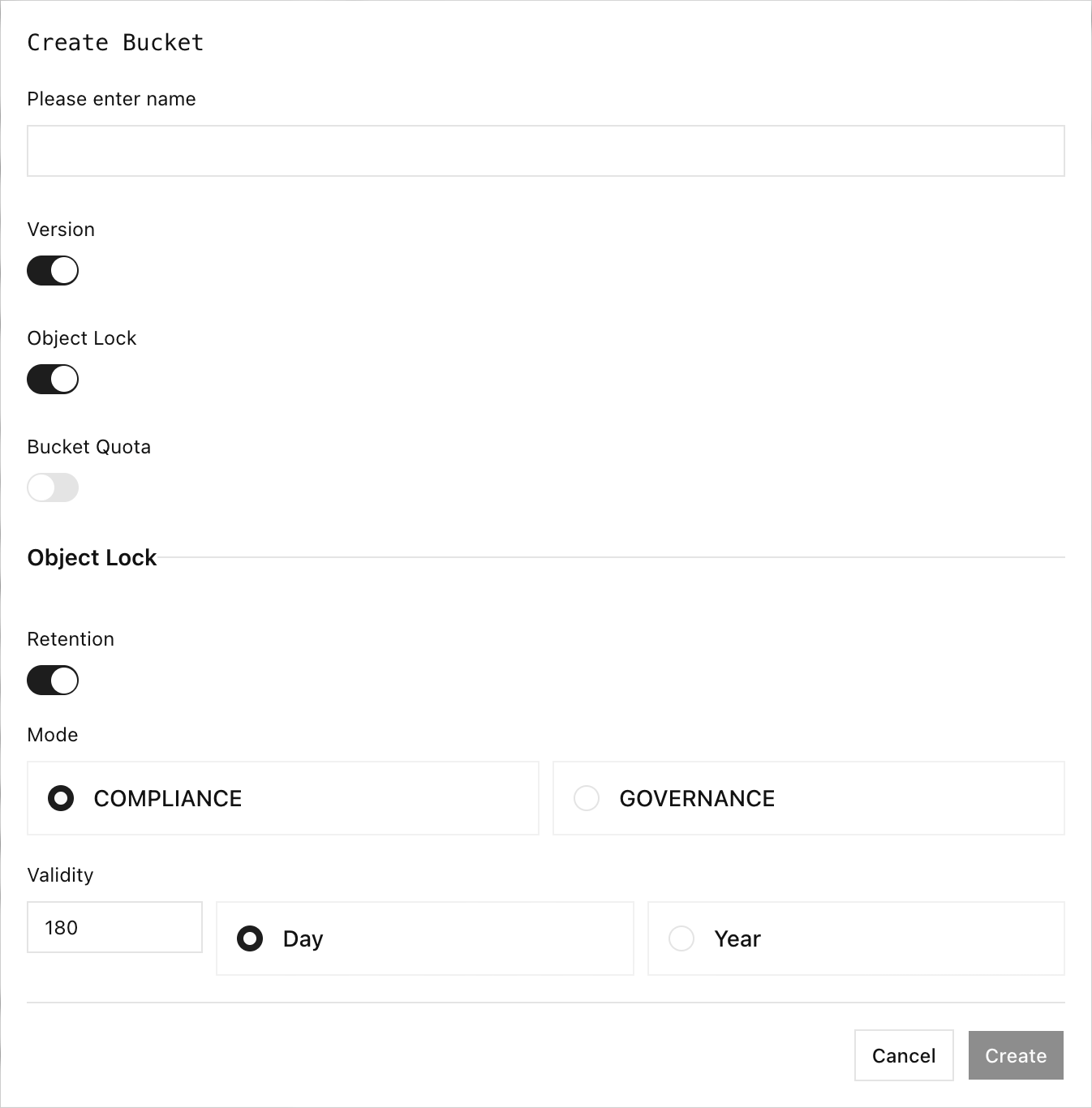
The Console initially displays 180 days when default retention is enabled. Replace it with the period required by your retention policy; it is a UI initial value, not a general recommendation.
To inspect a protected object, open the bucket, select the object name, and use the Versions and Info tabs. The Info tab exposes Legal Hold and RetentionPolicy fields.
Use rc
Configure an alias before running these examples:
rc alias set rustfs http://localhost:9000 \
	<your-access-key> <your-secret-key> \
	--region us-east-1 --bucket-lookup path
rc 0.1.29 bucket creation boundary
rc bucket create --with-lock and --with-versioning appear in the rc 0.1.29 help output but return not implemented when executed. Create the Object Lock bucket in the Console. The upload headers shown below are supported and were validated against RustFS.
Upload an object version with GOVERNANCE retention. Supply both retention headers together and use an RFC 3339 UTC timestamp in the future:
rc object copy /path/to/hello.txt rustfs/my-bucket/hello.txt \
	-H "x-amz-object-lock-mode:GOVERNANCE" \
	-H "x-amz-object-lock-retain-until-date:2027-01-01T00:00:00Z"
Upload an object version with Legal Hold enabled:
rc object copy /path/to/hello.txt rustfs/my-bucket/legal-hold.txt \
	-H "x-amz-object-lock-legal-hold:ON"
List the protected versions and inspect a specific version:
rc bucket version list rustfs/my-bucket --json
rc object stat rustfs/my-bucket/hello.txt \
	--version-id <version-id> --json
rc 0.1.29 does not provide commands to change retention or switch an existing Legal Hold between ON and OFF. Use the Console or an S3 SDK for those operations.
Verify protection
- Upload a test object with GOVERNANCE retention or Legal Hold.
- Record its version ID with
rc bucket version list. - Attempt to delete that exact version through an S3 client without bypass. RustFS must return
AccessDeniedwhile protection is active. - Confirm the version remains visible in the Console and through
rc object stat --version-id.
For GOVERNANCE retention, test bypass only with a dedicated administrative identity that has s3:BypassGovernanceRetention. COMPLIANCE retention and Legal Hold remain protected from governance bypass.
Operational considerations
- Default bucket retention is calculated when a new object version or multipart upload is initiated.
- Copying an object creates a new destination version; destination retention policy applies independently.
- Suspending versioning is not appropriate for an Object Lock bucket.
- Lifecycle expiration cannot remove a version while retention or Legal Hold blocks deletion.
- Replication targets for locked objects must support compatible Object Lock behavior.