
lakeFS
Run lakeFS with RustFS as its S3 blockstore for versioned data lakes.
This guide connects lakeFS — the Git-like data lake versioning layer — to RustFS as its S3 blockstore. You will start lakeFS, create a repository whose storage namespace points at a RustFS bucket, commit an object, and verify that the lakeFS metadata and data files live in RustFS. The workflow was verified with treeverse/lakefs:1.58.0 and rustfs/rustfs-x86-musl:v2.3.1.
You need Docker. This deployment is intended for local integration testing, not production.
Architecture
lakeFS stores repository metadata and committed data files in the blockstore under the storage namespace. The bucket holds one repo/ prefix containing _lakefs/ metadata and data/ objects; lakeFS reads and writes them through the S3 API.
Create the project files
Create the bucket, then the lakeFS configuration:
rc alias set rustfs http://<your-rustfs-endpoint>:9000 <your-access-key> <your-secret-key>
rc mb rustfs/lakefs-datadatabase:
type: local
local:
path: /lakefs/data
blockstore:
type: s3
s3:
endpoint: http://rustfs:9000
region: us-east-1
force_path_style: true
auth:
encrypt:
secret_key: change-me-to-a-random-string
gateways:
s3:
domain_name: rustfs-gateway.local
logging:
format: text
level: infoforce_path_style: true is required — without it lakeFS builds lakefs-data.<hostname> as a hostname and every request fails with a DNS error. The credentials are supplied through the standard AWS_ACCESS_KEY_ID and AWS_SECRET_ACCESS_KEY environment variables.
Create the environment file for the service credentials and the initial admin user, replacing the placeholders:
AWS_ACCESS_KEY_ID=<your-access-key>
AWS_SECRET_ACCESS_KEY=<your-secret-key>
LAKEFS_INSTALLATION_USER_NAME=admin
LAKEFS_INSTALLATION_ACCESS_KEY_ID=<your-lakefs-access-key>
LAKEFS_INSTALLATION_SECRET_ACCESS_KEY=<your-lakefs-secret-key>
LAKEFS_STATS_ENABLED=false
Start lakeFS
docker run -d --name lakefs --network oo-rustfs_default \
  -p 8000:8000 \
  -v "$PWD/config.yaml":/etc/lakefs/config.yaml:ro \
  --env-file .env \
  treeverse/lakefs:1.58.0 run
Wait for http://localhost:8000/api/healthcheck to return 200, then create a repository with a storage namespace inside the bucket:
curl -s -u <your-lakefs-access-key>:<your-lakefs-secret-key> \
  -X POST http://localhost:8000/api/v1/repositories \
  -H "Content-Type: application/json" \
  -d '{"name": "rustfs-demo", "storage_namespace": "s3://lakefs-data/repo"}'
Commit an object
Upload a file to the main branch and commit it:
echo "hello from lakefs on rustfs" > hello.txt

curl -s -u <your-lakefs-access-key>:<your-lakefs-secret-key> \
  -X POST "http://localhost:8000/api/v1/repositories/rustfs-demo/branches/main/objects?path=hello.txt" \
  --data-binary @hello.txt

curl -s -u <your-lakefs-access-key>:<your-lakefs-secret-key> \
  -X POST "http://localhost:8000/api/v1/repositories/rustfs-demo/branches/main/commits" \
  -H "Content-Type: application/json" \
  -d '{"message": "add hello"}'
Read the object back through the branch ref — the response body is the committed content:
curl -s -u <your-lakefs-access-key>:<your-lakefs-secret-key> \
  "http://localhost:8000/api/v1/repositories/rustfs-demo/refs/main/objects?path=hello.txt"
Verify objects in RustFS
List the bucket:
rc ls rustfs/lakefs-data/ -rThe output shows the lakeFS metadata objects and the committed data file under the repository prefix:
repo/_lakefs/19b2b26e37cb20fc6763c527f88eb5151891b04a2c8c9ddd32870c5c3f353281
repo/data/fueia10jdra000e1c480/daots7ojdra000e1c490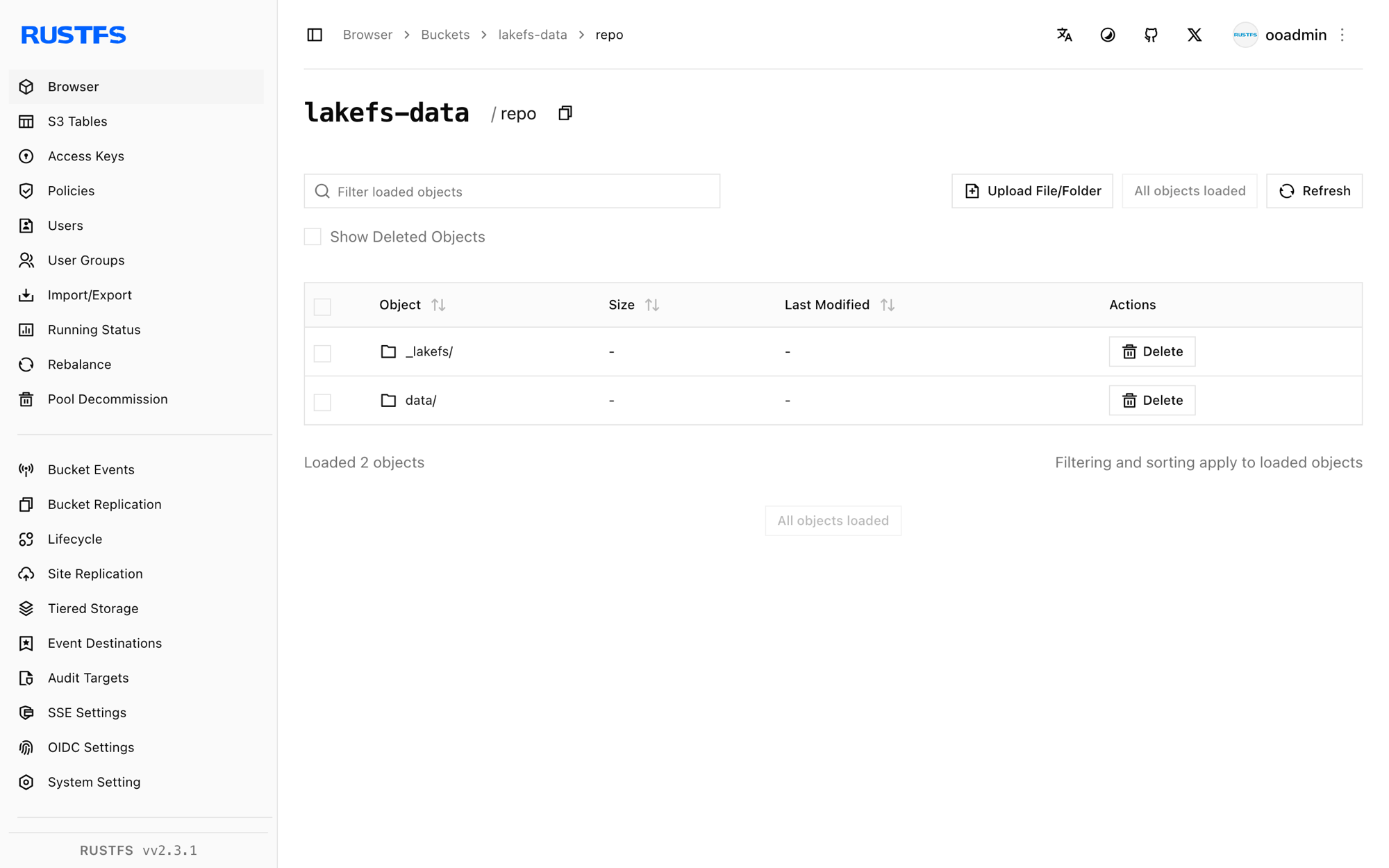
Stop or reset the deployment
Stop lakeFS while keeping the data:
docker rm -f lakefsThe repository metadata and data stay in the lakefs-data bucket, so restarting lakeFS with the same configuration brings the repository back. To delete everything, remove the bucket:
rc rb rustfs/lakefs-data --forceTroubleshooting
failed to create repository: failed to access storage with a DNS error
lakeFS is using virtual-hosted addressing. Set force_path_style: true under blockstore.s3 — in the 1.x configuration schema the older path_style key is rejected at startup.
missing required keys: [auth.encrypt.secret_key]
lakeFS 1.x requires an encryption key for the local database. Add the auth.encrypt.secret_key block as shown in the configuration above.
mkdir /lakefs: permission denied
The container runs as a non-root user and cannot create the database directory. Run the container with -u 0 for local testing, or mount a writable directory at the configured path.
Next steps
- Review S3 compatibility notes before adopting additional lakeFS operations.
- Create dedicated production credentials with Access Key Management.
- Follow the lakeFS S3 blockstore documentation to configure the S3 gateway for tools that speak the S3 protocol.