
Jenkins
Store Jenkins build artifacts in RustFS with the Artifact Manager on S3 plugin.
This guide connects Jenkins — the automation server — to RustFS through the Artifact Manager on S3 plugin. You will start Jenkins with the plugin, point its artifact manager at a RustFS bucket, run a job that archives an artifact, and verify that the artifact is stored in RustFS. The workflow was verified with jenkins/jenkins:lts-jdk17 (Jenkins 2.5xx LTS) and rustfs/rustfs-x86-musl:v2.3.1.
You need Docker. This deployment is intended for local integration testing, not production.
Architecture
With the plugin active, every job that publishes artifacts through the standard archiveArtifacts step (or stash/unstash) uploads them to the jenkins-artifacts bucket under the configured prefix instead of storing them on the controller disk.
Create the project files
Create the bucket first — the plugin validates the bucket but does not create it:
rc alias set rustfs http://<your-rustfs-endpoint>:9000 <your-access-key> <your-secret-key>
rc mb rustfs/jenkins-artifacts
Create a Dockerfile that installs the plugin into the Jenkins LTS image:
FROM jenkins/jenkins:lts-jdk17
USER root
RUN jenkins-plugin-cli --plugins artifact-manager-s3 aws-credentials
USER jenkins
The artifact-manager-s3 plugin brings in the AWS credentials support it needs; listing aws-credentials explicitly keeps the credential type available.
Build and start Jenkins on the same Docker network as RustFS:
docker build -t jenkins-rustfs .
docker run -d --name jenkins --network oo-rustfs_default \
  -p 8080:8080 -v jenkins-home:/var/jenkins_home jenkins-rustfs
Complete the setup wizard, then create an AWS credential: Manage Jenkins → Credentials → global → Add Credentials, kind AWS Credential, ID rustfs-creds, with your RustFS access key and secret key.
Configure the artifact manager
Open Manage Jenkins → AWS Configuration (from the aws-global-configuration plugin) and set:
- Region name:
us-east-1 - Credentials:
rustfs-creds
Open Manage Jenkins → System and locate the Artifact Management for Builds section. Select Cloud Provider Amazon S3, and fill in the S3 configuration:
- S3 Bucket Name:
jenkins-artifacts - S3 Bucket Region:
us-east-1 - Base Prefix:
artifacts/ - Custom Endpoint:
<your-rustfs-endpoint>:9000(for examplerustfs:9000inside the Compose network) - Custom Signing Region:
us-east-1 - Use Path Style URL: enabled
- Use Insecure HTTP: enabled
- Disable Session Token: enabled
Path-style addressing and plain HTTP are required for a non-AWS endpoint without TLS. Disabling the session token stops the plugin from calling AWS STS, which a plain access key pair cannot answer. Click Validate S3 Bucket configuration to confirm the settings, then save.
Run a job that archives an artifact
Create a freestyle job (or pipeline) that produces a file and archives it:
pipeline {
    agent any
    stages {
        stage('Build') {
            steps {
                sh 'echo "jenkins artifact stored on rustfs" > report.txt'
            }
        }
    }
    post {
        always {
            archiveArtifacts 'report.txt'
        }
    }
}
Run the build and wait for it to finish. The artifact upload goes to RustFS transparently — the job configuration does not mention S3 at all.
Verify objects in RustFS
List the bucket:
rc ls rustfs/jenkins-artifacts/ -rThe artifact is stored under the prefix, organized by job and build number:
artifacts/s3-artifacts-demo/3/artifacts/report.txt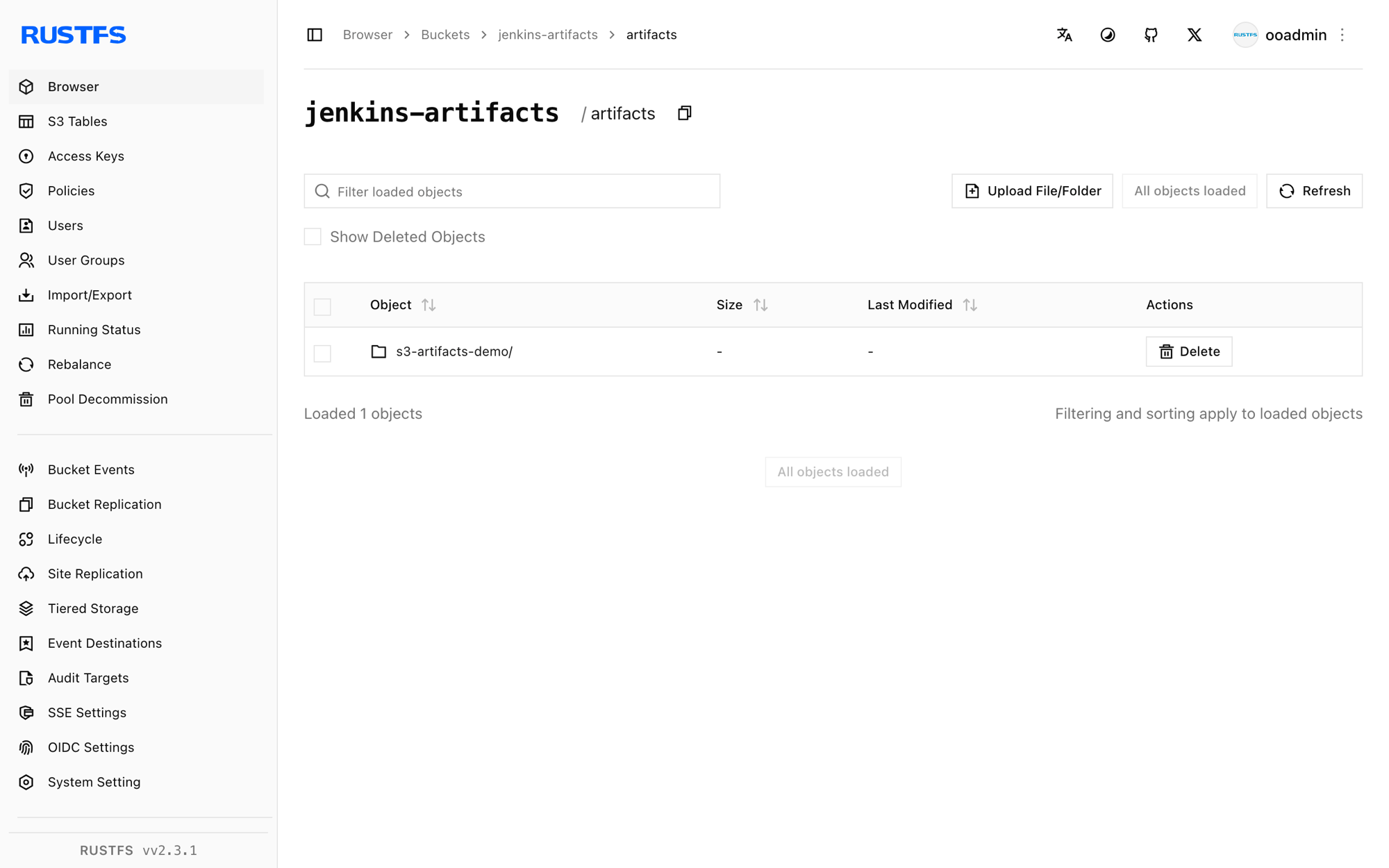
Downloading the artifact from the build page reads it back from RustFS.
Stop or reset the deployment
Stop Jenkins while keeping the data:
docker rm -f jenkinsThe artifacts stay in the jenkins-artifacts bucket. To delete them, remove the bucket:
rc rb rustfs/jenkins-artifacts --forceTroubleshooting
StsException: The security token included in the request is invalid
The plugin is calling AWS STS to obtain session credentials. Enable Disable Session Token in the S3 configuration — a static access key pair cannot answer an STS call.
UnknownHostException: jenkins-artifacts.rustfs
The plugin is using virtual-hosted addressing. Enable Use Path Style URL — RustFS resolves buckets from the URL path, not the hostname.
No valid session credentials or empty credential errors
Confirm the AWS Configuration page has the credential selected and saved before the S3 bucket settings are used, and that the credential ID matches the one you created.
Next steps
- Review S3 compatibility notes before adopting additional Jenkins integrations.
- Create dedicated production credentials with Access Key Management.
- Follow the Artifact Manager on S3 plugin documentation for stash support and cleanup options.