
MLflow
Run MLflow with RustFS as the S3 artifact store for experiment tracking, deployed with Docker Compose.
This guide connects MLflow — the experiment tracking and model registry platform — to RustFS as its S3 artifact store. You will start the MLflow tracking server with Docker Compose, log parameters, metrics, and artifacts from a training run, and verify that the artifacts are stored in RustFS. The workflow was verified with ghcr.io/mlflow/mlflow:v2.22.1 and rustfs/rustfs-x86-musl:v2.3.1.
You need Docker with the Compose plugin. This deployment is intended for local integration testing, not production.
Architecture
The tracking server keeps experiment and run metadata in SQLite and stores artifacts — model files, plots, reports — directly in RustFS through the s3:// artifact root. The client needs the same RustFS credentials because it uploads artifacts itself, using boto3 and the MLFLOW_S3_ENDPOINT_URL setting.
Create the project files
Create a working directory:
mkdir rustfs-mlflow
cd rustfs-mlflow
Create an environment file and replace both credential placeholders:
RUSTFS_ACCESS_KEY=<your-access-key>
RUSTFS_SECRET_KEY=<your-secret-key>
MLFLOW_BUCKET=my-bucket
Use dedicated credentials for the artifact bucket. Do not commit .env to source control.
Create the Compose file:
services:
  rustfs:
    image: rustfs/rustfs-x86-musl:v2.3.1
    environment:
      RUSTFS_ACCESS_KEY: ${RUSTFS_ACCESS_KEY}
      RUSTFS_SECRET_KEY: ${RUSTFS_SECRET_KEY}
      RUSTFS_VOLUMES: /data
      RUSTFS_ADDRESS: ":9000"
      RUSTFS_CONSOLE_ADDRESS: ":9001"
      RUSTFS_CONSOLE_ENABLE: "true"
    volumes:
      - rustfs-data:/data
    ports:
      - "9000:9000"
      - "9001:9001"
    healthcheck:
      test: ["CMD", "curl", "-sf", "http://127.0.0.1:9000/health"]
      interval: 10s
      timeout: 5s
      retries: 6
      start_period: 10s
    networks:
      - mlflow

  create-bucket:
    image: rustfs/rc:latest
    depends_on:
      rustfs:
        condition: service_healthy
    environment:
      RUSTFS_ACCESS_KEY: ${RUSTFS_ACCESS_KEY}
      RUSTFS_SECRET_KEY: ${RUSTFS_SECRET_KEY}
      MLFLOW_BUCKET: ${MLFLOW_BUCKET}
    entrypoint:
      - /bin/sh
      - -c
      - |
        /usr/bin/rc alias set rustfs http://rustfs:9000 "$${RUSTFS_ACCESS_KEY}" "$${RUSTFS_SECRET_KEY}"
        /usr/bin/rc mb --ignore-existing rustfs/$${MLFLOW_BUCKET}
    networks:
      - mlflow

  mlflow:
    image: ghcr.io/mlflow/mlflow:v2.22.1
    command:
      - server
      - --backend-store-uri
      - sqlite:////mlflow/mlflow.db
      - --default-artifact-root
      - s3://${MLFLOW_BUCKET}/mlflow-artifacts
      - --host
      - 0.0.0.0
      - --port
      - "5000"
    environment:
      AWS_ACCESS_KEY_ID: ${RUSTFS_ACCESS_KEY}
      AWS_SECRET_ACCESS_KEY: ${RUSTFS_SECRET_KEY}
      MLFLOW_S3_ENDPOINT_URL: http://rustfs:9000
      AWS_DEFAULT_REGION: us-east-1
    depends_on:
      create-bucket:
        condition: service_completed_successfully
    ports:
      - "5000:5000"
    volumes:
      - mlflow-db:/mlflow
    networks:
      - mlflow

networks:
  mlflow:

volumes:
  rustfs-data:
  mlflow-db:
The create-bucket service must run before the server starts because MLflow does not create the bucket. MLFLOW_S3_ENDPOINT_URL points the server's boto3 client at RustFS with path-style addressing. The SQLite database lives on a volume so experiment metadata survives restarts; production deployments should use a managed database backend instead.
Validate and start the deployment
Resolve the Compose file before starting containers:
docker compose configStart the services and wait for the tracking server:
docker compose up -d
docker compose ps
The create-bucket service should exit with code 0, and the MLflow UI should answer on http://localhost:5000:
curl -sf http://localhost:5000/ >/dev/null && echo readyOpen the RustFS Console at http://localhost:9001 to watch artifacts land in my-bucket during the next step.
Log a training run
Create the client script — it runs inside the MLflow image, which ships every dependency:
import mlflow

mlflow.set_tracking_uri("http://localhost:5000")
mlflow.set_experiment("rustfs-demo")

with mlflow.start_run(run_name="rustfs-verify") as run:
    mlflow.log_params({"model": "demo-regressor", "alpha": 0.5})
    for step in range(3):
        mlflow.log_metric("rmse", 0.9 - step * 0.2, step=step)
    with open("model-summary.txt", "w") as f:
        f.write("demo model trained against RustFS artifact store\n")
    mlflow.log_artifact("model-summary.txt", artifact_path="reports")
    print("run_id:", run.info.run_id)
    print("artifact_uri:", run.info.artifact_uri)
Copy the script into the running container and execute it with the service environment:
docker compose cp train_demo.py mlflow:/tmp/train_demo.py
docker compose exec -w /tmp mlflow python train_demo.py
The artifact_uri prints as s3://my-bucket/mlflow-artifacts/<experiment-id>/<run-id>/artifacts — the artifact is uploaded straight to RustFS by the client.
Verify artifacts in RustFS
Read the artifact back through the tracking server, then list the same object in RustFS. Save the following as verify.py, replace <your-run-id> with the identifier printed in step 3, and run it the same way:
import mlflow

mlflow.set_tracking_uri("http://localhost:5000")
client = mlflow.MlflowClient()
print([a.path for a in client.list_artifacts("<your-run-id>", "reports")])
path = client.download_artifacts("<your-run-id>", "reports/model-summary.txt")
print(open(path).read())
The download reads the object from RustFS through the tracking server. Then confirm the objects in the bucket:
docker compose exec rustfs /usr/bin/rc ls local/my-bucket/mlflow-artifacts/ -rThe output should include the artifact object:
mlflow-artifacts/1/a1aece9243504f2680a52fba0c32765f/artifacts/reports/model-summary.txt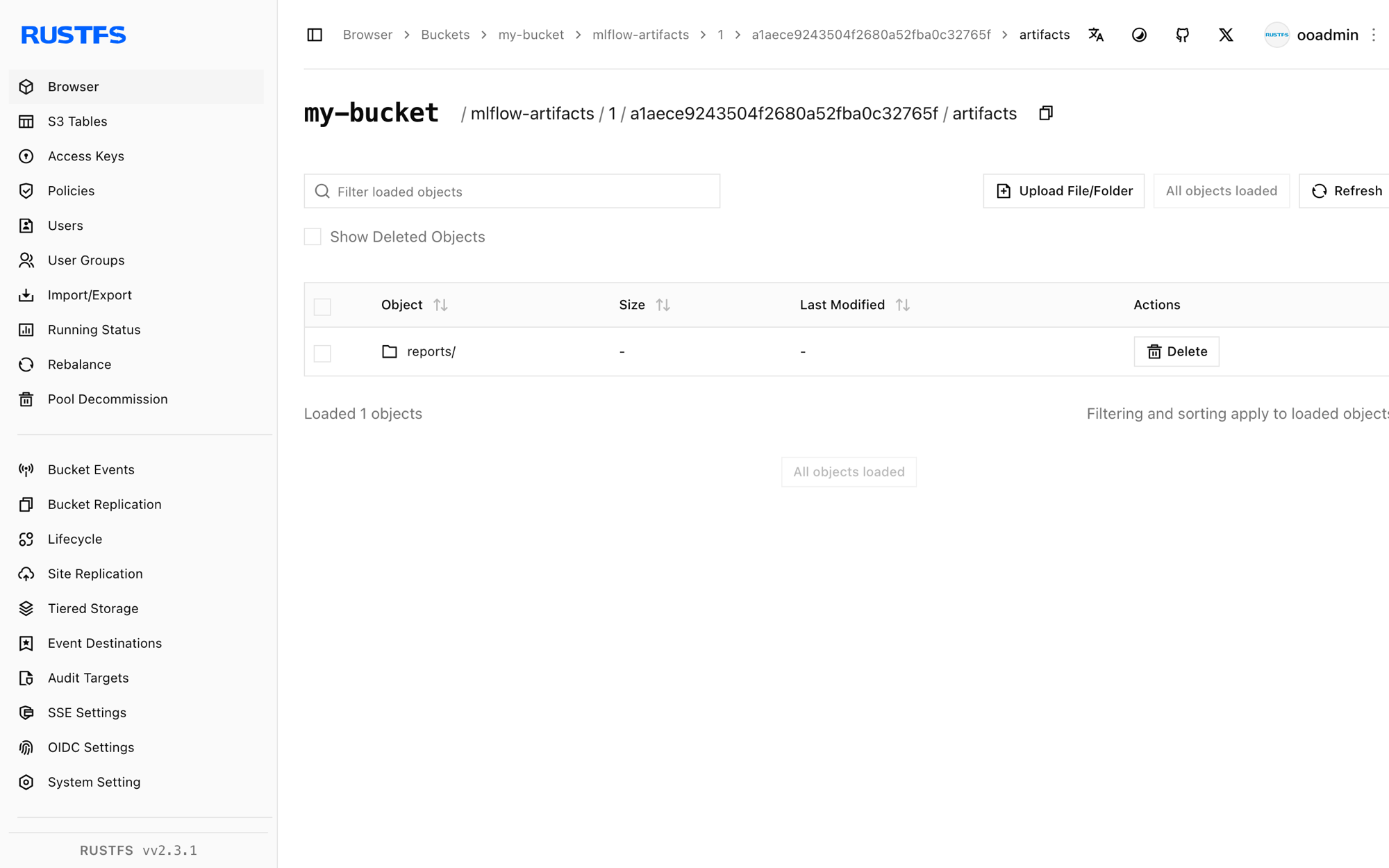
Runs, parameters, and metrics survive a server restart because they are stored in SQLite, while the artifacts stay in RustFS:
docker compose restart mlflow
docker compose exec -w /tmp mlflow python verify.py
The list_artifacts call succeeds again against the restarted server, reading from the same objects in RustFS.
Stop or reset the deployment
Stop the containers while keeping all data:
docker compose downThe RustFS volume keeps the artifact objects and the MLflow volume keeps the metadata database. To delete everything, including the artifacts in RustFS, add --volumes.
Troubleshooting
ModuleNotFoundError: No module named 'boto3' when logging artifacts
The client performing log_artifact needs boto3 because it uploads directly to S3. Install it in the environment that runs the training script, or run the script inside the MLflow image as shown in step 3.
AccessDenied or connection errors during artifact upload
Confirm that MLFLOW_S3_ENDPOINT_URL is set in the client environment — without it, boto3 sends requests to real AWS S3. The endpoint must be reachable from the machine running the training script; use http://localhost:9000 outside the Compose network and http://rustfs:9000 inside it.
The server fails to start with a bucket error
The artifact bucket must exist before the server starts. Check the create-bucket service logs:
docker compose logs create-bucketNext steps
- Review S3 compatibility notes before adopting additional MLflow operations.
- Create dedicated production credentials with Access Key Management.
- Follow the MLflow documentation to add a model registry or move the metadata store to a managed database.