
Apache Camel
用 Apache Camel 集成路由在 RustFS 桶之间搬运数据。
本指南将多面手集成框架 Apache Camel 通过其 S3 组件连接到 RustFS。你将用 YAML 编写两条路由:定时把消息写入桶的生产者路由,以及读回这些对象并记录日志的消费者路由。整个流程使用 Camel JBang(eclipse-temurin:21-jdk 镜像)和 aws2-s3 组件(覆写端点 + 路径样式寻址)验证通过。
你需要 Docker。本部署用于本地集成测试,不适用于生产环境。
架构
Camel JBang 直接运行路由文件并自动解析 S3 组件依赖——无需项目脚手架、构建或部署步骤。
编写集成路由
创建路由文件。凭证来自默认 AWS 凭证链(环境变量),URI 中只携带寻址信息:
- from:
    uri: "timer:tick"
    parameters:
      period: "5000"
    steps:
      - setBody:
          simple: "Hello from Camel at ${date:now:yyyy-MM-dd HH:mm:ss}"
      - setHeader:
          name: "CamelAwsS3Key"
          simple: "camel/hello-${date:now:HHmmss}.txt"
      - to:
          uri: "aws2-s3://my-bucket?overrideEndpoint=true&uriEndpointOverride=http://<your-rustfs-endpoint>:9000&forcePathStyle=true&useDefaultCredentialsProvider=true"
- from:
    uri: "aws2-s3://my-bucket?prefix=camel/&deleteAfterRead=false&maxMessagesPerPoll=5&overrideEndpoint=true&uriEndpointOverride=http://<your-rustfs-endpoint>:9000&forcePathStyle=true&useDefaultCredentialsProvider=true"
    steps:
      - to:
          uri: "log:from-rustfs"
生产者通过 CamelAwsS3Key 头设置对象 key——这里是每条消息一个时间戳,因此每次触发都会写入一个新对象。消费者以 deleteAfterRead=false 轮询 camel/ 前缀,对象消费后仍保留在桶中。
组件名与端点参数
本工作流中 Camel JBang 解析到的组件是 aws2-s3。overrideEndpoint=true 激活自定义端点,uriEndpointOverride 携带其 URL,forcePathStyle=true 选择 RustFS 期望的路径样式寻址,useDefaultCredentialsProvider=true 让组件从标准环境变量读取凭证。
用 Camel JBang 运行路由
在导出凭证的容器中运行集成。JBang 首次使用会请求信任来源,先加好信任规则再启动:
docker run --rm --network bridge \
  -e AWS_ACCESS_KEY_ID=<your-access-key> \
  -e AWS_SECRET_ACCESS_KEY=<your-secret-key> \
  -e AWS_REGION=us-east-1 \
  -v "$PWD:/routes" \
  --entrypoint bash eclipse-temurin:21-jdk -c '
    export JBANG_DIR=/root/.jbang PATH=/root/.jbang/bin:$PATH
    curl -Ls https://sh.jbang.dev | bash >/dev/null 2>&1
    jbang trust add https://github.com/apache/ 2>/dev/null || true
    jbang trust add /routes 2>/dev/null || true
    cd /routes && jbang camel@apache/camel run route.yaml
  '
首次运行会下载 Camel 运行时与依赖,然后启动路由。消费者每读到一个对象就输出一条日志:
2026-10-25 02:02:41.069 INFO 120 --- [-s3://my-bucket] from-rustfs : Exchange[ExchangePattern: InOnly, BodyType: byte[], Body: Hello from Camel at 2026-10-25 02:02:38]验证对象
确认生产者写入的对象已在 RustFS 中,替换全部连接占位符:
aws s3 ls s3://my-bucket/camel/ \
--endpoint-url http://<your-rustfs-endpoint>:90002026-10-25 02:02:13 39 hello-020213.txt
2026-10-25 02:02:18 39 hello-020218.txt
2026-10-25 02:02:23 39 hello-020223.txt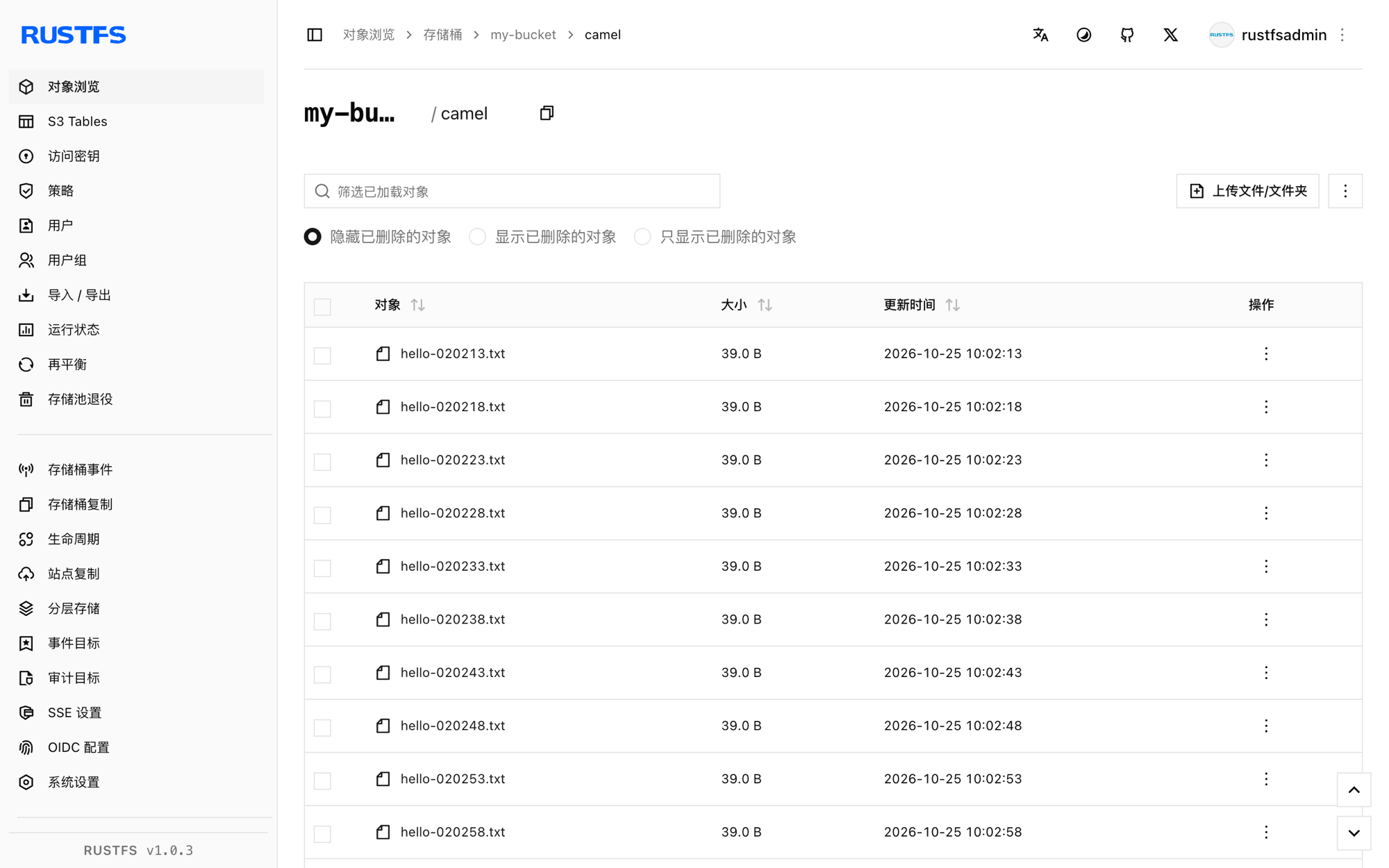
停止或重置
停止容器即结束路由。删除演示对象:
aws s3 rm s3://my-bucket/camel --recursive \
  --endpoint-url http://<your-rustfs-endpoint>:9000
故障排查
Cannot find component with name: aws-s3
你的 Camel 版本以别的名字解析组件——本工作流用的是 aws2-s3。以运行时建议列表(Did you mean: ... aws2-s3 ...)里的名字为准。
is not from a trusted source
JBang 拒绝运行不受信任的代码。按第 2 步先执行 jbang trust add https://github.com/apache/ 和 jbang trust add /routes 再运行。
useDefaultCredentialsProvider is set to false
组件没有在 URI 中找到凭证配置。要么加 useDefaultCredentialsProvider=true 并导出 AWS_ACCESS_KEY_ID 和 AWS_SECRET_ACCESS_KEY,要么直接配置 accessKey、secretKey 端点参数。
消费者读不到数据
消费者只轮询 prefix=camel/ 给出的前缀。确认生产者已运行(有 timer 日志),且其 CamelAwsS3Key 头以 camel/ 开头。
下一步
- 在采用分段或流式操作前,先阅读 S3 兼容性说明。
- 使用访问密钥管理创建专用的生产凭证。
- 按照 Camel S3 组件文档在相同路由上使用下载区间、桶操作与消费者调优。