
Helm
用 helm-s3 插件把私有 Helm Chart 仓库托管在 RustFS 桶中。
本指南将 Kubernetes 的 CNCF 包管理器 Helm 通过 helm-s3 插件连接到 RustFS,让 RustFS 桶成为私有 Chart 仓库。你将在桶中初始化仓库、推送打包好的 Chart,再把仓库添加进 Helm 并拉回 Chart。整个流程使用 alpine/helm:3.16.4 和 helm-s3 v0.17.2 对 RustFS 桶验证通过。
你需要 Docker。本部署用于本地集成测试,不适用于生产环境。
架构
桶前缀中保存 index.yaml 和每个 Chart 版本一个 .tgz。Helm 通过插件读写它们,因此任何能访问 RustFS 的地方都能使用这个仓库。
安装插件并初始化仓库
alpine/helm 镜像不带 git,因此从插件的发布压缩包安装,而不是仓库 URL:
cd /tmp
wget -q https://github.com/hypnoglow/helm-s3/releases/download/v0.17.2/helm-s3_0.17.2_linux_amd64.tar.gz
mkdir -p helm-s3 && tar -xzf helm-s3_0.17.2_linux_amd64.tar.gz -C helm-s3
helm plugin install helm-s3
通过插件自己的环境变量把它指向 RustFS,并初始化仓库前缀:
export AWS_ENDPOINT=<your-rustfs-endpoint>:9000
export AWS_DISABLE_SSL=true
export AWS_ACCESS_KEY_ID=<your-access-key>
export AWS_SECRET_ACCESS_KEY=<your-secret-key>
export AWS_DEFAULT_REGION=us-east-1

helm s3 init s3://my-bucket/chartsInitialized empty repository at s3://my-bucket/chartshelm-s3 用 AWS_ENDPOINT,不是 AWS_ENDPOINT_URL
插件用 AWS_ENDPOINT(主机与端口,不带协议)加 AWS_DISABLE_SSL=true 构造明文 HTTP 的请求 URL。标准的 AWS_ENDPOINT_URL 变量不会被识别,SDK 默认的虚拟主机寻址对 RustFS 会以 403 Forbidden 失败。
推送 Chart
第一次推送前先注册仓库——插件会读取 Helm 的仓库文件,文件不存在会报错:
helm repo add rustfs-charts s3://my-bucket/charts创建并打包一个演示 Chart,然后推送。helm s3 push 接收的是仓库名,不是 s3:// URI:
helm create demo
helm package demo
helm s3 push ./demo-0.1.0.tgz rustfs-chartsSuccessfully uploaded the chart to the repository.从桶安装或拉取
刷新仓库索引,确认 Chart 可被发现:
helm repo update
helm search repo rustfs-charts/demoNAME CHART VERSION APP VERSION DESCRIPTION
rustfs-charts/demo 0.1.0 1.16.0 A Helm chart for Kubernetes把 Chart 从 RustFS 拉回来:
helm pull rustfs-charts/demo --destination ./pullback
tar -tzf ./pullback/demo-0.1.0.tgz | head -2demo/Chart.yaml
demo/values.yaml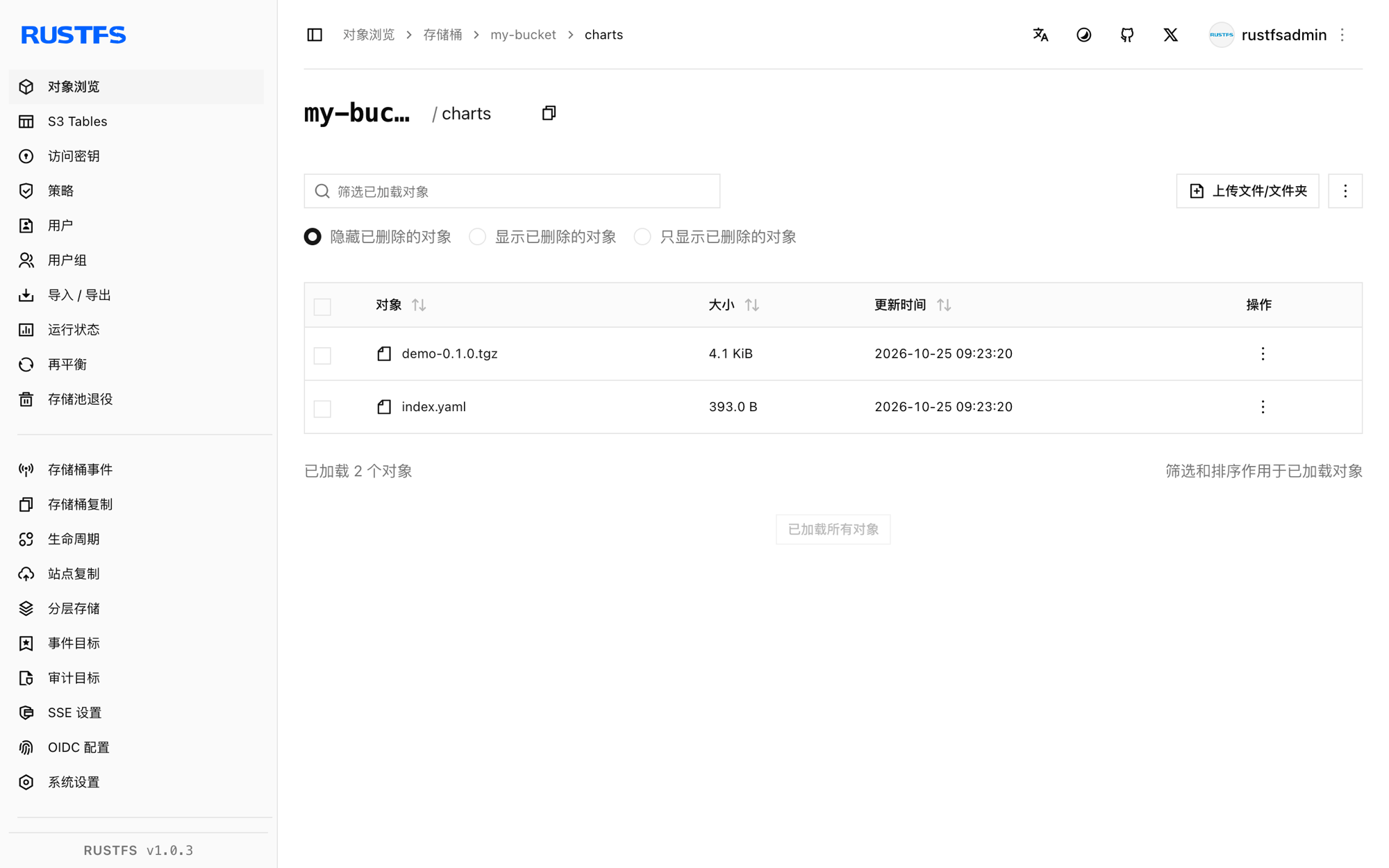
停止或重置
Chart 就是普通的桶对象,清理即删除前缀:
aws s3 rm s3://my-bucket/charts --recursive \
  --endpoint-url http://<your-rustfs-endpoint>:9000
故障排查
helm s3 init 报 head s3 object: Forbidden
插件在使用虚拟主机寻址——AWS_ENDPOINT 和 AWS_DISABLE_SSL 没有设置。按第 1 步原样导出它们。
check if index exists in the storage 报 git 相关错误
镜像里没有 git,helm plugin install <git-url> 无法克隆。按第 1 步从发布压缩包安装。
The index file already exists under the provided URI
仓库前缀之前初始化过。改用 helm s3 init --ignore-if-exists s3://my-bucket/charts 重跑,或加 --force 替换索引。
push 时报 repo with name s3://... not found
helm s3 push 需要的是 helm repo add 注册过的仓库名——使用 helm s3 push ./demo-0.1.0.tgz rustfs-charts。
push 时报 couldn't load repositories file
当前环境还没有 Helm 的 repositories.yaml。先执行 helm repo add rustfs-charts s3://my-bucket/charts 再推送。
下一步
- 在托管包含大量 Chart 版本的大型仓库前,先阅读 S3 兼容性说明。
- 使用访问密钥管理创建专用的生产凭证。
- 按照 helm-s3 文档在同一个桶上使用仓库重建索引、Chart 删除与 CI 集成。