
Fluentd
使用 S3 输出插件把 Fluentd 日志事件发送到 RustFS。
本指南通过 out_s3 输出插件,将开源数据采集器 Fluentd 连接到 RustFS。你将运行带 tail 输入源的 Fluentd,缓冲日志事件,并验证冲刷出的对象已存储在 RustFS 中。整个流程使用 fluent/fluentd:v1.17-1、fluent-plugin-s3 1.8.6 和 rustfs/rustfs-x86-musl:v2.3.1 验证通过。
你需要安装 Docker。本部署用于本地集成测试,不适用于生产环境。
架构
tail 输入源读取 app.log 的新增行并交给 S3 输出,输出按时间键缓冲事件,每个冲刷窗口上传一个 gzip 对象。
创建项目文件
先创建存储桶——Fluentd 不会创建桶:
rc alias set rustfs http://<your-rustfs-endpoint>:9000 <your-access-key> <your-secret-key>
rc mb rustfs/fluentd-data
官方 Fluentd 镜像以非 root 用户运行,无法在启动时安装 gem,因此构建一个带 S3 插件的小镜像:
FROM fluent/fluentd:v1.17-1
USER root
RUN gem install fluent-plugin-s3 --no-document
USER fluent
创建 Fluentd 配置,并替换两个凭证占位符:
<source>
  @type tail
  path /var/log/app.log
  pos_file /var/log/app.log.pos
  tag rustfs.demo
  <parse>
    @type none
  </parse>
</source>

<match **>
  @type s3
  aws_key_id <your-access-key>
  aws_sec_key <your-secret-key>
  s3_bucket fluentd-data
  s3_endpoint http://rustfs:9000/
  s3_region us-east-1
  force_path_style true
  path fluentd-logs
  <buffer>
    @type memory
    timekey 30s
    timekey_wait 0s
    flush_mode immediate
  </buffer>
</match>
force_path_style true 是必需的——缺少它插件会构造 fluentd-data.rustfs 作为主机名,所有请求都会因 DNS 错误失败。Compose 网络内主机名为 rustfs;宿主机上使用 (http://localhost:9000/)。
构建镜像,并在与 RustFS 相同的 Docker 网络中启动 Fluentd:
docker build -t fluentd-rustfs .
mkdir -p logs
docker run -d --name fluentd --network oo-rustfs_default \
  -v "$PWD/fluent.conf":/fluentd/etc/fluent.conf:ro \
  -v "$PWD/logs":/var/log fluentd-rustfs
产生日志事件
向被监视的文件追加内容:
echo "rustfs fluentd demo line 1" >> logs/app.log
echo "rustfs fluentd demo line 2" >> logs/app.log
在 30 秒时间键和立即冲刷模式下,每个窗口关闭后不久就会上传一个 gzip 对象。等待约一分钟。
在 RustFS 中验证对象
列出存储桶:
rc ls rustfs/fluentd-data/ -r每个冲刷窗口产生一个 gzip 对象:
fluentd-logs20260921154400_0.gz
fluentd-logs20260921154400_1.gz
读回一个对象确认事件完整:
rc cat rustfs/fluentd-data/fluentd-logs20260921154400_0.gz | gunzip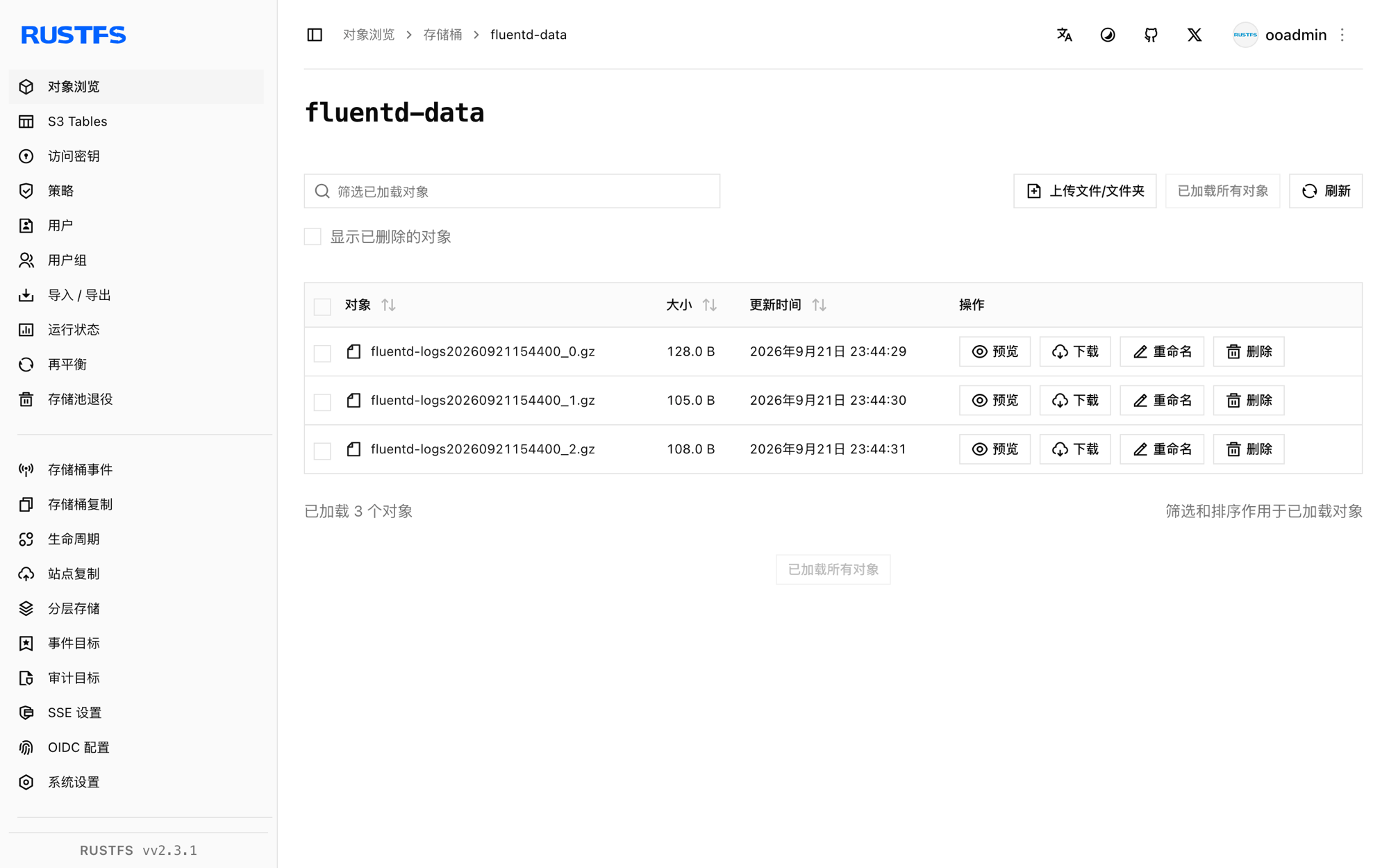
停止或重置部署
停止 Fluentd 并保留数据:
docker rm -f fluentd对象保留在 fluentd-data 存储桶中。若要删除它们,请移除存储桶:
rc rb rustfs/fluentd-data --force故障排查
Unknown output plugin 's3'
插件未安装。确认 Dockerfile 在以 root 身份安装 fluent-plugin-s3 后才切回 fluent 用户——以默认用户在容器启动时安装会因权限错误失败。
Failed to open TCP connection to fluentd-data.rustfs
正在使用 virtual-hosted 寻址。在 s3 输出中添加 force_path_style true,让桶保留在 URL 路径中。
worker 反复崩溃重启
桶不存在时输出会硬失败。启动 Fluentd 前先创建 fluentd-data,并检查启动日志:
docker logs fluentd | grep -iE "error|bucket" | tail后续步骤
- 在采用更多 Fluentd 输出之前,请查阅 S3 兼容性说明。
- 通过访问密钥管理创建专用的生产凭证。
- 按照 fluent-plugin-s3 文档了解对象键格式与压缩选项。