
ZeroFS
Serve a RustFS bucket as a POSIX filesystem over NFS with ZeroFS.
This guide connects ZeroFS — the log-structured filesystem that serves S3 buckets as POSIX filesystems — to RustFS as its object storage backend. You will run ZeroFS with its LSM tree rooted in a RustFS bucket, mount the filesystem over NFS on a Linux host, write files through the mount, and verify they survive a ZeroFS restart as objects in the bucket. The workflow was verified with ZeroFS v2.3.5 (ghcr.io/barre/zerofs) against rustfs/rustfs-x86-musl:v2.3.1.
You need Docker and a Linux host with an NFS client (nfs-common). This deployment is intended for local integration testing, not production.
Architecture
ZeroFS translates filesystem operations into an LSM key-value tree stored in the bucket: writes land in a write-ahead log, flush into SST segments, and compaction runs in the background. Clients see an ordinary directory tree over NFS (or 9P/NBD).
Generate the configuration
Create the bucket and the config file, replacing all connection placeholders:
rc mb rustfs/zerofs-demo

docker run --rm -u root:root -v /opt/zerofs:/cfg -w /cfg \
  --entrypoint /bin/sh ghcr.io/barre/zerofs:latest -c "zerofs init"
Then edit zerofs.toml so the storage and AWS sections point at RustFS:
[cache]
dir = "/cache"
disk_size_gb = 5.0

[storage]
url = "s3://zerofs-demo/zerofs-data"
encryption_password = "${ZEROFS_PASSWORD}"

[servers.nfs]
addresses = ["0.0.0.0:2049"]

[servers.rpc]
addresses = ["0.0.0.0:7000"]

[aws]
access_key_id = "${AWS_ACCESS_KEY_ID}"
secret_access_key = "${AWS_SECRET_ACCESS_KEY}"
endpoint = "http://<your-rustfs-endpoint>:9000"
default_region = "us-east-1"
allow_http = "true"
The endpoint plus allow_http pair is what redirects ZeroFS from AWS to RustFS. Custom endpoints use path-style addressing, so no extra option is needed.
Run ZeroFS
Run the server with the config file, credentials, and a writable cache directory (the image runs as UID 1001):
mkdir -p /opt/zerofs/cache && chown -R 1001:1001 /opt/zerofs/cache

docker run -d --name zerofs --network oo-rustfs_default -p 2049:2049 \
  -e ZEROFS_PASSWORD=<encryption-password> \
  -e AWS_ACCESS_KEY_ID=<your-access-key> \
  -e AWS_SECRET_ACCESS_KEY=<your-secret-key> \
  -v /opt/zerofs/zerofs.toml:/zerofs.toml:ro \
  -v /opt/zerofs/cache:/cache \
ghcr.io/barre/zerofs:latest run -c /zerofs.tomlINFO zerofs::nfs: NFS server listening on 0.0.0.0:2049Mount over NFS
On the host, mount the export with the options ZeroFS recommends:
apt-get install -y nfs-common
mkdir -p /mnt/zerofs

mount -t nfs -o async,nolock,rsize=1048576,wsize=1048576,tcp,port=2049,mountport=2049,hard \
  127.0.0.1:/ /mnt/zerofs
The mount is an ordinary POSIX filesystem:
echo "written via zerofs nfs mount on rustfs" > /mnt/zerofs/hello.txt
dd if=/dev/urandom of=/mnt/zerofs/data/inner/blob.bin bs=1M count=8
Verify persistence and objects in RustFS
Force pending writes to the bucket, then restart ZeroFS and remount:
docker exec zerofs zerofs flush -c /zerofs.toml
umount /mnt/zerofs
docker restart zerofs
mount -t nfs -o async,nolock,rsize=1048576,wsize=1048576,tcp,port=2049,mountport=2049,hard \
  127.0.0.1:/ /mnt/zerofs
Everything written before the restart is still there:
cat /mnt/zerofs/hello.txt
sha1sum /mnt/zerofs/data/inner/blob.binwritten via zerofs nfs mount on rustfs
645faaefe499f9ebda8edceeeb1a6261999aece7 /mnt/zerofs/data/inner/blob.binList the bucket to see where the files actually live:
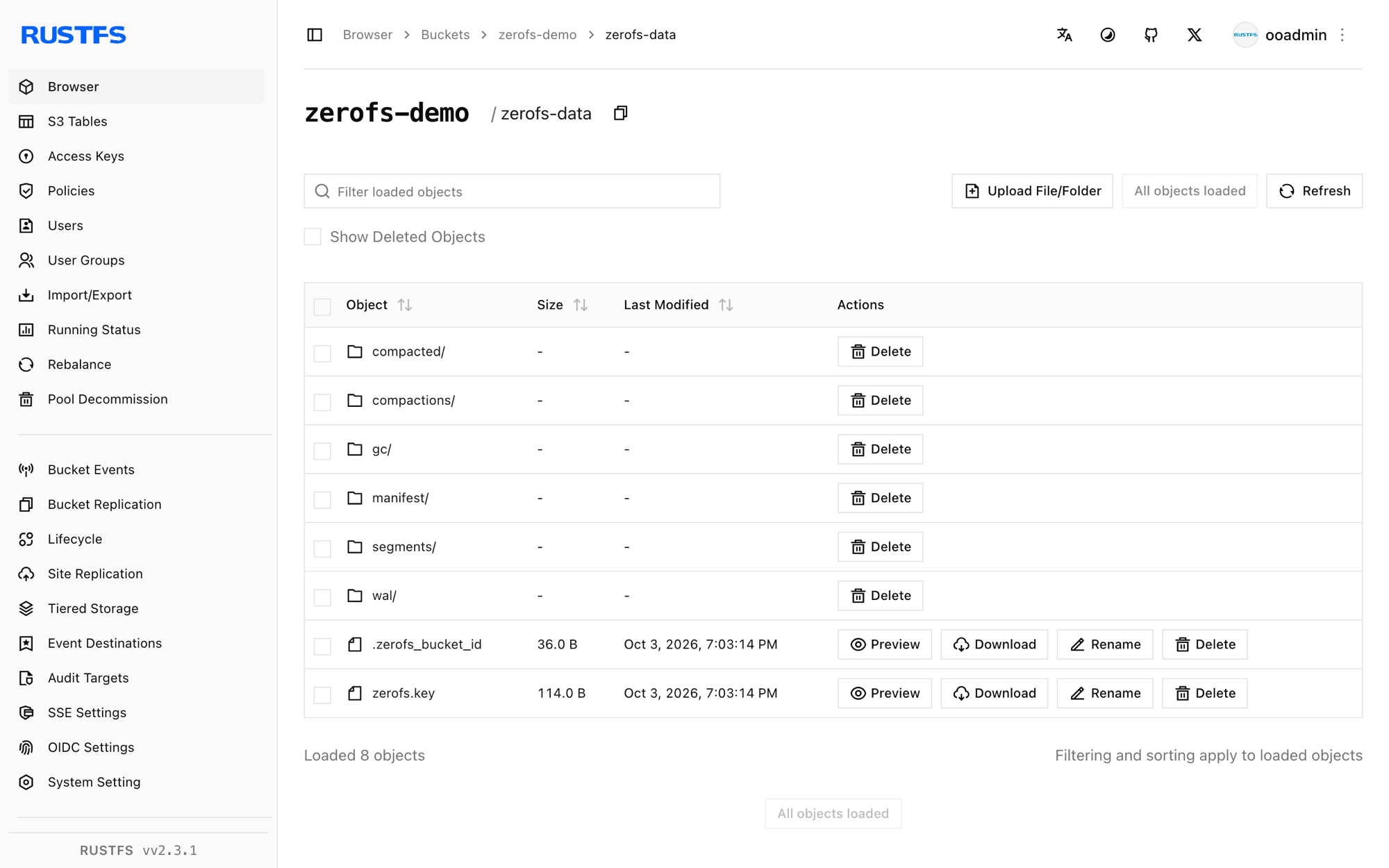
rc ls rustfs/zerofs-demo/ -r | head -4zerofs-data/compacted/01M40Q1RA0X3AVG76VC0SBYE58.sst
zerofs-data/manifest/0000000000000000.json
zerofs-data/wal/00000000000000000001.sstFiles are not stored 1:1 — they are keys and values inside the LSM tree, which is what lets ZeroFS serve a bucket as a filesystem.
Stop or reset
To tear down the demo while keeping the bucket objects:
umount /mnt/zerofs
docker rm -f zerofs
To delete the stored data (this erases the filesystem itself):
rc rm rustfs/zerofs-demo/ --recursive --forceTroubleshooting
Failed to parse config file: missing field uid at [servers.webui]
ZeroFS v2.3.5 requires uid and gid in the [servers.webui] section when it is present. Either add uid = 1000 and gid = 1000 or delete the section entirely if you do not need the Web UI.
Permission denied creating the cache directory
The container runs as UID 1001. After mounting the cache volume, run chown -R 1001:1001 <cache-dir> before starting the container.
Mount fails or hangs
Confirm the NFS client package is installed (nfs-common) and that ZeroFS is listening on 0.0.0.0:2049 inside a network your client can reach. The port=2049,mountport=2049 options matter because ZeroFS serves the mountd traffic on the same port.
Writes vanish after a container crash
ZeroFS buffers writes and flushes periodically. For the demo, run docker exec zerofs zerofs flush -c /zerofs.toml; in production, clients that need strict durability should fsync (or use the 9P mount, whose fsync waits for stable storage).
Next steps
- Review S3 compatibility notes before adopting additional ZeroFS backends.
- Create dedicated production credentials with Access Key Management.
- Follow the ZeroFS configuration guide for cache sizing, 9P/NBD serving, and high-availability replication over the same bucket.