
Databend
Run Databend with RustFS as the S3-compatible storage backend.
This guide connects Databend — the open-source cloud data warehouse — to RustFS as its object storage backend. You will start the meta service and query node, point the storage backend at a RustFS bucket, create a database and table, and verify the Parquet files in the bucket. The workflow was verified with Databend v1.2.925-patch-13 against rustfs/rustfs-x86-musl:v2.3.1.
You need the Databend release tarball on a Linux host (or Docker). This deployment is intended for local integration testing, not production.
Architecture
Databend stores table data as Parquet files with bloom-filter indexes in object storage, so the bucket holds the entire table dataset and the query node stays stateless.
Download and install
Grab a release tarball and unpack the binaries:
curl -Lo /tmp/databend.tgz \
  "https://github.com/datafuselabs/databend/releases/download/v1.2.925-patch-13/databend-v1.2.925-patch-13-x86_64-unknown-linux-gnu.tar.gz"
tar -xzf /tmp/databend.tgz -C /opt
Create the data directories:
mkdir -p /opt/databend/data /opt/databend/logs /opt/databend/meta-logsConfigure the meta service
Create databend-meta.toml — note the top-level addresses and the [raft_config] section with single = true:
admin_api_address = "0.0.0.0:28002"
grpc_api_address = "0.0.0.0:9191"
grpc_api_advertise_host = "127.0.0.1"

[log]
[log.file]
level = "INFO"
dir = "/opt/databend/meta-logs"

[raft_config]
id = 0
raft_dir = "/opt/databend/data/raft"
raft_api_port = 28004
raft_listen_host = "127.0.0.1"
raft_advertise_host = "127.0.0.1"
single = true
Configure the query node
Create databend-query.toml. The tenant_id and cluster_id keys must live inside the [query] section, and [storage.s3] points at RustFS:
[query]
username = "databend"
tenant_id = "default"
cluster_id = "rustfs-demo"
flight_api_address = "127.0.0.1:9091"
metric_api_address = "127.0.0.1:7071"
admin_api_address = "127.0.0.1:8081"

[[query.users]]
name = "databend"
auth_type = "no_password"

[log]
[log.file]
dir = "/opt/databend/logs"

[meta]
endpoints = ["127.0.0.1:9191"]
username = "root"
password = "root"
client_timeout_in_second = 20
auto_sync_interval = 60

[storage]
type = "s3"

[storage.s3]
bucket = "databend-demo"
endpoint_url = "http://<your-rustfs-endpoint>:9000"
access_key_id = "<your-access-key>"
secret_access_key = "<your-secret-key>"
enable_virtual_host_style = false
Keep all keys before the [[query.users]] array entry — TOML treats everything after it as part of that array element, and misplaced keys fail validation with confusing errors.
Start the services
nohup /opt/databend/bin/databend-meta -c /opt/databend/databend-meta.toml > /opt/databend/meta.out 2>&1 &
sleep 10
nohup /opt/databend/bin/databend-query -c /opt/databend/databend-query.toml > /opt/databend/query.out 2>&1 &
sleep 20
Create a table and query
Databend serves an HTTP API on port 8000. Create a database and a table, insert rows, and read them back — quotes inside SQL must be single quotes (double quotes mean identifiers):
curl -s -m 90 -u databend: http://127.0.0.1:8000/v1/query \
  -H "Content-Type: application/json" \
  -d '{"sql": "CREATE DATABASE rustfs_demo; CREATE TABLE rustfs_demo.events (id INT, label STRING);"}' | head -c 120

curl -s -m 120 -u databend: http://127.0.0.1:8000/v1/query \
  -H "Content-Type: application/json" \
  -d "{\"sql\": \"INSERT INTO rustfs_demo.events VALUES (1,'alpha'),(2,'beta'),(3,'gamma')\"}" | head -c 120

curl -s -m 120 -u databend: http://127.0.0.1:8000/v1/query \
  -H "Content-Type: application/json" \
-d "{\"sql\": \"SELECT * FROM rustfs_demo.events ORDER BY id\"}" | head -c 300{"id":"...","state":"Succeeded",...,"data":[["1","alpha"],["2","beta"],["3","gamma"]],...}Verify objects in RustFS
List the bucket — the table lives as Parquet blocks with index files under numeric prefixes:
rc ls rustfs/databend-demo/ -r | head -473/116/_b/h01a1192b11b07c38b9ae1178abc78882_v2.parquet
73/116/_i_b_v2/01a1192b11b07c38b9ae1178abc78882_v4.parquet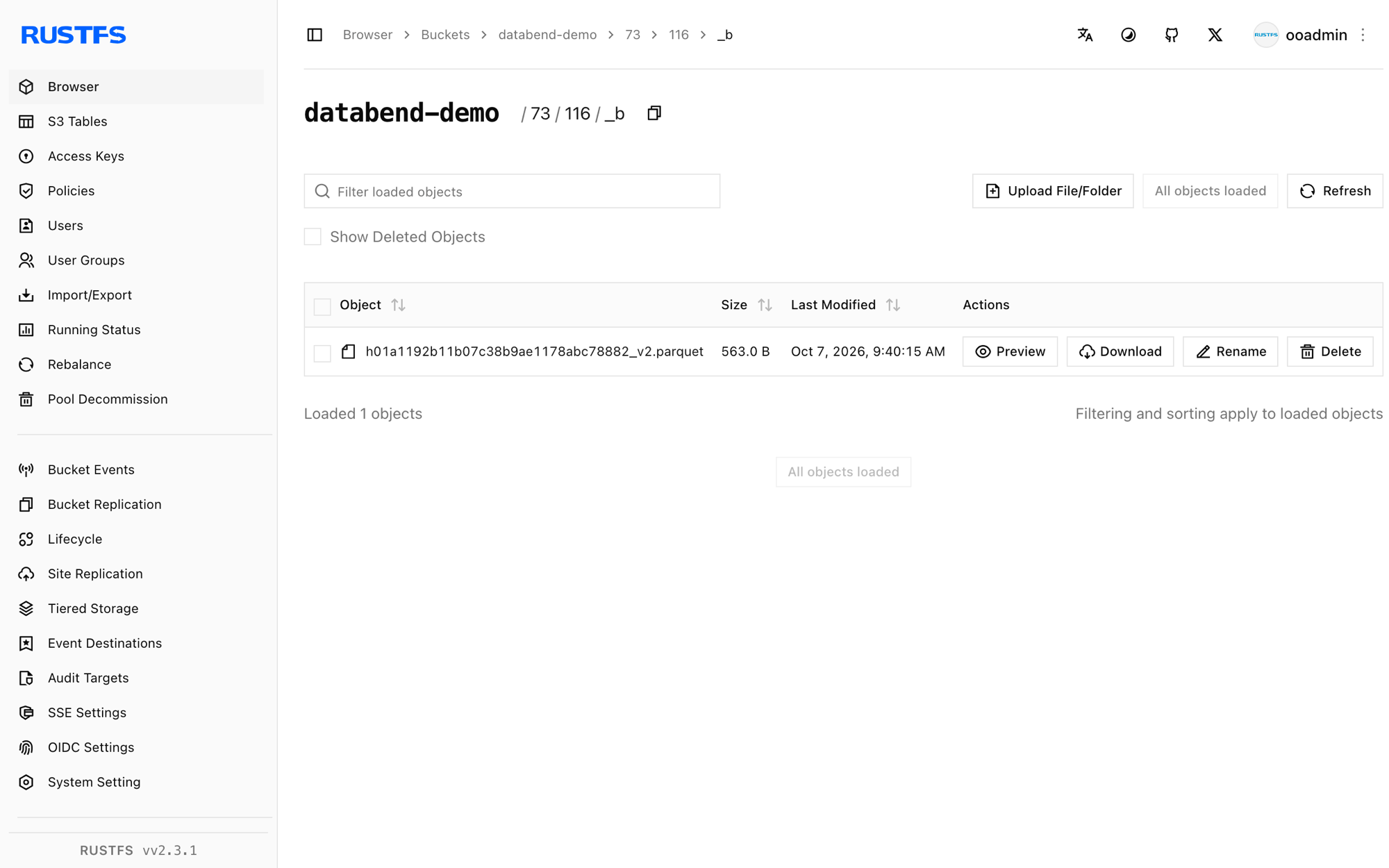
Stop or reset
pkill -f databend-query; pkill -f databend-meta
rc rm rustfs/databend-demo/ --recursive --force
Troubleshooting
cluster_id is empty without resources management
tenant_id and cluster_id were placed outside the [query] section. In TOML, every key belongs to the most recent section header — move them back under [query].
CannotListenerPort ... 127.0.0.1:9090
The flight API defaults to 9090, which other local services often occupy. Set flight_api_address, metric_api_address, and admin_api_address to free ports inside [query].
Query returns Authentication error: no authorization header provided
The HTTP API requires basic auth matching the [[query.users]] entry, e.g. -u databend: with auth_type = "no_password".
Unknown table right after CREATE succeeded
Double-quoted strings in SQL are identifiers, not literals. Use single quotes for VALUES and for the CONNECTION/LOCATION options.
Next steps
- Review S3 compatibility notes before adopting additional Databend storage options.
- Create dedicated production credentials with Access Key Management.
- Follow the Databend documentation for multi-node clusters and share tables on top of the same bucket.