
Qdrant
Store Qdrant collection snapshots in a RustFS bucket through S3-backed snapshot storage.
This guide connects Qdrant — the open-source vector database for AI search and RAG — to RustFS as its snapshot storage. You will enable S3-backed snapshots, create a collection with vectors, upload a snapshot into the bucket, and recover it onto a fresh node. The workflow was verified with qdrant/qdrant:v1.20.0 storing snapshots in a RustFS bucket over path-style addressing.
You need Docker. This deployment is intended for local integration testing, not production.
Architecture
With snapshots_storage: s3, every collection snapshot is uploaded to the bucket under <prefix>/snapshots/<collection>/, so a new node pointed at the same bucket can rebuild any collection without local files.
Point Qdrant at RustFS
Configure the snapshot storage through environment variables — the QDRANT__ prefix maps to the config tree, and S3_CONFIG__ENDPOINT_URL is the custom-endpoint field for MinIO-class stores. Create the bucket first if it does not exist; the prefix may be empty.
docker run -d --name qdrant -p 6333:6333 \
  -e QDRANT__STORAGE__SNAPSHOTS_CONFIG__SNAPSHOTS_STORAGE=s3 \
  -e QDRANT__STORAGE__SNAPSHOTS_CONFIG__S3_CONFIG__BUCKET=my-bucket \
  -e QDRANT__STORAGE__SNAPSHOTS_CONFIG__S3_CONFIG__PREFIX=qdrant \
  -e QDRANT__STORAGE__SNAPSHOTS_CONFIG__S3_CONFIG__REGION=us-east-1 \
  -e QDRANT__STORAGE__SNAPSHOTS_CONFIG__S3_CONFIG__ACCESS_KEY=<your-access-key> \
  -e QDRANT__STORAGE__SNAPSHOTS_CONFIG__S3_CONFIG__SECRET_KEY=<your-secret-key> \
  -e QDRANT__STORAGE__SNAPSHOTS_CONFIG__S3_CONFIG__ENDPOINT_URL=http://<your-rustfs-endpoint>:9000 \
  qdrant/qdrant:v1.20.0
Use the QDRANT__STORAGE__SNAPSHOTS_CONFIG path
In released Qdrant versions the settings live under storage.snapshots_config (not storage.snapshots), and the s3 section key is endpoint_url. A mounted custom_config.yaml with the older key names is silently ignored — snapshots keep going to the local ./snapshots directory. Verify the storage switch by checking that the local directory stays empty after a snapshot.
Create a collection and snapshot it
Create a collection, insert points, and request a snapshot:
curl -s -X PUT http://localhost:6333/collections/demo \
  -H "Content-Type: application/json" \
  -d '{"vectors":{"size":4,"distance":"Dot"}}'

curl -s -X PUT "http://localhost:6333/collections/demo/points?wait=true" \
  -H "Content-Type: application/json" \
  -d '{"points":[{"id":1,"vector":[0.1,0.2,0.3,0.4],"payload":{"city":"Berlin"}},{"id":2,"vector":[0.9,0.8,0.7,0.6],"payload":{"city":"Tokyo"}}]}'

curl -s -X POST http://localhost:6333/collections/demo/snapshots{"result":{"name":"demo-8437507706552082-2026-11-01-13-31-15-0.snapshot","size":64512},"status":"ok"}Confirm the snapshot object landed in RustFS, replacing all connection placeholders:
aws s3 ls s3://my-bucket/qdrant/ --recursive \
--endpoint-url http://<your-rustfs-endpoint>:90002026-11-01 13:31:15 64512 qdrant/snapshots/demo/demo-8437507706552082-2026-11-01-13-31-15-0.snapshot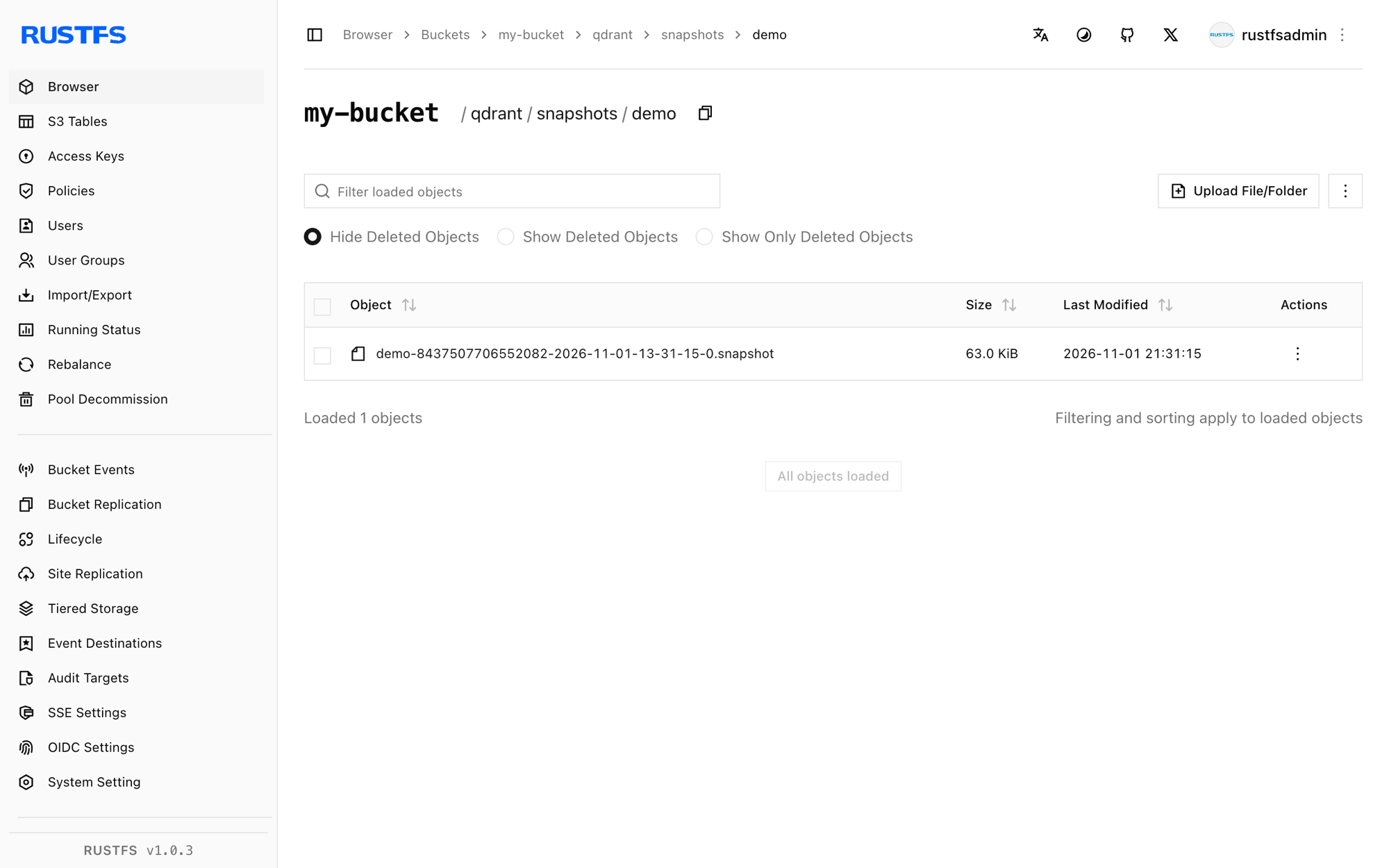
Recover onto a fresh node
A snapshot recovers into a collection with the same name. Wipe the local node (or start a second one) pointed at the same bucket, download the snapshot from RustFS, and upload it through the recovery API:
aws s3 cp "s3://my-bucket/qdrant/snapshots/demo/demo-8437507706552082-2026-11-01-13-31-15-0.snapshot" . \
  --endpoint-url http://<your-rustfs-endpoint>:9000

curl -s -X POST "http://localhost:6333/collections/demo/snapshots/upload?priority=snapshot" \
  -F "snapshot=@demo-8437507706552082-2026-11-01-13-31-15-0.snapshot"
Verify the recovered data:
curl -s -X POST http://localhost:6333/collections/demo/points/scroll \
-H "Content-Type: application/json" -d '{"limit":2,"with_payload":true}'{"result":{"points":[{"id":1,"payload":{"city":"Berlin"}},{"id":2,"payload":{"city":"Tokyo"}}]},"status":"ok"}Both vectors and payloads come back from the snapshot that RustFS stored.
Stop or reset
To tear down the demo while keeping the snapshot objects:
docker rm -f qdrantTo delete the stored snapshots:
aws s3 rm s3://my-bucket/qdrant --recursive \
  --endpoint-url http://<your-rustfs-endpoint>:9000
Troubleshooting
Snapshots still appear under /qdrant/snapshots in the container
The storage switch did not apply — either the env var path is wrong or an old config file overrides it. Use exactly the QDRANT__STORAGE__SNAPSHOTS_CONFIG__* variables from step 1 and restart the container; then confirm the local snapshot directory stays empty.
Wrong input: Snapshot is not compatible with existing collection
The target collection already exists with a different schema. Delete the empty or stale collection before recovering — the upload API creates the collection from the snapshot.
Bucket listing shows nothing after a snapshot
The bucket name or endpoint is wrong. The endpoint must include the scheme, and the bucket must exist; the object key is <prefix>/snapshots/<collection>/<name>.snapshot, so list recursively.
Next steps
- Review S3 compatibility notes before scheduling snapshot backups.
- Create dedicated production credentials with Access Key Management.
- Follow the Qdrant snapshots documentation for full-storage snapshots, shard-level snapshots, and version compatibility on the same bucket.