
Weaviate
Back up Weaviate collections into a RustFS bucket with the backup-s3 module.
This guide connects Weaviate — the open-source vector database for AI search and RAG — to RustFS through its backup-s3 module. You will enable the module, create a collection with vectors, create a backup in the bucket, and restore it. The workflow was verified with semitechnologies/weaviate:1.31.0 backing up to a RustFS bucket.
You need Docker. This deployment is intended for local integration testing, not production.
Architecture
A backup writes backup_config.json, per-class backup.json, and data chunks into the bucket prefix <backup-id>/. Restore reads them back into the same collection names.
Enable the backup-s3 module
Start Weaviate with the module and its S3 settings. Credentials go through the standard AWS variables — in Weaviate 1.31 the module reads AWS_ACCESS_KEY_ID and AWS_SECRET_ACCESS_KEY, not BACKUP_S3_ACCESS_KEY_ID:
docker run -d --name weaviate -p 8080:8080 \
  -e QUERY_DEFAULTS_LIMIT=20 \
  -e AUTHENTICATION_ANONYMOUS_ACCESS_ENABLED=true \
  -e PERSISTENCE_DATA_PATH=/var/lib/weaviate \
  -e ENABLE_MODULES=backup-s3 \
  -e BACKUP_S3_BUCKET=my-bucket \
  -e AWS_REGION=us-east-1 \
  -e AWS_ACCESS_KEY_ID=<your-access-key> \
  -e AWS_SECRET_ACCESS_KEY=<your-secret-key> \
  -e BACKUP_S3_ENDPOINT=<your-rustfs-endpoint>:9000 \
  -e BACKUP_S3_USE_SSL=false \
  -e CLUSTER_HOSTNAME=weaviate-demo \
  semitechnologies/weaviate:1.31.0
Endpoint format and credentials
BACKUP_S3_ENDPOINT takes host and port without a scheme — the AWS SDK Go v1 client behind the module rejects http://... values with Endpoint url cannot have fully qualified paths. TLS is controlled by BACKUP_S3_USE_SSL=false, and requests are path-style. Passing BACKUP_S3_ACCESS_KEY_ID instead of AWS_ACCESS_KEY_ID leaves the client anonymous, and every backup call fails with Access Denied.
Confirm the module is live:
curl -s http://localhost:8080/v1/meta | grep -o "backup-s3"Create a collection and back it up
Schema creation uses POST /v1/schema in Weaviate 1.31. Insert two objects, then start a backup:
curl -s -X POST http://localhost:8080/v1/schema \
  -H "Content-Type: application/json" \
  -d '{"class":"Doc","vectorizer":"none","properties":[{"name":"title","dataType":["text"]}]}'

curl -s -X POST http://localhost:8080/v1/objects -H "Content-Type: application/json" \
  -d '{"class":"Doc","properties":{"title":"RustFS vector backup"},"vector":[0.11,0.22,0.33,0.44]}'

curl -s -X POST http://localhost:8080/v1/objects -H "Content-Type: application/json" \
  -d '{"class":"Doc","properties":{"title":"Weaviate on object storage"},"vector":[0.11,0.22,0.33,0.44]}'

curl -s -X POST http://localhost:8080/v1/backups/s3 -H "Content-Type: application/json" \
-d '{"id":"rustfs-demo"}'{"backend":"s3","classes":["Doc"],"id":"rustfs-demo","path":"s3://my-bucket/rustfs-demo","status":"STARTED"}Wait for SUCCESS, then confirm the objects in RustFS, replacing all connection placeholders:
curl -s http://localhost:8080/v1/backups/s3/rustfs-demo
aws s3 ls s3://my-bucket/rustfs-demo/ --recursive \
--endpoint-url http://<your-rustfs-endpoint>:90002026-11-01 13:46:10 304 rustfs-demo/backup_config.json
2026-11-01 13:46:08 1406 rustfs-demo/weaviate-demo/Doc/chunk-1
2026-11-01 13:46:08 27666 rustfs-demo/weaviate-demo/backup.json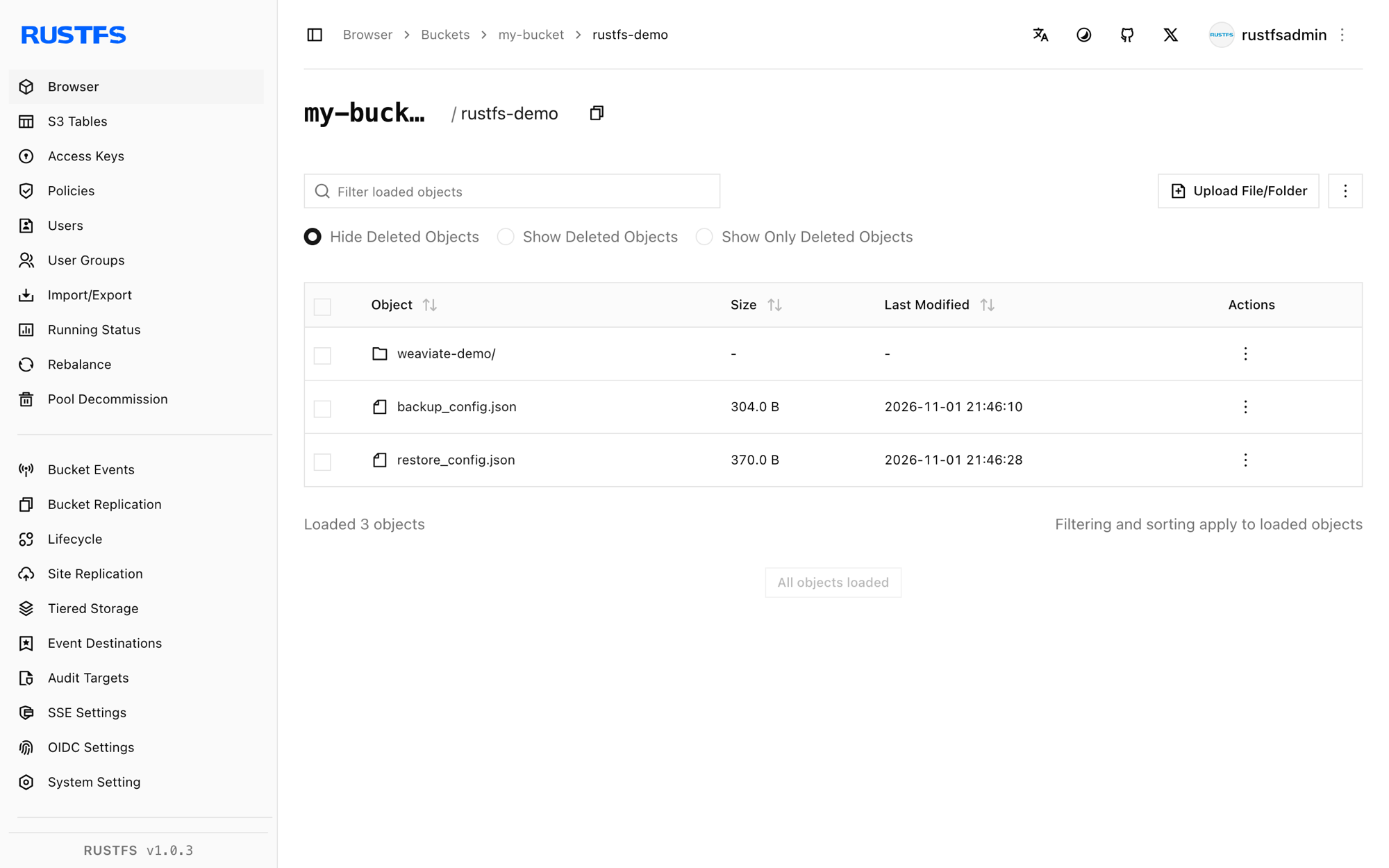
Restore
Restore the backup into Weaviate (drop the live class first for a clean restore):
curl -s -X POST http://localhost:8080/v1/backups/s3/rustfs-demo/restore \
  -H "Content-Type: application/json" -d '{}'
Query the restored data:
curl -s -X POST http://localhost:8080/v1/graphql -H "Content-Type: application/json" \
-d '{"query":"{Get{Doc(limit:2){title}}}"}'{"data":{"Get":{"Doc":[{"title":"RustFS vector backup"},{"title":"Weaviate on object storage"}]}}}Stop or reset
To tear down the demo while keeping the bucket objects:
docker rm -f weaviateTo delete the stored backup:
aws s3 rm s3://my-bucket/rustfs-demo --recursive \
  --endpoint-url http://<your-rustfs-endpoint>:9000
Troubleshooting
Endpoint url cannot have fully qualified paths at startup
BACKUP_S3_ENDPOINT contains a scheme. Use the bare host:port form and set BACKUP_S3_USE_SSL=false.
Access Denied when creating a backup
The module found no credentials. In Weaviate 1.31 the S3 client reads AWS_ACCESS_KEY_ID and AWS_SECRET_ACCESS_KEY (or AWS_ACCESS_KEY/AWS_SECRET_KEY) from the environment — the BACKUP_S3_ACCESS_KEY_ID variable alone is not enough.
s3://my-bucket/s3Path/... appears in the error
BACKUP_S3_PATH is a bucket sub-prefix in this version, not a path-style switch — do not set it to s3Path. Weaviate's S3 client uses path-style addressing automatically for custom endpoints.
check if backup ... exists fails with an unexpected error
RustFS is unreachable from the container. Confirm the endpoint host resolves and the bucket exists.
Next steps
- Review S3 compatibility notes before automating backup schedules.
- Create dedicated production credentials with Access Key Management.
- Follow the Weaviate backups documentation for restore filters, role-based backups, and filesystem alternatives on the same bucket.