
Loki
Run Grafana Loki with RustFS as its S3 object storage backend, deployed with Docker Compose.
This guide runs Grafana Loki — the log aggregation system from Grafana Labs — with RustFS as its object storage backend. You will start a single-binary Loki with Docker Compose, push log streams through the HTTP API, query them back, and verify that the log chunks are stored as objects in RustFS. The workflow was verified with grafana/loki:latest (v3.7.8) and rustfs/rustfs-x86-musl:v2.3.1.
You need Docker with the Compose plugin. This deployment is intended for local integration testing, not production.
Architecture
Loki ingests log streams into an in-memory chunk and a write-ahead log, flushes compressed chunks to object storage once a stream goes idle, and ships TSDB index files to the same bucket. Queries resolve chunks through the index and read them from object storage.
Create the project files
Create a working directory:
mkdir rustfs-loki
cd rustfs-loki
Create an environment file and replace both credential placeholders:
RUSTFS_ACCESS_KEY=<your-access-key>
RUSTFS_SECRET_KEY=<your-secret-key>
Use dedicated credentials for the bucket. Do not commit .env to source control.
Create the Loki configuration — a single-binary setup with the TSDB schema and the S3 backend pointed at RustFS:
auth_enabled: false

server:
  http_listen_port: 3100

common:
  instance_addr: 127.0.0.1
  path_prefix: /loki
  storage:
    s3:
      endpoint: rustfs:9000
      insecure: true
      bucketnames: my-bucket
      access_key_id: ${RUSTFS_ACCESS_KEY}
      secret_access_key: ${RUSTFS_SECRET_KEY}
      s3forcepathstyle: true
  replication_factor: 1
  ring:
    kvstore:
      store: inmemory

schema_config:
  configs:
    - from: 2020-10-24
      store: tsdb
      object_store: s3
      schema: v13
      index:
        prefix: index_
        period: 24h

ingester:
  chunk_idle_period: 30s
  max_chunk_age: 1m

ruler:
  alertmanager_url: http://localhost:9093
s3forcepathstyle: true and insecure: true select path-style addressing over plain HTTP, which is what RustFS expects for the container-network endpoint. chunk_idle_period and max_chunk_age are lowered so a verification run does not have to wait the default 30 minutes for chunks to flush.
Create the Compose file:
services:
  rustfs:
    image: rustfs/rustfs-x86-musl:v2.3.1
    environment:
      RUSTFS_ACCESS_KEY: ${RUSTFS_ACCESS_KEY}
      RUSTFS_SECRET_KEY: ${RUSTFS_SECRET_KEY}
      RUSTFS_VOLUMES: /data
      RUSTFS_ADDRESS: ":9000"
      RUSTFS_CONSOLE_ADDRESS: ":9001"
      RUSTFS_CONSOLE_ENABLE: "true"
    volumes:
      - rustfs-data:/data
    ports:
      - "9000:9000"
      - "9001:9001"
    healthcheck:
      test: ["CMD", "curl", "-sf", "http://127.0.0.1:9000/health"]
      interval: 10s
      timeout: 5s
      retries: 6
      start_period: 10s
    networks:
      - loki

  create-bucket:
    image: rustfs/rc:latest
    depends_on:
      rustfs:
        condition: service_healthy
    environment:
      RUSTFS_ACCESS_KEY: ${RUSTFS_ACCESS_KEY}
      RUSTFS_SECRET_KEY: ${RUSTFS_SECRET_KEY}
    entrypoint:
      - /bin/sh
      - -c
      - |
        until /usr/bin/rc alias set rustfs http://rustfs:9000 "$${RUSTFS_ACCESS_KEY}" "$${RUSTFS_SECRET_KEY}"; do
          echo "Waiting for RustFS..."
          sleep 2
        done
        /usr/bin/rc ls rustfs/my-bucket >/dev/null 2>&1 || /usr/bin/rc mb rustfs/my-bucket
    networks:
      - loki

  loki:
    image: grafana/loki:latest
    command: -config.file=/etc/loki/loki-config.yml
    volumes:
      - ./loki.yml:/etc/loki/loki-config.yml:ro
    ports:
      - "3100:3100"
    depends_on:
      create-bucket:
        condition: service_completed_successfully
    networks:
      - loki

networks:
  loki:

volumes:
  rustfs-data:
Start the deployment
Resolve the Compose file before starting containers:
docker compose configStart the services and wait for the bucket initializer to finish:
docker compose up -d
docker compose ps -a
Loki is ready when the readiness endpoint reports success:
curl -s http://localhost:3100/readyreadyPush log streams
Send a batch of log entries through the push API:
python3 - <<'PY'
import json, time, urllib.request

values = []
base_ns = int(time.time() * 1e9)
for i in range(20):
    values.append([
        str(base_ns - i * 1_000_000_000),
        f"[rustfs-loki-integration] log line {i} stored in RustFS object storage",
    ])

payload = {
    "streams": [{
        "stream": {"job": "rustfs-demo", "service": "loki-integration"},
        "values": values,
    }]
}

req = urllib.request.Request(
    "http://localhost:3100/loki/api/v1/push",
    data=json.dumps(payload).encode(),
    headers={"Content-Type": "application/json"},
    method="POST",
)
with urllib.request.urlopen(req, timeout=30) as r:
    print("push:", r.status)
PY
push: 204Query the logs
Query the stream back through the range query API:
curl -sG "http://localhost:3100/loki/api/v1/query_range" \
  --data-urlencode 'query={job="rustfs-demo"}' \
  --data-urlencode "start=$(($(date +%s) - 3600))000000000" \
  --data-urlencode "end=$(($(date +%s) + 60))000000000" \
  | python3 -m json.tool | head -20
The response contains the pushed lines:
"values": [
    [
      "1789916564000000000",
      "[rustfs-loki-integration] log line 0 stored in RustFS object storage"
    ],
Verify chunks in RustFS
With chunk_idle_period: 30s, the ingester flushes the stream to object storage roughly one minute after the last line. List the tenant prefix through the bucket-initializer image:
docker compose run --rm --entrypoint /bin/sh create-bucket -c \
  '/usr/bin/rc alias set rustfs http://rustfs:9000 "$RUSTFS_ACCESS_KEY" "$RUSTFS_SECRET_KEY" >/dev/null && /usr/bin/rc ls rustfs/my-bucket/fake --recursive'
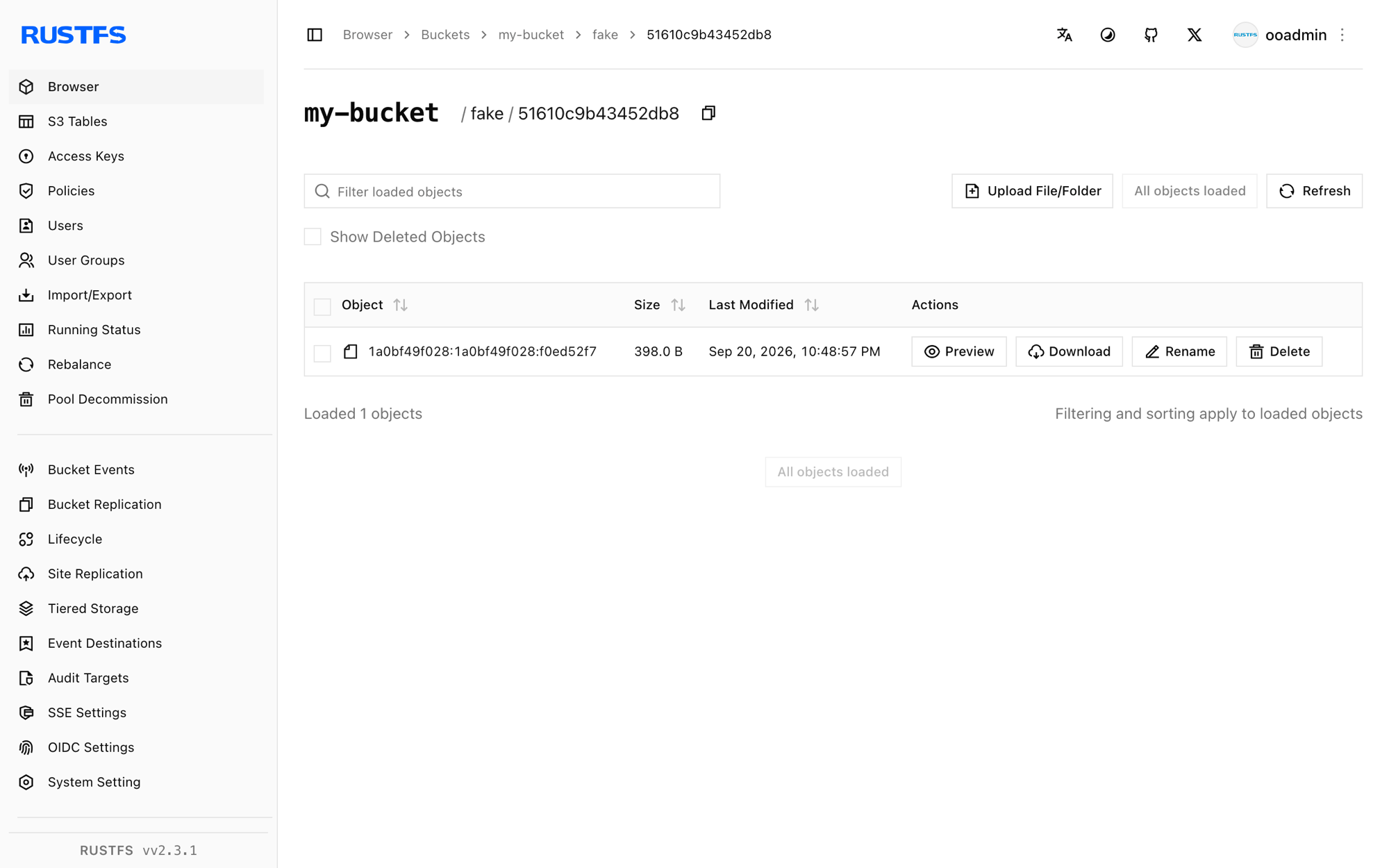
fake is the tenant Loki uses when auth_enabled is false; each object is one compressed log chunk:
[2026-09-20 14:48:57]      398 B fake/51610c9b43452db8/1a0bf49f028:1a0bf49f028:f0ed52f7
[2026-09-20 14:49:33]      670 B fake/cd916b27d004a688/1a0bf4a03ca:1a0bf4a4e03:1376b308
You can also browse the prefix in the RustFS Console:
Stop or reset the stack
Stop the containers while keeping the RustFS data volume:
docker compose downTo delete the stored logs and start from an empty RustFS volume, explicitly include --volumes:
docker compose down --volumesTroubleshooting
Loki throttles writes and reports "disk usage exceeded threshold"
Loki monitors the disk that holds its write-ahead log and throttles the ingester when usage passes 90 percent. Make sure the volume behind path_prefix has enough free space, or run the container with a tmpfs for the WAL when the machine is otherwise healthy.
The ring fails with connection errors to port 8500
The default ring key-value store is Consul. For a single binary set common.ring.kvstore.store: inmemory, as shown in the configuration above.
Push requests fail with "Ingester is shutting down"
The ingester never reached a running state — usually a leftover container from an earlier failed start. Remove the container with docker compose down and start it again, or check the logs for the underlying storage error.
AccessDenied or 403 responses
Confirm the credentials in loki.yml match the RustFS credentials and that the create-bucket service completed successfully:
docker compose logs create-bucketNext steps
- Review S3 compatibility notes before adopting additional S3 operations.
- Create dedicated production credentials with Access Key Management.
- Follow the Grafana Loki documentation to connect Promtail, Alloy, or the OpenTelemetry Collector as log producers.