
OpenObserve
Run OpenObserve with RustFS as its S3-compatible object storage backend using Docker Compose, and verify log ingestion, storage, and search.
This guide runs OpenObserve with RustFS as its object storage backend. You will start both services with Docker Compose, ingest log records into OpenObserve, flush them to object storage, verify the resulting Parquet files in RustFS, and query them back through the OpenObserve UI and search API.
You need Docker with the Compose plugin and a machine that can run three containers. This deployment is intended for local integration testing, not production.
Product introduction
OpenObserve
OpenObserve is an open-source observability platform for logs, metrics, traces, and real user monitoring. It separates storage from compute: ingested data lands in a local write-ahead log (WAL) first, is converted to Parquet files with full-text indexes, and is then uploaded to object storage, which acts as the only persistent data layer. Queries locate remote Parquet files through file list metadata and download them on demand into a local cache.
OpenObserve talks to object storage through the Rust object_store client. By default it uses path-style requests with SigV4 signing, so any S3-compatible endpoint works — including RustFS — when you provide the endpoint URL, region, credentials, and bucket name.
RustFS
RustFS is a distributed object storage system built in Rust. It implements the Amazon S3 API, including SigV4 signing, path-style and virtual-host style addressing, and multipart uploads, and it ships with a web console and multi-tenant IAM. RustFS runs from a single node up to multi-node clusters and covers the S3 operations OpenObserve needs for its telemetry data.
How the integration works
- Write path: OpenObserve merges WAL records into Parquet files once they reach a size threshold or
ZO_MAX_FILE_RETENTION_TIME(600 seconds by default), then uploads them under thefiles/prefix of the bucket and records them in its file list. - Query path: the search API resolves files for the requested time range, downloads them from RustFS into the local cache, and runs the query.
Integration steps
Create the project files
Create a working directory:
mkdir rustfs-openobserve
cd rustfs-openobserve
Create an environment file and replace the credential placeholders:
RUSTFS_ACCESS_KEY=<your-access-key>
RUSTFS_SECRET_KEY=<your-secret-key>
RUSTFS_BUCKET_NAME=my-bucket
ZO_ROOT_USER_EMAIL=root@example.com
ZO_ROOT_USER_PASSWORD=Complexpass#123
Sample OpenObserve credentials
root@example.com and Complexpass#123 are the sample values from the OpenObserve documentation. OpenObserve v1.0.x enforces a password policy of 8 to 128 characters with uppercase, lowercase, digit, and special characters. Change both values for any real deployment, and do not commit .env to source control.
Create the Compose file:
services:
  rustfs:
    image: rustfs/rustfs-x86-musl:v2.3.1
    environment:
      RUSTFS_ACCESS_KEY: ${RUSTFS_ACCESS_KEY}
      RUSTFS_SECRET_KEY: ${RUSTFS_SECRET_KEY}
      RUSTFS_VOLUMES: /data
      RUSTFS_ADDRESS: ":9000"
      RUSTFS_CONSOLE_ADDRESS: ":9001"
      RUSTFS_CONSOLE_ENABLE: "true"
    volumes:
      - rustfs-data:/data
    ports:
      - "9000:9000"
      - "9001:9001"
    healthcheck:
      test: ["CMD", "curl", "-sf", "http://127.0.0.1:9000/health"]
      interval: 10s
      timeout: 5s
      retries: 6
      start_period: 10s
    networks:
      - observability

  init-bucket:
    image: rustfs/rc:latest
    depends_on:
      rustfs:
        condition: service_healthy
    environment:
      RUSTFS_ACCESS_KEY: ${RUSTFS_ACCESS_KEY}
      RUSTFS_SECRET_KEY: ${RUSTFS_SECRET_KEY}
    entrypoint:
      - /bin/sh
      - -c
      - |
        until /usr/bin/rc alias set rustfs http://rustfs:9000 "$${RUSTFS_ACCESS_KEY}" "$${RUSTFS_SECRET_KEY}"; do
          echo "Waiting for RustFS..."
          sleep 2
        done
        /usr/bin/rc ls rustfs/my-bucket >/dev/null 2>&1 || /usr/bin/rc mb rustfs/my-bucket
    networks:
      - observability

  openobserve:
    image: openobserve/openobserve:v1.0.3
    depends_on:
      rustfs:
        condition: service_healthy
      init-bucket:
        condition: service_completed_successfully
    environment:
      ZO_ROOT_USER_EMAIL: ${ZO_ROOT_USER_EMAIL}
      ZO_ROOT_USER_PASSWORD: ${ZO_ROOT_USER_PASSWORD}
      ZO_LOCAL_MODE: "true"
      ZO_LOCAL_MODE_STORAGE: "s3"
      ZO_DATA_DIR: /data
      ZO_HTTP_PORT: "5080"
      RUST_LOG: INFO
      ZO_S3_PROVIDER: s3
      ZO_S3_SERVER_URL: http://rustfs:9000
      ZO_S3_REGION_NAME: us-east-1
      ZO_S3_ACCESS_KEY: ${RUSTFS_ACCESS_KEY}
      ZO_S3_SECRET_KEY: ${RUSTFS_SECRET_KEY}
      ZO_S3_BUCKET_NAME: ${RUSTFS_BUCKET_NAME}
      # Upload Parquet files after 60 seconds instead of the default 600.
      # Keep the default for production-like setups.
      ZO_MAX_FILE_RETENTION_TIME: "60"
    volumes:
      - oo-data:/data
    ports:
      - "5080:5080"
    networks:
      - observability

networks:
  observability:

volumes:
  rustfs-data:
  oo-data:
ZO_LOCAL_MODE_STORAGE=s3 is required: in single-node mode OpenObserve otherwise stores Parquet files on the local disk and ignores the ZO_S3_* variables. The init-bucket job uses the rc image to create my-bucket once RustFS is healthy, and it skips creation when the bucket already exists.
Start the deployment
Resolve and start the Compose stack:
docker compose config
docker compose up -d
docker compose ps
The init-bucket service should exit with code 0 after creating the bucket:
✓ Bucket 'rustfs/my-bucket' created successfully.Open the OpenObserve UI at http://localhost:5080 and sign in with the ZO_ROOT_USER_EMAIL and ZO_ROOT_USER_PASSWORD values from .env. The RustFS Console is available at http://localhost:9001/rustfs/console/.
Confirm the OpenObserve-to-RustFS connection
Check the OpenObserve startup log for the storage configuration:
docker compose logs openobserve | grep "s3 init config"INFO infra::storage::remote: s3 init config: StorageConfig { name: "default", provider: "s3", server_url: "http://rustfs:9000", region_name: "us-east-1", access_key: "<your-access-key>", secret_key: "<your-secret-key>", bucket_name: "my-bucket", bucket_prefix: "" }During startup OpenObserve also runs a storage probe: it writes the file o2_test/check.txt into the bucket and reads it back. Seeing this file in RustFS confirms that the write path works.
Ingest log records
Send a batch of records to the JSON ingestion API of the default organization and the rustfs_test stream:
curl -u "root@example.com:Complexpass#123" \
  -X POST "http://localhost:5080/api/default/rustfs_test/_json" \
  -H "Content-Type: application/json" \
  -d '[
    {"level":"info","service":"rustfs-openobserve-demo","host":"host-1",
     "job":"integration-test","log":"[rustfs-integration] request 1 stored via RustFS S3 API","code":200},
    {"level":"error","service":"rustfs-openobserve-demo","host":"host-1",
     "job":"integration-test","log":"[rustfs-integration] request 2 stored via RustFS S3 API","code":200}
]'{"code":200,"status":[{"name":"rustfs_test","successful":2,"failed":0}]}Flush data to object storage
Trigger the node-level flush endpoint so the records leave the WAL:
curl -s -u "root@example.com:Complexpass#123" -X PUT "http://localhost:5080/node/flush"The ingester converts the WAL records into a Parquet file and uploads it to RustFS in the background once the file is older than ZO_MAX_FILE_RETENTION_TIME (60 seconds in this Compose file, 600 seconds by default).
Verification
Verify objects in RustFS
List the bucket through the bucket-initializer image:
docker compose run --rm --entrypoint /bin/sh init-bucket -c \
  '/usr/bin/rc alias set rustfs http://rustfs:9000 "$RUSTFS_ACCESS_KEY" "$RUSTFS_SECRET_KEY" >/dev/null && /usr/bin/rc ls rustfs/my-bucket --recursive'
The output should include the probe file and the ingester output below files/:
      19 B o2_test/check.txt
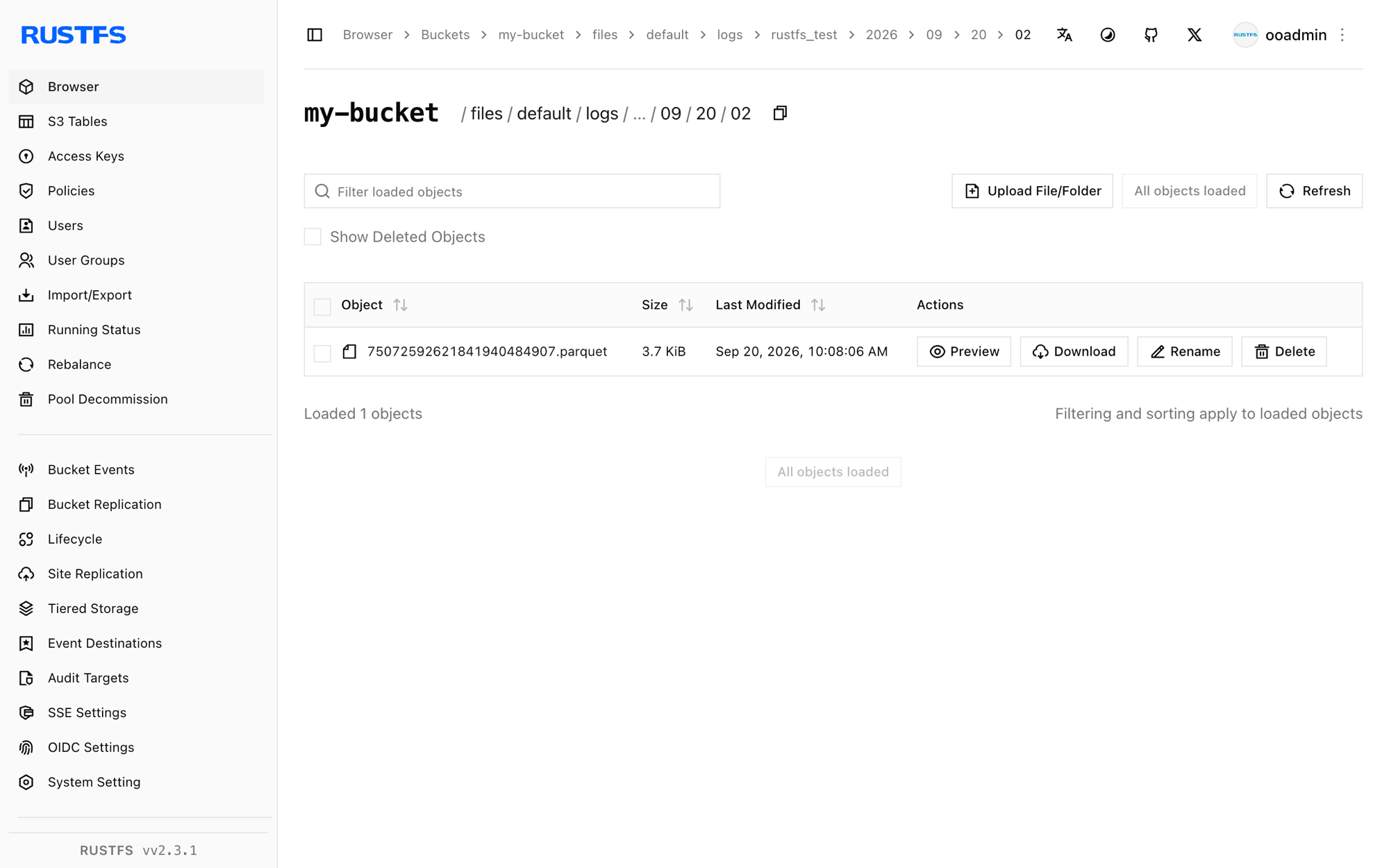
   3.7 KiB files/default/logs/rustfs_test/2026/09/20/02/75072592621841940484907.parquet
   6.5 KiB files/default/index/rustfs_test_logs/2026/09/20/02/75072592621841940484907.ttv
You can also inspect the bucket in the RustFS Console at http://localhost:9001/rustfs/console/:
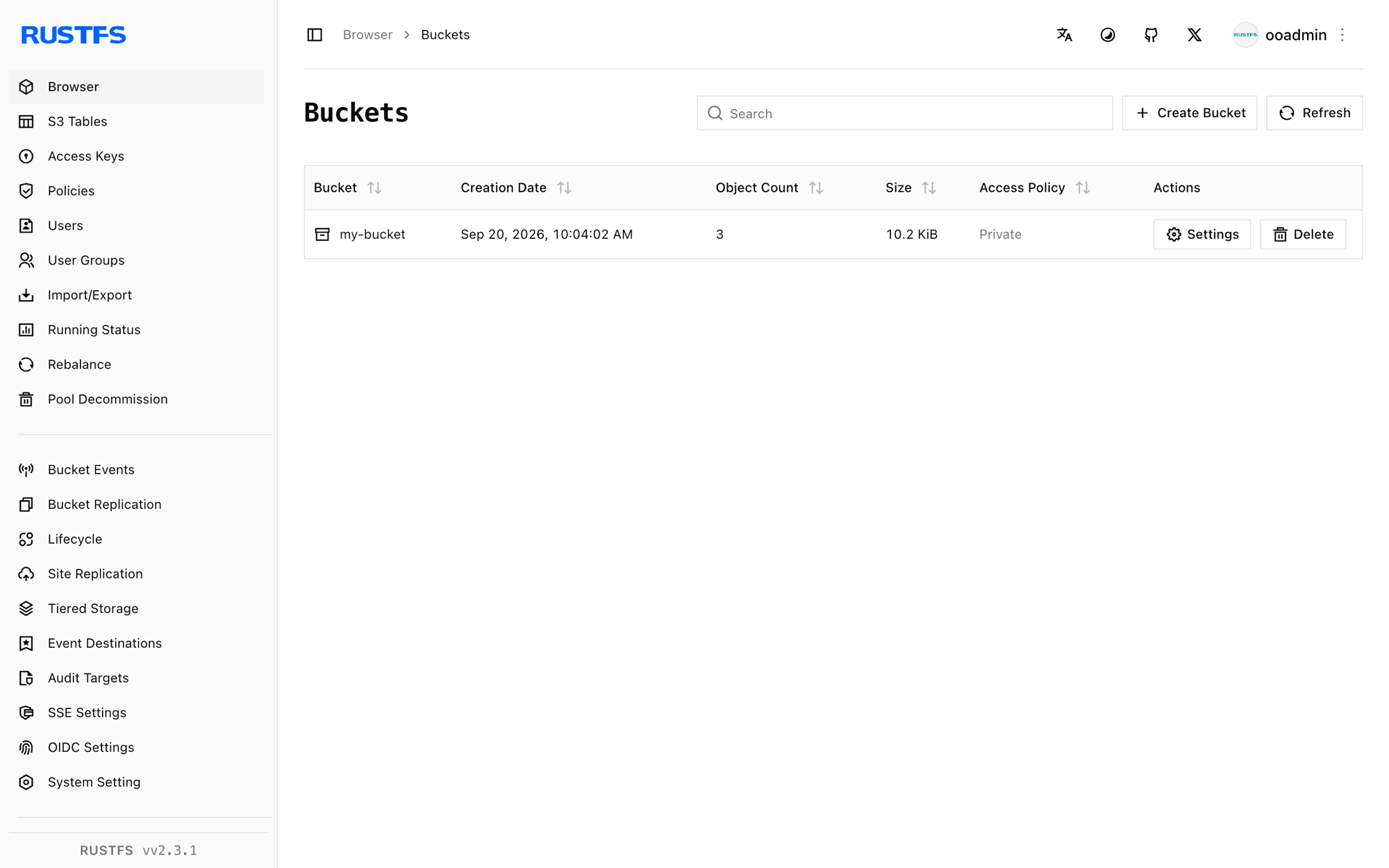
OpenObserve stores Parquet data files below files/<organization>/<stream type>/<stream>/<date partitions> and full-text index files below files/<organization>/index/:
Query the logs in OpenObserve
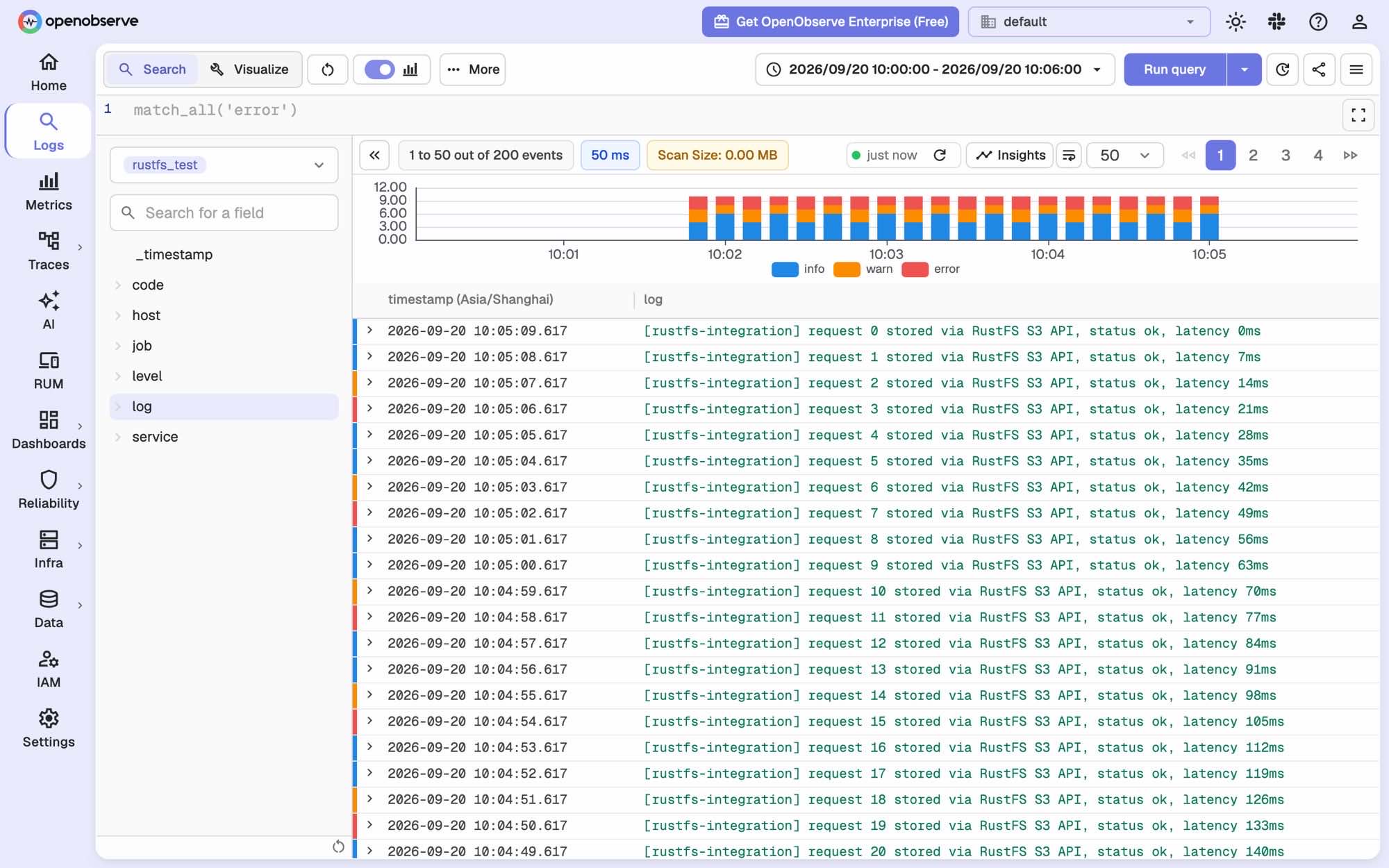
In the OpenObserve UI, open Logs, select the stream rustfs_test, and run a query. The records you ingested appear in the result table:
The same query through the search API. Note that start_time and end_time are in microseconds:
curl -s -u "root@example.com:Complexpass#123" \
  -X POST "http://localhost:5080/api/default/_search?type=logs" \
  -H "Content-Type: application/json" \
  -d '{"query":{"sql":"SELECT count(*) AS cnt FROM \"rustfs_test\"","start_time":1789869600000000,"end_time":1789869960000000}}'
"hits": [{"cnt": 200}]Review stream statistics
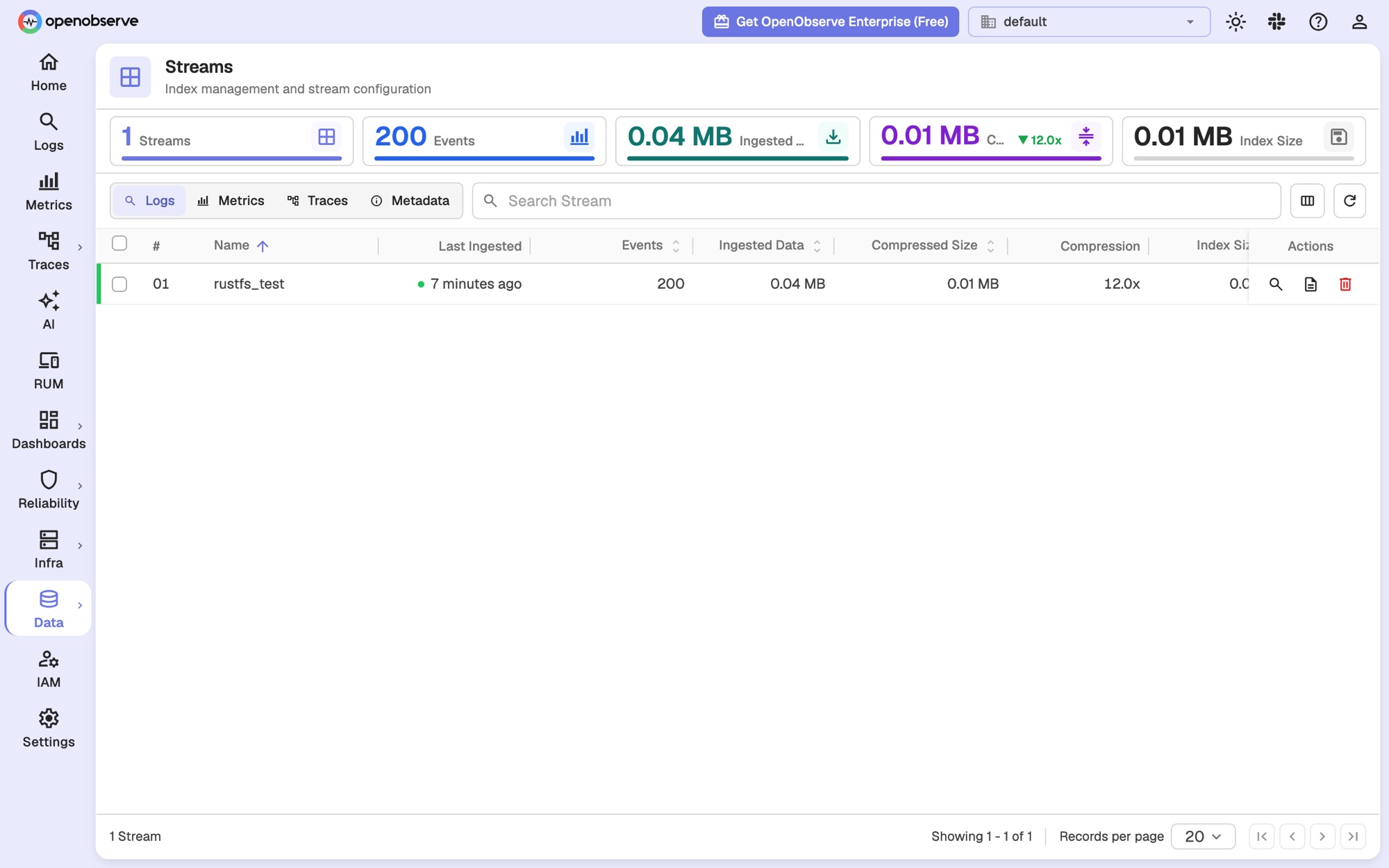
The Data → Streams page shows the event count, the ingested and compressed size, and the index size for rustfs_test:
Verify that data survives without local cache
To confirm that RustFS is the persistent layer and not the local disk, delete the OpenObserve cache directory, restart the container, and query again. The OpenObserve image contains no shell, so use busybox to remove the files:
docker compose stop openobserve
docker run --rm -v rustfs-openobserve_oo-data:/data busybox rm -rf /data/cache
docker compose start openobserve
Wait for the UI to come back, then repeat the search query from above. The same records return because OpenObserve downloads the Parquet files from RustFS again. The directory name of the project (rustfs-openobserve) becomes the prefix of the volume name; run docker volume ls if you used a different directory.
Troubleshooting
Data is written to local disk instead of RustFS
In single-node mode (ZO_LOCAL_MODE=true) the storage backend defaults to disk. Without ZO_LOCAL_MODE_STORAGE=s3, OpenObserve ignores the ZO_S3_* variables and keeps Parquet files under /data/wal/files/.
No Parquet files appear in the bucket after flushing
The uploader runs in the background and only uploads a Parquet file once it is older than ZO_MAX_FILE_RETENTION_TIME — 600 seconds by default. This guide sets the value to 60 seconds. Check the ingester logs if files are still missing:
docker compose logs openobserve | grep "INGESTER:JOB"The search API returns no hits
start_time and end_time of the search API are in microseconds. A millisecond timestamp such as 1789869600000 selects a range in 1970; multiply by 1000.
OpenObserve restarts with a weak-password error
OpenObserve v1.0.x rejects ZO_ROOT_USER_PASSWORD values that do not contain at least one uppercase letter, one lowercase letter, one digit, and one special character.
The RustFS Console does not open
In RustFS v2.x the console is served under the /rustfs/console/ path prefix. Requesting the root path of port 9001 returns an S3-style XML access-denied response, which is expected.
RustFS fails to start with a permission error
The RustFS image runs as user and group 10001. When you bind-mount a host directory instead of the named volume in this guide, run chown -R 10001:10001 <host-directory> first.
Next steps
- Review S3 compatibility notes before adopting additional S3 operations.
- Create dedicated production credentials with Access Key Management.
- Follow the OpenObserve documentation to connect real log producers such as Fluent Bit or the OpenTelemetry Collector.