
RustFS Bucket Creation
This guide explains how to create buckets using the RustFS UI, mc (MinIO Client), or API.
Creating Buckets
Prerequisites:
- A running RustFS instance (see Installation Guide).
Using the RustFS UI
- Log in to the RustFS Console.
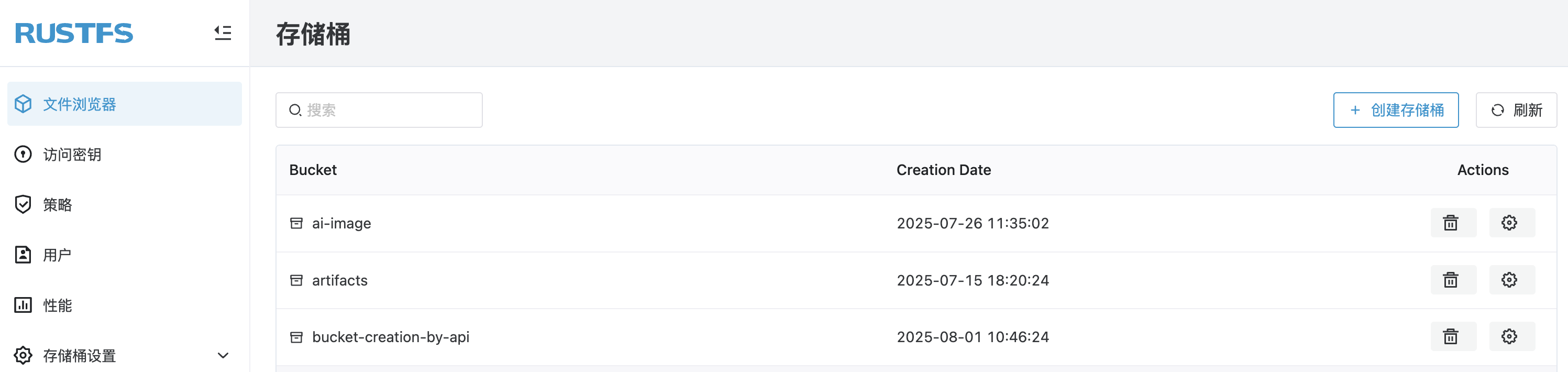
- On the homepage, in the top left corner, select Create Bucket.
- Enter the bucket name and click Create to complete bucket creation.
Using mc
See the
mcUsage Guide for installation and configuration.
Create a bucket:
bash
# create rustfs bucket
mc mb rustfs/bucket-creation-by-mc
Bucket created successfully `rustfs/bucket-creation-by-mc`.

# confirm bucket creation
mc ls rustfs/bucket-creation-by-mc
Using the API
Create a bucket via API:
PUT /{bucketName} HTTP/1.1Request example:
bash
curl --location --request PUT 'http://12.34.56.78:9000/bucket-creation-by-api' \
--header 'X-Amz-Content-Sha256: e3b0c44298fc1c149afbf4c8996fb92427ae41e4649b934ca495991b7852b855' \
--header 'X-Amz-Date: 20250801T023519Z' \
--header 'Authorization: AWS4-HMAC-SHA256 Credential=H4xcBZKQfvJjEnk3zp1N/20250801/cn-east-1/s3/aws4_request, SignedHeaders=host;x-amz-content-sha256;x-amz-date, Signature=c2fb2ba5199a30ebcfa9976d0f35000ba274da3701327957e84ea0f3920288f2'
Verify the bucket creation in the RustFS Console.