
Availability and Scalability Description
Note: This document is based on the latest RustFS version. Please perform full data backup before scaling operations. For production environments, it's recommended to contact RustFS technical support engineers for solution review.
Scaling Solution Overview
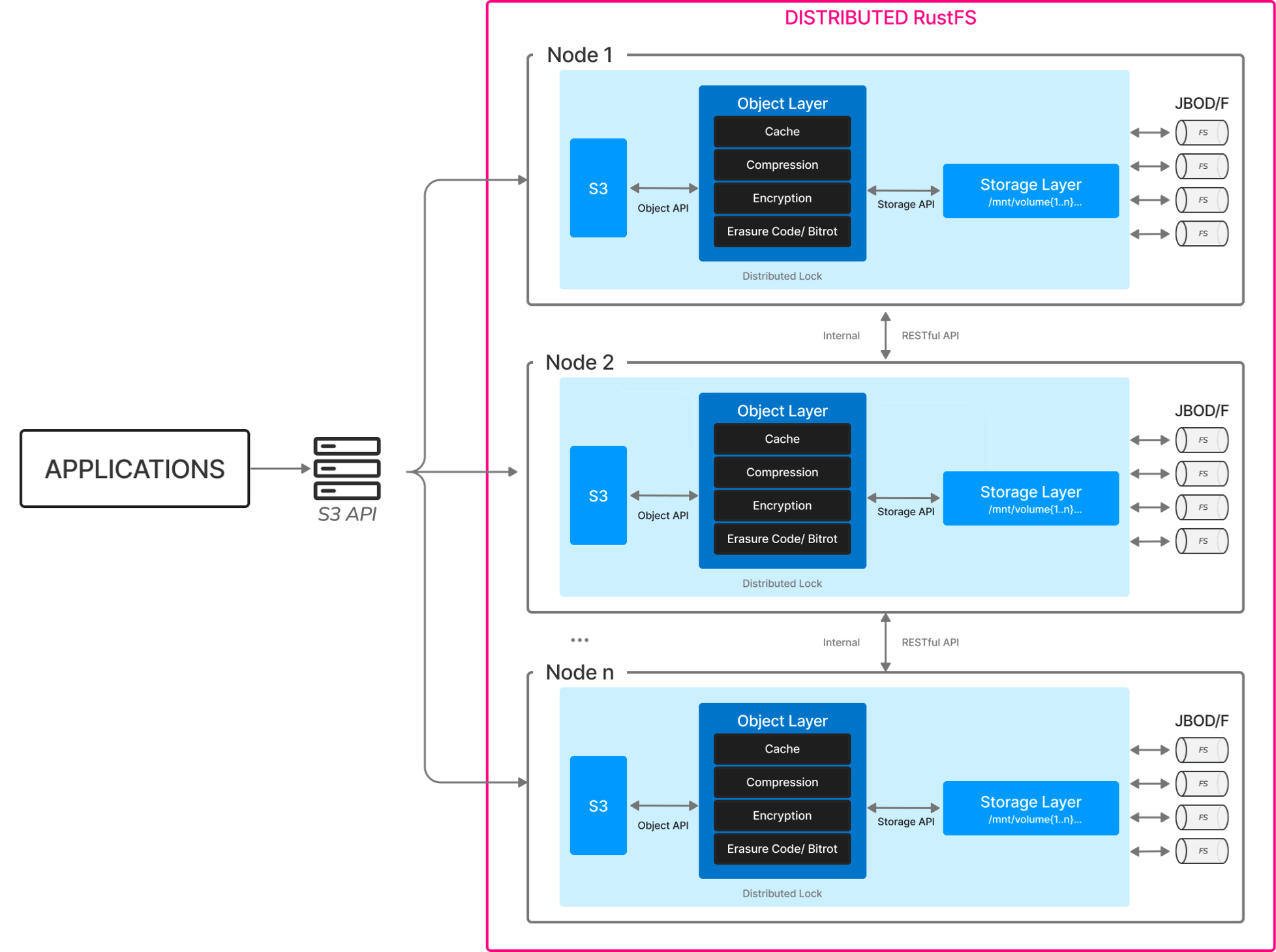
RustFS supports horizontal scaling by adding new storage pools (Server Pool). Each new storage pool must meet:
- Nodes within the storage pool must use consecutive hostnames (e.g., node5-node8)
- Single storage pool must use same specifications of disks (type/capacity/quantity)
- New storage pools must maintain time synchronization and network connectivity with existing clusters
1. Pre-Scaling Preparation
1.1 Hardware Planning Requirements
| Item | Minimum Requirements | Recommended Production Configuration |
|---|---|---|
| Node Count | 4 nodes/storage pool | 4 - 8 nodes/storage pool |
| Single Node Memory | 128 GB | 128 GB |
| Disk Type | SSD | NVMe SSD |
| Single Disk Capacity | ≥1 TB | ≥4 TB |
| Network Bandwidth | 10 Gbps | 25 Gbps |
1.2 System Environment Check
bash
# Check hostname continuity (new node example)
cat /etc/hosts
192.168.10.5 node5
192.168.10.6 node6
192.168.10.7 node7
192.168.10.8 node8

# Verify time synchronization status
timedatectl status | grep synchronized

# Check firewall rules (all nodes need to open ports 9000/9001)
firewall-cmd --list-ports | grep 9000
firewall-cmd --list-ports | grep 9001
2. Scaling Implementation Steps
2.1 New Node Basic Configuration
bash
# Create dedicated user (execute on all new nodes)
groupadd rustfs-user
useradd -M -r -g rustfs-user rustfs-user

# Create storage directories (example with 8 disks)
mkdir -p /data/rustfs{0..7}
chown -R rustfs-user:rustfs-user /data/rustfs*
2.2 Install RustFS Binary on all new nodes
bash
# Check rustfs version on existing node
/usr/local/bin/rustfs --version

# Download and install binary package (version must match existing cluster), e.g. for version 1.0.0-alpha.67:
wget https://github.com/rustfs/rustfs/releases/download/1.0.0-alpha.67/rustfs-linux-x86_64-musl-latest.zip
unzip rustfs-linux-x86_64-musl-latest.zip
chmod +x rustfs
mv rustfs /usr/local/bin/
2.3 Create RustFS configuration file on all new nodes (/etc/default/rustfs)
bash
# Create configuration file (/etc/default/rustfs)
# Please replace <Your RustFS admin username> and <Secure password of your RustFS admin> with yours values!
cat <<EOF > /etc/default/rustfs
RUSTFS_ACCESS_KEY=<Your RustFS admin username> # e.g. rustfsadmin
RUSTFS_SECRET_KEY=<Secure password of your RustFS admin> # e.g. rustfsadmin
RUSTFS_VOLUMES="http://node-{1...4}:9000/data/rustfs{0...3} http://node-{5...8}:9000/data/rustfs{0...7}" # add new storage pool to the existing
RUSTFS_ADDRESS=":9000"
RUSTFS_CONSOLE_ADDRESS=":9001"
EOF
2.4 Configure System Service on all new nodes
bash
# Create systemd service file

sudo tee /etc/systemd/system/rustfs.service <<EOF
[Unit]
Description=RustFS Object Storage Server
Documentation=https://rustfs.com/docs/
After=network-online.target
Wants=network-online.target

[Service]
Type=notify
NotifyAccess=main
User=root
Group=root

WorkingDirectory=/usr/local
EnvironmentFile=-/etc/default/rustfs
ExecStart=/usr/local/bin/rustfs \$RUSTFS_VOLUMES

LimitNOFILE=1048576
LimitNPROC=32768
TasksMax=infinity

Restart=always
RestartSec=10s

OOMScoreAdjust=-1000
SendSIGKILL=no

TimeoutStartSec=30s
TimeoutStopSec=30s

NoNewPrivileges=true
ProtectHome=true
PrivateTmp=true
PrivateDevices=true
ProtectClock=true
ProtectKernelTunables=true
ProtectKernelModules=true
ProtectControlGroups=true
RestrictSUIDSGID=true
RestrictRealtime=true

# service log configuration
StandardOutput=append:/var/logs/rustfs/rustfs.log
StandardError=append:/var/logs/rustfs/rustfs-err.log

[Install]
WantedBy=multi-user.target
EOF
2.5 Reload service configuration on all new nodes
bash
#Reload service configuration
sudo systemctl daemon-reload

#Start service and set auto-start
sudo systemctl enable --now rustfs
2.6 Cluster Scaling Operation on all existing nodes
bash
# Update configuration on all existing nodes (following command will add new storage pool to the existing $RUSTFS_VOLUMES list)
sed -i '/RUSTFS_VOLUMES/s|"$| http://node{5...8}:9000/data/rustfs{0...7}"|' /etc/default/rustfs
2.7 Cluster Scaling Operation on all nodes (existing and added)
bash
# Global service restart (execute simultaneously on all nodes)
systemctl restart rustfs.service
3. Post-Scaling Verification
3.1 Check Server List in RustFS Console
Open in the RustFS Console Performance menu, e.g. http://node1:9001/rustfs/console/performance and check node join status in the Server List
3.2 Data Balance Verification
bash
# View data distribution ratio (should be close to each storage pool capacity ratio)
watch -n 5 "rustfs-admin metrics | grep 'PoolUsagePercent'"
4. Important Notes
- Rolling Restart Prohibited: Must restart all nodes simultaneously to avoid data inconsistency
- Capacity Planning Recommendation: Should plan next scaling when storage usage reaches 70%
- Performance Tuning Recommendations:
bash
# Adjust kernel parameters (all nodes)
echo "vm.swappiness=10" >> /etc/sysctl.conf
echo "net.core.somaxconn=32768" >> /etc/sysctl.conf
sysctl -p
5. Troubleshooting Guide
| Symptom | Check Point | Fix Command |
|---|---|---|
| New nodes cannot join cluster | Check port 9000 connectivity | telnet node5 9000 |
| Uneven data distribution | Check storage pool capacity configuration | rustfs-admin rebalance start |
| Console shows abnormal node status | Verify time synchronization status | chronyc sources |