
Dify
Store Dify uploads, knowledge-base files, and system state in a RustFS bucket.
This guide connects Dify — the open-source LLM application platform — to RustFS through its OpenDAL storage backend. You will switch the file storage from local disk to a RustFS bucket, start the stack, upload a document into a knowledge base, and confirm the object in the bucket. The workflow was verified with Dify 1.18.0 in Docker Compose.
You need Docker Compose. This deployment is intended for local integration testing, not production.
Architecture
Dify persists uploaded documents, knowledge-base files, and its bootstrap secret (.dify_secret_key, workspace keys) through the configured storage backend. When the backend is a bucket, none of these live on container disks.
Configure storage for RustFS
In docker/.env (copied from .env.example), switch OpenDAL to the S3 scheme:
STORAGE_TYPE=opendal
OPENDAL_SCHEME=s3
OPENDAL_S3_ENDPOINT=http://<your-rustfs-endpoint>:9000
OPENDAL_S3_BUCKET=dify
OPENDAL_S3_ACCESS_KEY_ID=<your-access-key>
OPENDAL_S3_SECRET_ACCESS_KEY=<your-secret-key>
OPENDAL_S3_REGION=us-east-1
OPENDAL_S3_ENABLE_PATH_STYLE=true
OPENDAL_S3_ROOT=/
Create the bucket before starting the stack:
aws s3 mb s3://dify --endpoint-url http://<your-rustfs-endpoint>:9000Attach RustFS to the Compose network
The Compose stack lives in its own bridge network, and Docker isolates bridges from each other — an endpoint like http://172.17.0.2:9000 times out from the api container. Attach the RustFS container to the Compose network with an alias and use the alias as the endpoint host:
docker network connect --alias rustfs <compose-network> <rustfs-container>Recreate the stack after changing .env — docker compose restart keeps the old environment variables.
Start the stack and set up
cd dify/docker
docker compose up -d
Wait for the api health check to pass, then create the admin account in the web UI (http://localhost:80). Dify immediately writes its bootstrap state into the bucket:
aws s3 ls s3://dify/ --recursive \
--endpoint-url http://<your-rustfs-endpoint>:90002026-11-01 14:31:00 65 .dify_secret_key
2026-11-01 14:33:06 1674 privkeys/<tenant-id>/private.pemThe secret key and workspace keys now live in RustFS — the containers hold no state that matters.
Upload a knowledge-base document
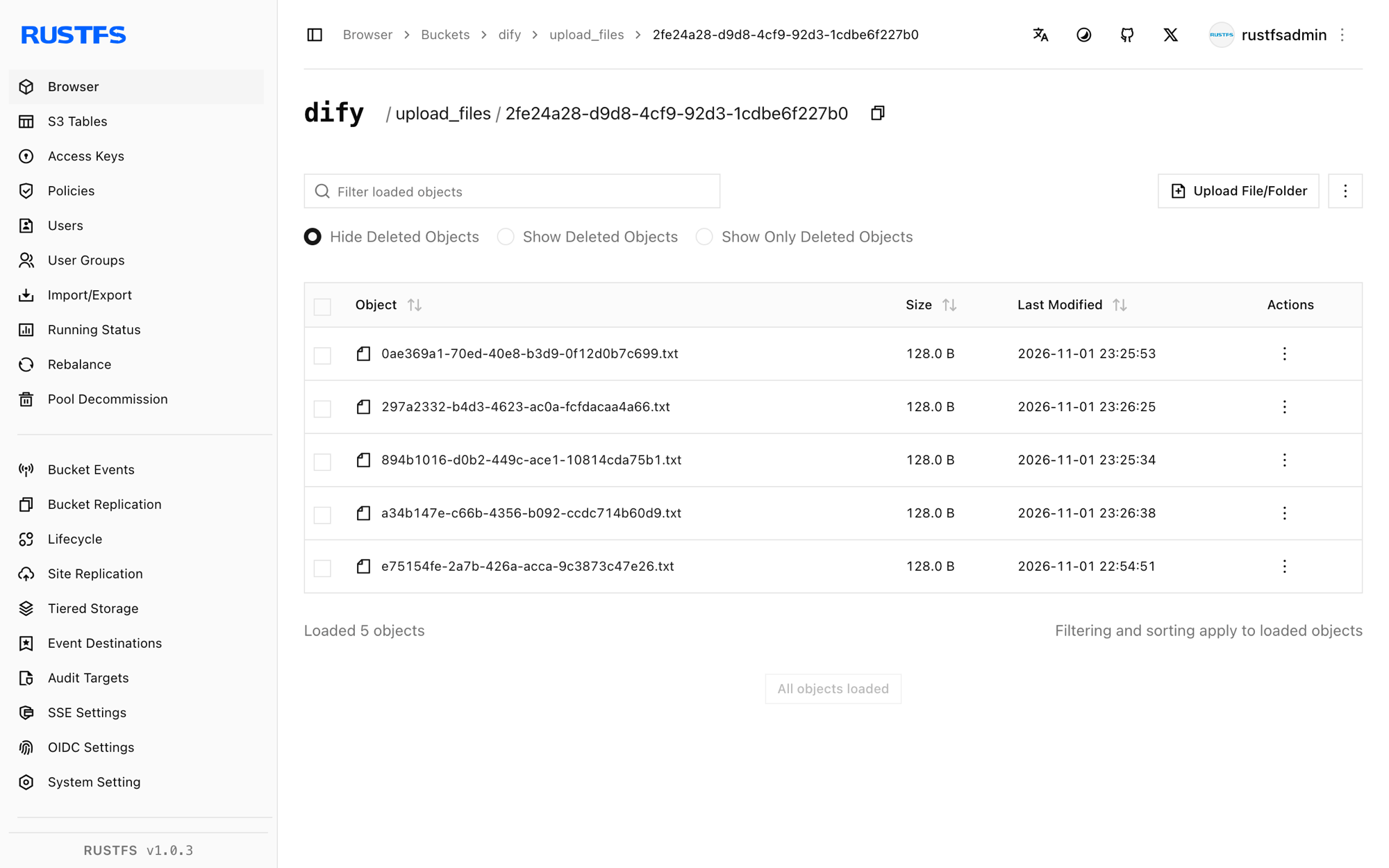
Create a knowledge base in the UI, then upload a document. The upload lands in the bucket under upload_files/<tenant-id>/:
aws s3 ls s3://dify/upload_files/ --recursive \
--endpoint-url http://<your-rustfs-endpoint>:90002026-11-01 15:25:53 128 upload_files/<tenant-id>/0ae369a1-70ed-40e8-b3d9-0f12d0b7c699.txtThe object appears the moment the upload finishes — indexing runs against the bucket copy.
Stop or reset
To tear down the stack while keeping the bucket objects:
docker compose downTo delete the Dify data:
aws s3 rm s3://dify --recursive \
  --endpoint-url http://<your-rustfs-endpoint>:9000
Wipe bind mounts when resetting
Dify's Compose file bind-mounts its database and storage under docker/volumes/. docker compose down -v does not remove bind mounts — delete docker/volumes/ explicitly when you need a clean slate, or the old admin account and encryption state survive.
Troubleshooting
Startup logs show tcp connect error: Connection timed out against the bucket
The stack cannot reach the RustFS address — network isolation between Docker bridges. Attach RustFS to the Compose network with an alias as shown in step 1.
Login fails with Invalid encrypted data
The admin password field is Base64-encoded by the frontend; a raw password over the console API fails. Use the web UI for account and password operations, or encode the field the way the frontend does.
Default model not found for text-embedding when creating documents
The high-quality indexing mode needs an embedding model provider configured in Dify. Use economy indexing for a storage-only test, or configure a model provider first.
Uploads still land on local disk
The api and worker containers predate the .env change. Recreate the whole stack with docker compose up -d --force-recreate so every service reads the new storage configuration.
Next steps
- Review S3 compatibility notes before enabling large knowledge bases.
- Create dedicated production credentials with Access Key Management.
- Follow the Dify environment variables reference for the plugin daemon's separate S3 settings and multipart tuning on the same bucket.