
RAGFlow
Run RAGFlow with uploaded documents and workspace state stored in a RustFS bucket.
This guide connects RAGFlow — the open-source RAG engine — to RustFS as its object storage. RAGFlow stores every uploaded document and parsed artifact in S3-compatible storage through its MinIO-compatible client configuration. You will point that configuration at RustFS, start the stack, upload a document into a knowledge base, and confirm the object in the bucket. The workflow was verified with infiniflow/ragflow:v1.0.0-rc3 using the Infinity document engine.
You need Docker Compose. This deployment is intended for local integration testing, not production.
Architecture
Each tenant gets a bucket named after its tenant ID, and every uploaded file becomes an object under that bucket. Parsing writes further artifacts next to the source document.
Configure the stack for RustFS
Clone RAGFlow and edit docker/.env. Select the Infinity document engine and point the storage client at RustFS:
DOC_ENGINE=infinity
MINIO_HOST=<your-rustfs-endpoint>
MINIO_USER=<your-access-key>
MINIO_PASSWORD=<your-secret-key>
The minio: section of docker/service_conf.yaml.template renders from these variables, so the same fields drive any S3-compatible endpoint. RAGFlow creates one bucket per tenant automatically — you do not need to pre-create it.
Give the RustFS container a network alias
The Compose stack runs in its own bridge network, and Docker isolates bridges from each other, so the RustFS container's 172.17.0.x address is unreachable from the stack. Attach RustFS to the Compose network with an alias and use the alias as MINIO_HOST:
docker network connect --alias rustfs ragflow_ragflow <rustfs-container>Also replace the bundled MinIO image (pulled from quay.io) if your registry blocks it — the stack never talks to it when MINIO_HOST points elsewhere.
Start the stack
cd ragflow/docker
docker compose -p ragflow up -d
Wait for the API to come up, then confirm the storage configuration the server loaded:
docker logs ragflow-cpu 2>&1 | grep "minio:"minio: {'user': '...', 'password': '...', 'host': 'rustfs:9000', 'bucket': '', 'prefix_path': ''}An empty bucket is expected: RAGFlow creates one bucket per tenant on first upload.
Upload a document into a knowledge base
Create a user and an API key (from the web UI at https://localhost:443, or through the user API), then use the HTTP API:
curl -s -X POST http://localhost:9380/api/v1/datasets \
  -H "Authorization: Bearer <your-api-key>" -H "Content-Type: application/json" \
  -d '{"name":"rustfs-kb"}'

curl -s -X POST "http://localhost:9380/api/v1/datasets/<dataset-id>/documents" \
  -H "Authorization: Bearer <your-api-key>" \
-F "file=@rustfs-overview.txt"{"code":0,"data":[{"chunk_method":"naive","location":"rustfs-overview.txt","name":"rustfs-overview.txt","run":"UNSTART"}]}Confirm the object landed in RustFS — the tenant bucket is named after the tenant ID:
aws s3 ls s3://<tenant-id>/ --recursive \
--endpoint-url http://<your-rustfs-endpoint>:90002026-11-01 16:02:41 204 rg-doc.txtRead the object back and compare it with the uploaded file:
aws s3 cp s3://<tenant-id>/rg-doc.txt - \
  --endpoint-url http://<your-rustfs-endpoint>:9000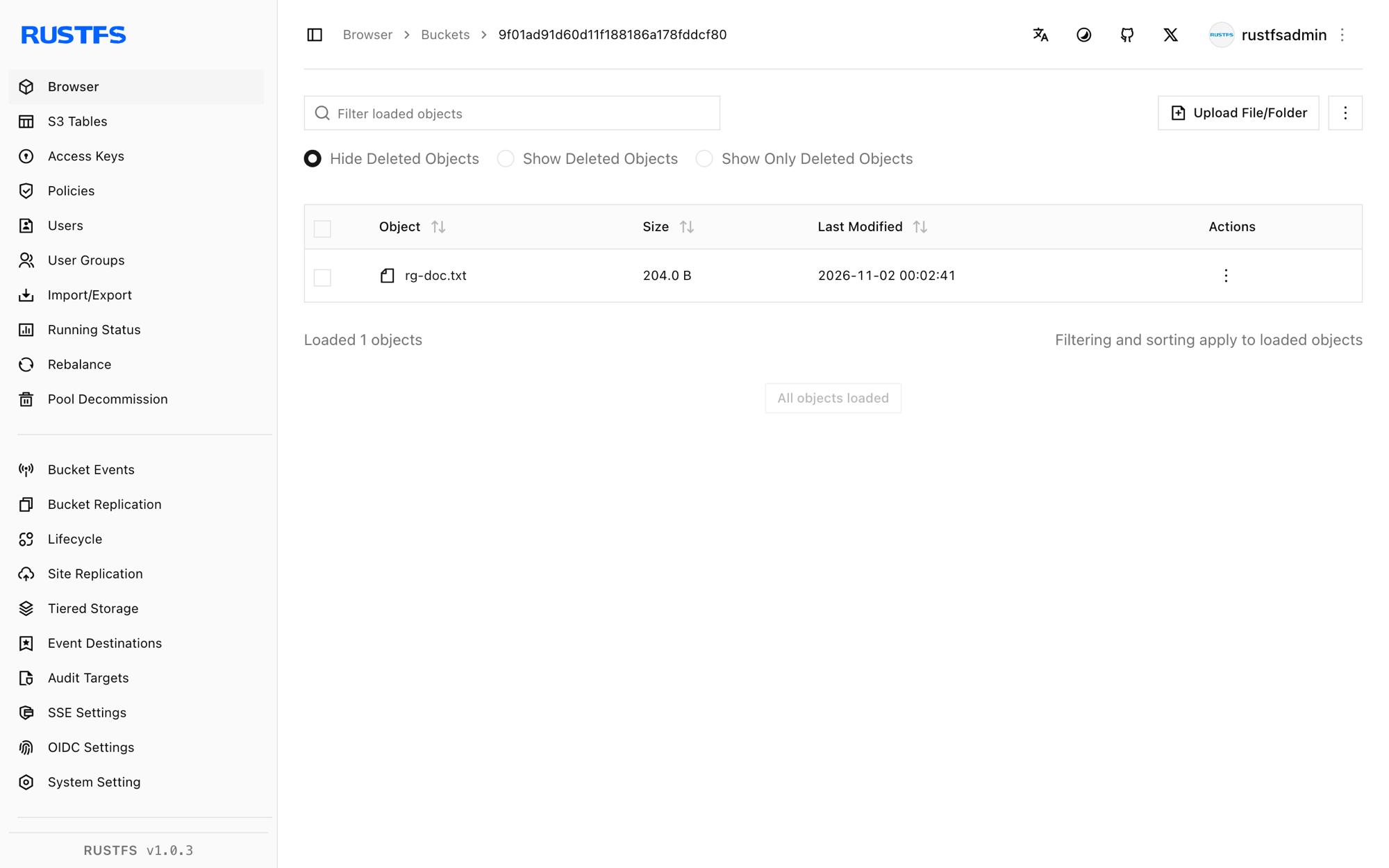
Parse and retrieve
Document parsing (PUT /api/v1/datasets/{id}/documents/{doc_id} with {"run":"parse"}) consumes the stored object from RustFS and writes chunk artifacts next to it. Parsing additionally requires an embedding model configured in RAGFlow — that step depends on your model setup, not on storage.
Stop or reset
To tear down the stack while keeping the bucket objects:
docker compose -p ragflow stopTo delete the tenant data:
aws s3 rm s3://<tenant-id> --recursive \
  --endpoint-url http://<your-rustfs-endpoint>:9000
Troubleshooting
Upload succeeds but nothing appears in RustFS
The server is still talking to the bundled MinIO. Check the minio: line in the startup log — if the host is not your RustFS alias, the .env edit did not reach the container; recreate it with docker compose -p ragflow up -d --force-recreate ragflow-cpu.
tcp connect error: Connection timed out on startup
The RustFS container address is not routable from the Compose network. Attach RustFS to the Compose network with an alias as shown in step 1 and use the alias in MINIO_HOST.
Authentication error: API key is invalid! on /api/v1
The /api/v1 SDK routes accept a RAGFlow API key (created in the web UI), not the login access token. /v1/* routes take the login session instead.
Password errors on register or login
RAGFlow expects the password encrypted with its bundled RSA public key before it reaches the API — the web UI does this for you. Use the UI for account creation unless you replicate the client-side encryption.
Next steps
- Review S3 compatibility notes before enabling large-scale ingestion.
- Create dedicated production credentials with Access Key Management.
- Follow the RAGFlow documentation for chunk templates, embedding models, and agent workflows on the same bucket.