
Hive
Store Hive table data on RustFS over S3A.
This guide connects Apache Hive — the classic data warehouse — to RustFS through the S3A filesystem. You will run the Hive 4.0.1 Docker image with a metastore and HiveServer2, configure S3A in three configuration layers, create an external table over a RustFS location, and load and query data. The workflow was verified with Hive 4.0.1 against rustfs/rustfs-x86-musl:v2.3.1.
You need Docker (two containers: metastore and hiveserver2).
Architecture
Hive stores table metadata in the metastore (Derby in this test) and table data in the table's S3A location. Query execution runs on Tez inside the hiveserver2 container.
Run the metastore and HiveServer2
docker run -d --name hive-metastore --hostname hive-meta --network oo-rustfs_default \
  -e SERVICE_NAME=metastore -e DB_DRIVER=derby apache/hive:4.0.1

docker run -d --name hive-server --hostname hive-server --network oo-rustfs_default \
  -e SERVICE_NAME=hiveserver2 -e DB_DRIVER=derby apache/hive:4.0.1
The metastore takes 1-2 minutes to initialize its Derby schema; HiveServer2 listens on 10000, the metastore on 9083.
Configure S3A in three places
Tez tasks read the Hadoop configuration directory, HiveServer2 reads the Hive configuration, and the metastore needs the endpoint too. Create one properties file and copy it to all three paths:
<?xml version="1.0"?>
<configuration>
  <property><name>fs.s3a.endpoint</name><value>http://<your-rustfs-endpoint>:9000</value></property>
  <property><name>fs.s3a.access.key</name><value><your-access-key></value></property>
  <property><name>fs.s3a.secret.key</name><value><your-secret-key></value></property>
  <property><name>fs.s3a.path.style.access</name><value>true</value></property>
  <property><name>fs.s3a.connection.ssl.enabled</name><value>false</value></property>
  <property><name>fs.s3a.aws.credentials.provider</name><value>org.apache.hadoop.fs.s3a.SimpleAWSCredentialsProvider</value></property>
  <property><name>fs.s3a.impl</name><value>org.apache.hadoop.fs.s3a.S3AFileSystem</value></property>
</configuration>rc mb rustfs/hive-demo
docker cp s3a-core-site.xml hive-server:/opt/hive/conf/hive-site.xml
docker cp s3a-core-site.xml hive-server:/opt/hive/conf/core-site.xml
docker cp s3a-core-site.xml hive-server:/opt/hadoop/etc/hadoop/core-site.xml
docker exec -u root hive-server bash -c \
"chown hive:hive /opt/hive/conf/hive-site.xml /opt/hive/conf/core-site.xml /opt/hadoop/etc/hadoop/core-site.xml; \
mkdir -p /home/hive/.beeline; chmod 777 /home/hive/.beeline"
docker exec hive-server bash -c \
"echo 'export HADOOP_CONF_DIR=/opt/hadoop/etc/hadoop' >> /opt/hive/conf/hive-env.sh; \
echo 'export HADOOP_CLASSPATH=/opt/hadoop/share/hadoop/tools/lib/*:/opt/tez/*:/opt/tez/lib/*' >> /opt/hive/conf/hive-env.sh"
docker restart hive-serverThe hadoop-aws jar ships in /opt/hadoop/share/hadoop/tools/lib — the HADOOP_CLASSPATH export puts it on the query classpath. mkdir /home/hive/.beeline silences a harmless beeline home-directory error.
Create an external table
docker exec hive-server bash -c "cd /opt/hive && beeline -u 'jdbc:hive2://localhost:10000' \
  -n hive -e \"CREATE EXTERNAL TABLE default.events (id INT, label STRING) \
  ROW FORMAT DELIMITED FIELDS TERMINATED BY ',' STORED AS TEXTFILE \
  LOCATION 's3a://hive-demo/warehouse/events';\""
An EXTERNAL table with an S3A LOCATION keeps all data in RustFS. (A managed CREATE TABLE ... LOCATION on a non-default database path is rejected by Hive 4 managed-table rules — use external tables for S3A locations.)
Load and query data
LOAD DATA INPATH moves a local file into the table's S3A location (the rename is executed by HiveServer2, which has the credentials):
docker exec hive-server bash -c "printf '1,alpha\n2,beta\n3,gamma\n' > /tmp/hive-load.txt"
docker exec hive-server bash -c "cd /opt/hive && beeline -u 'jdbc:hive2://localhost:10000' \
-n hive -e \"LOAD DATA INPATH 'file:///tmp/hive-load.txt' INTO TABLE default.events;\""INFO : Loading data to table default.events from file:/tmp/hive-load.txtQuery and verify in RustFS
docker exec hive-server bash -c "cd /opt/hive && beeline -u 'jdbc:hive2://localhost:10000' \
-n hive --outputformat=tsv2 -e 'SELECT * FROM default.events ORDER BY id;'"1 alpha
2 beta
3 gammaList the table directory — the loaded file is an ordinary object:
rc ls rustfs/hive-demo/warehouse/events/warehouse/events/hive-load.txt
warehouse/events/hive-load_copy_1.txt
warehouse/events/hive-load_copy_2.txt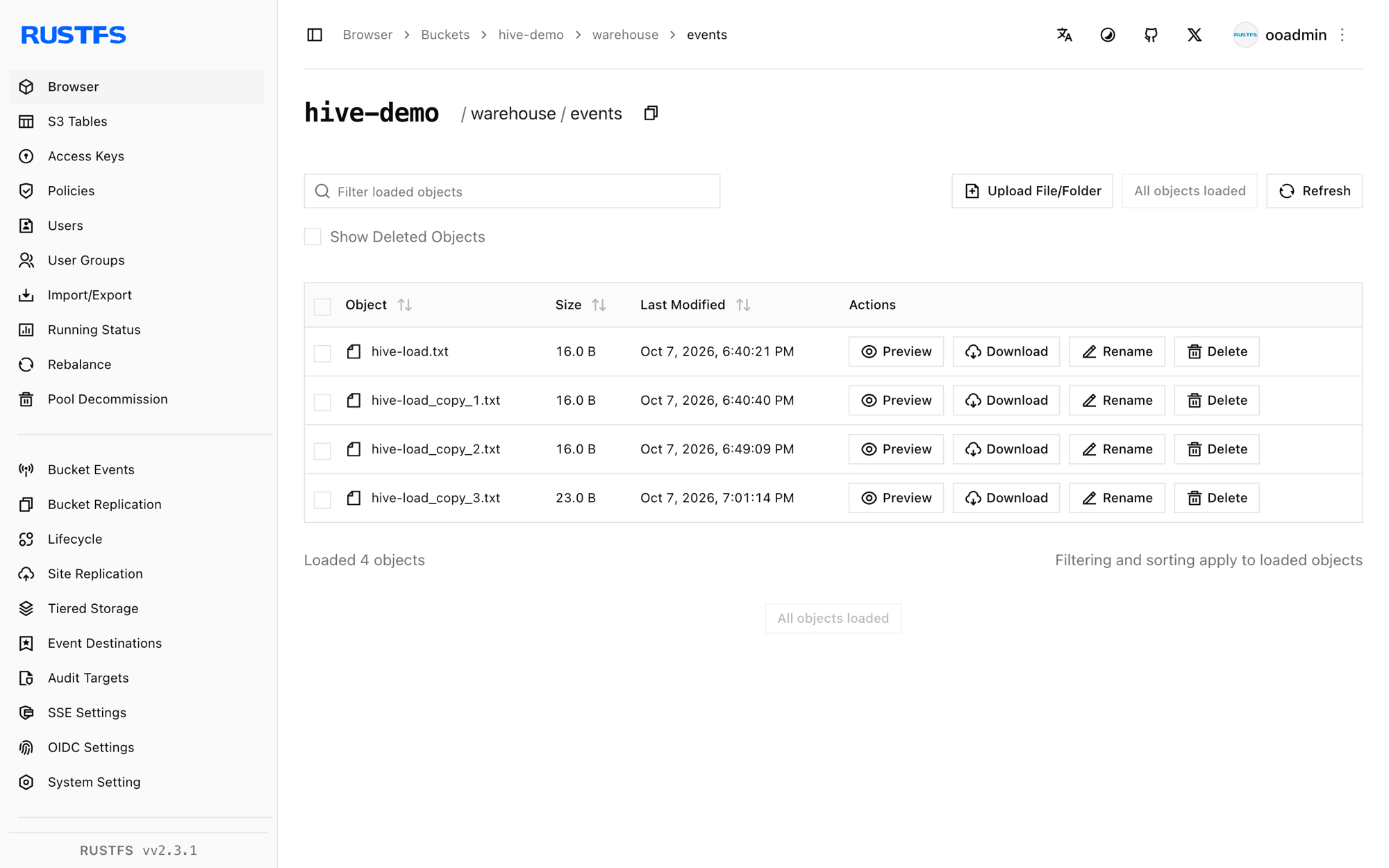
Stop or reset
docker rm -f hive-server hive-metastore
rc rm rustfs/hive-demo/ --recursive --force
Troubleshooting
NoClassDefFoundError: org.apache.tez.mapreduce.hadoop.InputSplitInfo on INSERT
The Tez jars are missing from the query classpath. Add the HADOOP_CLASSPATH export from step 2 (tools lib + tez + tez lib) to /opt/hive/conf/hive-env.sh.
NoAwsCredentialsException: SimpleAWSCredentialsProvider: No AWS credentials in the Hadoop configuration
Tez task processes read /opt/hadoop/etc/hadoop/core-site.xml, not only the Hive conf directory. Copy the S3A properties to all three paths from step 2.
Permission denied printed after every beeline command
beeline tries to create /home/hive/.beeline. Run mkdir -p /home/hive/.beeline && chmod 777 once (as root in the container).
Unable to create database managed path file:/user/hive/warehouse/...
Hive 4 keeps managed databases inside the managed warehouse root. Use CREATE EXTERNAL TABLE ... LOCATION 's3a://...' for S3A locations.
Next steps
- Compare with the Trino guide when you want interactive SQL over the same objects without a metastore.
- Create dedicated production credentials with Access Key Management.
- Follow the Hive documentation to attach a MySQL-backed metastore and share the same warehouse across Hive and Spark on the same bucket.