
Apache Spark
Read and write Parquet data stored in RustFS object storage with Apache Spark over the s3a connector.
This guide connects Apache Spark to RustFS through the s3a connector. You will start RustFS with Docker Compose, run a Spark job that writes a Parquet dataset to the bucket, read it back, and verify the objects in RustFS. The workflow was verified with apache/spark:3.5.6 (Hadoop 3.3.4 via hadoop-aws) and rustfs/rustfs-x86-musl:v2.3.1.
You need Docker with the Compose plugin. This deployment is intended for local integration testing, not production.
Architecture
Spark talks to RustFS through the hadoop-aws S3A filesystem. The connector settings — endpoint, path-style addressing, plain HTTP, and credentials — are passed as spark.hadoop.fs.s3a.* properties.
Create the project files
Create a working directory:
mkdir rustfs-spark
cd rustfs-spark
Create an environment file and replace both credential placeholders:
RUSTFS_ACCESS_KEY=<your-access-key>
RUSTFS_SECRET_KEY=<your-secret-key>
Use dedicated credentials for the bucket. Do not commit .env to source control.
Create the Spark job:
from pyspark.sql import SparkSession

spark = SparkSession.builder.appName("rustfs-spark-demo").getOrCreate()
spark.sparkContext.setLogLevel("WARN")

spark.range(1000).withColumnRenamed("id", "num") \
    .write.mode("overwrite").parquet("s3a://my-bucket/spark-demo/events")

back = spark.read.parquet("s3a://my-bucket/spark-demo/events")
print("ROWS_READ_BACK:", back.count())
spark.stop()
Create the Compose file:
services:
  rustfs:
    image: rustfs/rustfs-x86-musl:v2.3.1
    environment:
      RUSTFS_ACCESS_KEY: ${RUSTFS_ACCESS_KEY}
      RUSTFS_SECRET_KEY: ${RUSTFS_SECRET_KEY}
      RUSTFS_VOLUMES: /data
      RUSTFS_ADDRESS: ":9000"
      RUSTFS_CONSOLE_ADDRESS: ":9001"
      RUSTFS_CONSOLE_ENABLE: "true"
    volumes:
      - rustfs-data:/data
    ports:
      - "9000:9000"
      - "9001:9001"
    healthcheck:
      test: ["CMD", "curl", "-sf", "http://127.0.0.1:9000/health"]
      interval: 10s
      timeout: 5s
      retries: 6
      start_period: 10s
    networks:
      - warehouse

  create-bucket:
    image: rustfs/rc:latest
    depends_on:
      rustfs:
        condition: service_healthy
    environment:
      RUSTFS_ACCESS_KEY: ${RUSTFS_ACCESS_KEY}
      RUSTFS_SECRET_KEY: ${RUSTFS_SECRET_KEY}
    entrypoint:
      - /bin/sh
      - -c
      - |
        until /usr/bin/rc alias set rustfs http://rustfs:9000 "$${RUSTFS_ACCESS_KEY}" "$${RUSTFS_SECRET_KEY}"; do
          echo "Waiting for RustFS..."
          sleep 2
        done
        /usr/bin/rc ls rustfs/my-bucket >/dev/null 2>&1 || /usr/bin/rc mb rustfs/my-bucket
    networks:
      - warehouse

  spark:
    image: apache/spark:3.5.6
    entrypoint: ["/opt/spark/bin/spark-submit"]
    volumes:
      - ./job.py:/job.py:ro
    command:
      - --conf
      - spark.jars.ivy=/tmp/.ivy2
      - --packages
      - org.apache.hadoop:hadoop-aws:3.3.4
      - --conf
      - spark.hadoop.fs.s3a.endpoint=http://rustfs:9000
      - --conf
      - spark.hadoop.fs.s3a.access.key=${RUSTFS_ACCESS_KEY}
      - --conf
      - spark.hadoop.fs.s3a.secret.key=${RUSTFS_SECRET_KEY}
      - --conf
      - spark.hadoop.fs.s3a.path.style.access=true
      - --conf
      - spark.hadoop.fs.s3a.connection.ssl.enabled=false
      - --conf
      - spark.hadoop.fs.s3a.impl=org.apache.hadoop.fs.s3a.S3AFileSystem
      - /job.py
    depends_on:
      create-bucket:
        condition: service_completed_successfully
    networks:
      - warehouse

networks:
  warehouse:

volumes:
  rustfs-data:
--packages org.apache.hadoop:hadoop-aws:3.3.4 downloads the S3 connector at launch; it must match the Hadoop version bundled with the Spark image. spark.jars.ivy=/tmp/.ivy2 moves the download cache to a writable directory.
Start RustFS and run the job
Start the storage services:
docker compose up -d
docker compose ps -a
Run the Spark job:
docker compose run --rm sparkROWS_READ_BACK: 1000Verify objects in RustFS
List the dataset through the bucket-initializer image:
docker compose run --rm --entrypoint /bin/sh create-bucket -c \
  '/usr/bin/rc alias set rustfs http://rustfs:9000 "$RUSTFS_ACCESS_KEY" "$RUSTFS_SECRET_KEY" >/dev/null && /usr/bin/rc ls rustfs/my-bucket/spark-demo --recursive'
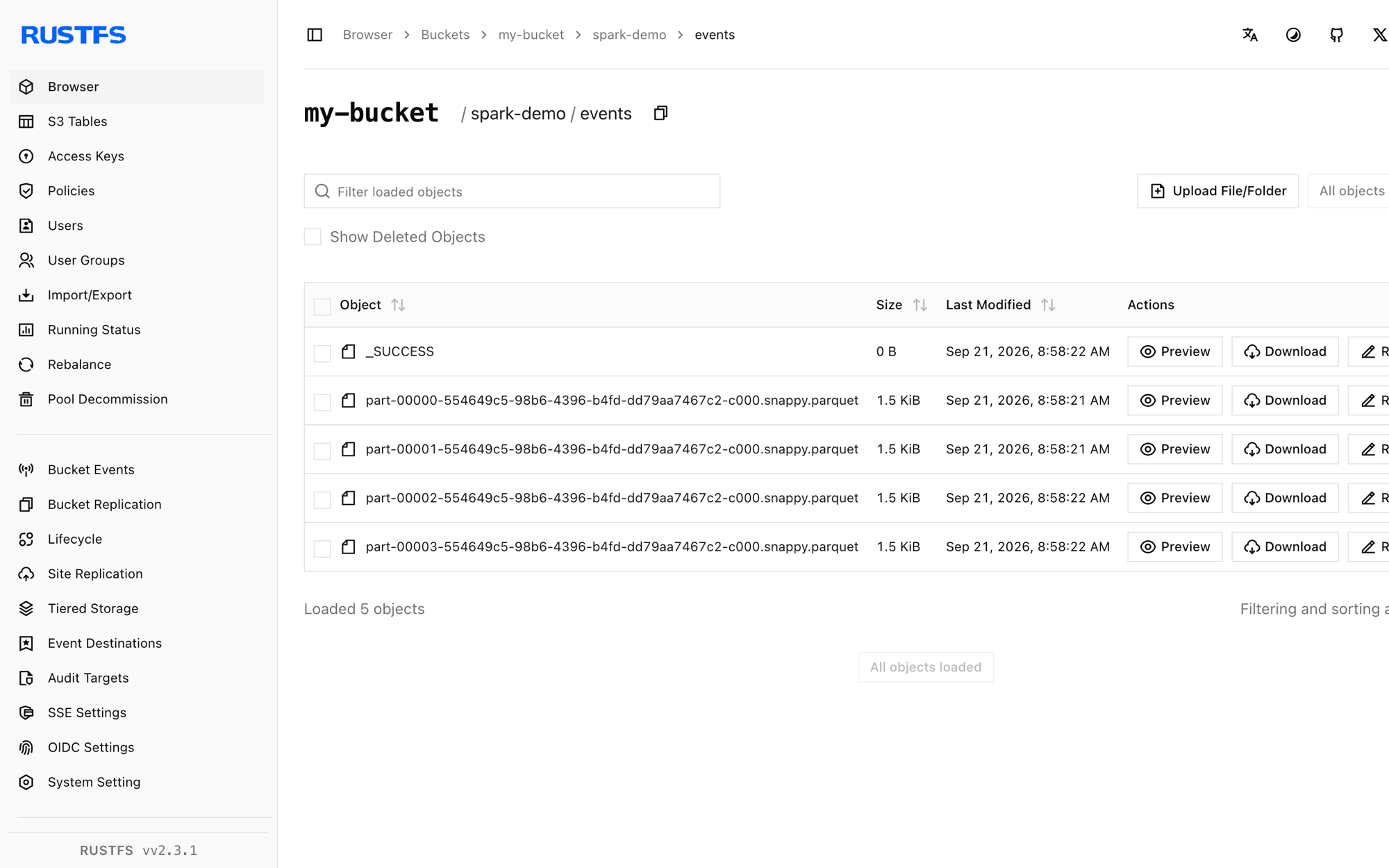
[2026-09-21 00:58:22] 0 B spark-demo/events/_SUCCESS
[2026-09-21 00:58:21] 1.46 KiB spark-demo/events/part-00000-...-c000.snappy.parquet
[2026-09-21 00:58:21] 1.46 KiB spark-demo/events/part-00001-...-c000.snappy.parquet
[2026-09-21 00:58:21] 1.46 KiB spark-demo/events/part-00002-...-c000.snappy.parquetYou can also browse the prefix in the RustFS Console:
Use RustFS S3 Tables
RustFS S3 Tables provides a built-in Apache Iceberg REST catalog, so Spark can treat a table bucket as a managed Iceberg warehouse while the data stays in RustFS. Enable a table bucket and connect Spark's Iceberg REST catalog as described in S3 Tables: the REST catalog URI is http://<rustfs-host>:9000/iceberg, the warehouse is the bucket name, and both catalog requests (AWS Signature Version 4, signing name s3) and S3 file access use path-style addressing.
Per the S3 Tables support matrix, validate the exact Spark and Iceberg versions you deploy against the catalog before adopting this path in production.
Stop or reset the stack
Stop the containers while keeping the RustFS data volume:
docker compose downTo delete the dataset and start from an empty RustFS volume, explicitly include --volumes:
docker compose down --volumesTroubleshooting
NumberFormatException: For input string: "60s"
The hadoop-aws version does not match the Hadoop version inside the Spark image. Spark 4.x images need hadoop-aws 3.4.x; this guide pins apache/spark:3.5.6 together with hadoop-aws:3.3.4.
Connection failures to rustfs:9000
fs.s3a.endpoint is resolved inside the Compose network. From a Spark process running on the host, use http://localhost:9000 instead.
AccessDenied or 403 responses
Confirm that the connector settings match the RustFS credentials and that the create-bucket service completed successfully:
docker compose logs create-bucketNext steps
- Review S3 compatibility notes before adopting additional S3 operations.
- Create dedicated production credentials with Access Key Management.
- Follow the Spark documentation for structured streaming and data source options.