
ClickHouse
Run ClickHouse with an S3 disk backed by RustFS for MergeTree table data.
This guide connects ClickHouse — the real-time OLAP database — to RustFS through ClickHouse's S3 disk storage policy. You will start a ClickHouse server with Docker, create a MergeTree table that stores its parts on RustFS, insert rows, and verify that the table data lives in the bucket. The workflow was verified with clickhouse/clickhouse-server:25.8 and rustfs/rustfs-x86-musl:v2.3.1.
You need Docker. This deployment is intended for local integration testing, not production.
Architecture
The rustfs disk is a ClickHouse S3 disk pointed at the clickhouse-data bucket. Tables created with the matching storage policy write their parts — data, index, and checksum files — to the bucket instead of the local filesystem.
Create the project files
Create the bucket first — ClickHouse does not create buckets:
rc alias set rustfs http://<your-rustfs-endpoint>:9000 <your-access-key> <your-secret-key>
rc mb rustfs/clickhouse-data
Create the storage configuration, replacing both credential placeholders:
<clickhouse>
  <storage_configuration>
    <disks>
      <rustfs>
        <type>s3</type>
        <endpoint>http://rustfs:9000/clickhouse-data/</endpoint>
        <access_key_id><your-access-key></access_key_id>
        <secret_access_key><your-secret-key></secret_access_key>
      </rustfs>
    </disks>
    <policies>
      <rustfs_policy>
        <volumes>
          <main>
            <disk>rustfs</disk>
          </main>
        </volumes>
      </rustfs_policy>
    </policies>
  </storage_configuration>
</clickhouse>
The endpoint must end with / and includes the bucket name as the first path segment. Inside the Compose network the hostname is rustfs; from the host use http://localhost:9000/clickhouse-data/.
Start ClickHouse with the configuration mounted:
docker run -d --name clickhouse --network oo-rustfs_default \
  -p 8123:8123 \
  -e CLICKHOUSE_PASSWORD=<your-clickhouse-password> \
  -v "$PWD/storage.xml":/etc/clickhouse-server/config.d/storage.xml:ro \
  clickhouse/clickhouse-server:25.8
Create a table on the S3 disk
Wait for the HTTP interface, then create a database and a MergeTree table with the storage policy:
curl "http://localhost:8123/?password=<your-clickhouse-password>" \
  --data-binary "CREATE DATABASE rustfs_demo"

curl "http://localhost:8123/?password=<your-clickhouse-password>" \
  --data-binary "CREATE TABLE rustfs_demo.events
    (id UInt32, name String)
    ENGINE = MergeTree ORDER BY id
    SETTINGS storage_policy = 'rustfs_policy'"

curl "http://localhost:8123/?password=<your-clickhouse-password>" \
  --data-binary "INSERT INTO rustfs_demo.events
    VALUES (1, 'clickhouse-on-rustfs'), (2, 'second')"
Read the rows back and confirm ClickHouse reports the part on the rustfs disk:
curl "http://localhost:8123/?password=<your-clickhouse-password>" \
  --data-binary "SELECT count(), any(name) FROM rustfs_demo.events"

curl "http://localhost:8123/?password=<your-clickhouse-password>" \
  --data-binary "SELECT name, disk_name FROM system.parts
    WHERE database = 'rustfs_demo' AND active"
2 clickhouse-on-rustfs
all_1_1_0 rustfsVerify objects in RustFS
List the bucket:
rc ls rustfs/clickhouse-data/ -rClickHouse writes each part as content-addressed blobs. The output contains several small objects, and the count grows as more parts are written:
dtg/hpsyncexixvdnsgorvseobogcgowg
dzp/zfblobhsatzdveqdrsfqcupkdehja
izg/gvhchqobrizpkdftuvlmakkoutwps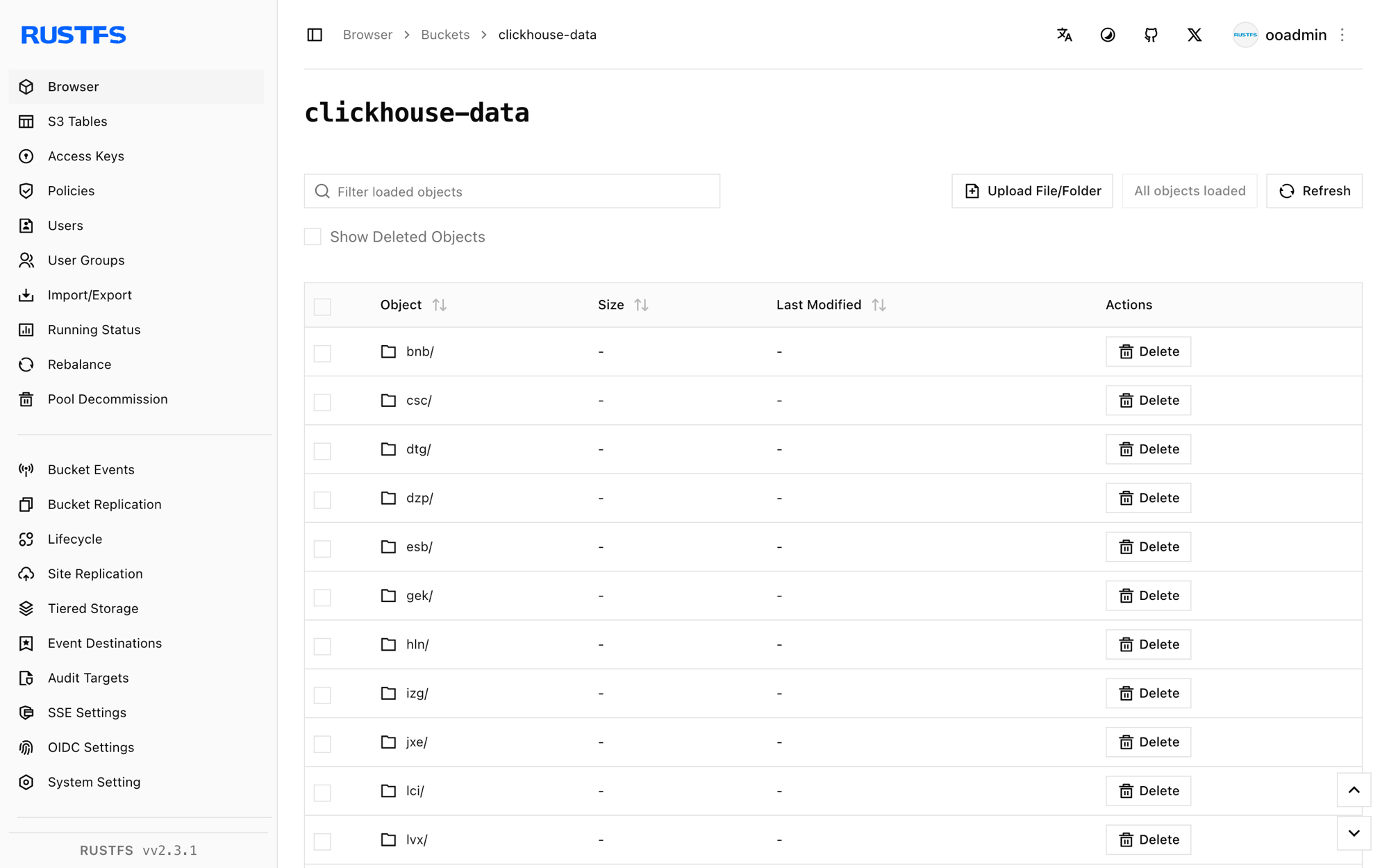
The data survives a container restart because the parts live in RustFS:
docker restart clickhouse
curl "http://localhost:8123/?password=<your-clickhouse-password>" \
  --data-binary "SELECT count() FROM rustfs_demo.events"
Stop or reset the deployment
Stop the server while keeping the data:
docker rm -f clickhouseThe parts stay in the clickhouse-data bucket and the table can be queried again after the next start. To delete the data, remove the bucket:
rc rb rustfs/clickhouse-data --forceTroubleshooting
REQUIRED_PASSWORD on every query
ClickHouse 25.8 images require a password for the default user. Set CLICKHOUSE_PASSWORD on the container and pass the same value as the password query parameter, as shown above.
Table creation fails with a disk or endpoint error
Confirm that the bucket exists before the table is created, that the endpoint ends with /, and that the credentials match the RustFS deployment. Check the server log for the underlying S3 error:
docker logs clickhouse | grep -i s3 | tailNext steps
- Review S3 compatibility notes before adopting additional ClickHouse operations.
- Create dedicated production credentials with Access Key Management.
- Follow the ClickHouse S3 disk documentation to add a cache disk or a tiered hot/cold policy.