
InfluxDB
Run InfluxDB 3 Core with RustFS as its S3 object store, deployed with Docker Compose.
This guide runs InfluxDB — specifically InfluxDB 3 Core, the Rust-based time-series database with a Parquet storage engine — with RustFS as its object store. You will start InfluxDB with Docker Compose, write line protocol through the HTTP API, query it back with SQL, verify the persisted objects in RustFS, and confirm the data survives an InfluxDB restart. The workflow was verified with influxdb:3-core (v3.11.5) and rustfs/rustfs-x86-musl:v2.3.1.
You need Docker with the Compose plugin. This deployment is intended for local integration testing, not production.
Architecture
InfluxDB 3 Core keeps its catalog, write-ahead log, and Parquet data files in the configured object store. Writes land in the WAL first and are persisted to RustFS, so every write survives a restart even before compaction produces Parquet files. The server uses path-style addressing against the configured endpoint by default.
Create the project files
Create a working directory:
mkdir rustfs-influxdb
cd rustfs-influxdb
Create an environment file and replace both credential placeholders:
RUSTFS_ACCESS_KEY=<your-access-key>
RUSTFS_SECRET_KEY=<your-secret-key>
Use dedicated credentials for the bucket. Do not commit .env to source control.
Create the Compose file:
services:
  rustfs:
    image: rustfs/rustfs-x86-musl:v2.3.1
    environment:
      RUSTFS_ACCESS_KEY: ${RUSTFS_ACCESS_KEY}
      RUSTFS_SECRET_KEY: ${RUSTFS_SECRET_KEY}
      RUSTFS_VOLUMES: /data
      RUSTFS_ADDRESS: ":9000"
      RUSTFS_CONSOLE_ADDRESS: ":9001"
      RUSTFS_CONSOLE_ENABLE: "true"
    volumes:
      - rustfs-data:/data
    ports:
      - "9000:9000"
      - "9001:9001"
    healthcheck:
      test: ["CMD", "curl", "-sf", "http://127.0.0.1:9000/health"]
      interval: 10s
      timeout: 5s
      retries: 6
      start_period: 10s
    networks:
      - influxdb

  create-bucket:
    image: rustfs/rc:latest
    depends_on:
      rustfs:
        condition: service_healthy
    environment:
      RUSTFS_ACCESS_KEY: ${RUSTFS_ACCESS_KEY}
      RUSTFS_SECRET_KEY: ${RUSTFS_SECRET_KEY}
    entrypoint:
      - /bin/sh
      - -c
      - |
        until /usr/bin/rc alias set rustfs http://rustfs:9000 "$${RUSTFS_ACCESS_KEY}" "$${RUSTFS_SECRET_KEY}"; do
          echo "Waiting for RustFS..."
          sleep 2
        done
        /usr/bin/rc ls rustfs/my-bucket >/dev/null 2>&1 || /usr/bin/rc mb rustfs/my-bucket
    networks:
      - influxdb

  influxdb:
    image: influxdb:3-core
    command:
      - serve
      - --node-id
      - influxdb-demo
      - --object-store
      - s3
      - --bucket
      - my-bucket
      - --aws-endpoint
      - http://rustfs:9000
      - --aws-access-key-id
      - ${RUSTFS_ACCESS_KEY}
      - --aws-secret-access-key
      - ${RUSTFS_SECRET_KEY}
      - --aws-allow-http
    ports:
      - "8181:8181"
    depends_on:
      create-bucket:
        condition: service_completed_successfully
    networks:
      - influxdb

networks:
  influxdb:

volumes:
  rustfs-data:
--object-store s3 with --aws-endpoint routes all catalog, WAL, and Parquet writes to RustFS. InfluxDB uses path-style addressing against the endpoint by default, and --aws-allow-http permits plain HTTP inside the Compose network.
Start the deployment
Resolve the Compose file before starting containers:
docker compose configStart the services and wait for the bucket initializer to finish:
docker compose up -d
docker compose ps -a
Create the admin token
InfluxDB 3 Core protects every API request with a bearer token. Create the admin token once after the first start and keep the printed value:
docker compose exec influxdb3 influxdb3 create token --adminToken: <your-admin-token>Token creation
The token value is printed only once and cannot be recovered later. If the token name is already taken (HTTP 409), the node has existing metadata — start from a fresh bucket prefix or delete the node prefix in the bucket before retrying.
Write line protocol
Send a batch of CPU measurements in line protocol to the rustfs_demo database:
python3 - <<'PY'
import time, urllib.request

token = "<your-admin-token>"
now_ns = int(time.time() * 1e9)
lines = []
for i in range(30):
    ts = now_ns - i * 1_000_000_000
    lines.append(f"cpu_usage,host=az-server,region=us-east-1 usage={60 + i % 30}.{i % 10} {ts}")

req = urllib.request.Request(
    "http://localhost:8181/api/v3/write_lp?db=rustfs_demo",
    data="\n".join(lines).encode(),
    headers={"Content-Type": "text/plain", "Authorization": f"Bearer {token}"},
    method="POST",
)
with urllib.request.urlopen(req, timeout=30) as r:
    print("write:", r.status)
PY
write: 204Query with SQL
Query the measurement back through the SQL API:
curl -sG "http://localhost:8181/api/v3/query_sql" \
  --data-urlencode "db=rustfs_demo" \
  --data-urlencode "format=json" \
  --data-urlencode "q=SELECT count(*) AS cnt FROM cpu_usage" \
-H "Authorization: Bearer <your-admin-token>"[{"cnt":30}]Verify objects in RustFS
List the node prefix through the bucket-initializer image:
docker compose run --rm --entrypoint /bin/sh create-bucket -c \
  '/usr/bin/rc alias set rustfs http://rustfs:9000 "$RUSTFS_ACCESS_KEY" "$RUSTFS_SECRET_KEY" >/dev/null && /usr/bin/rc ls rustfs/my-bucket/influxdb-demo --recursive'
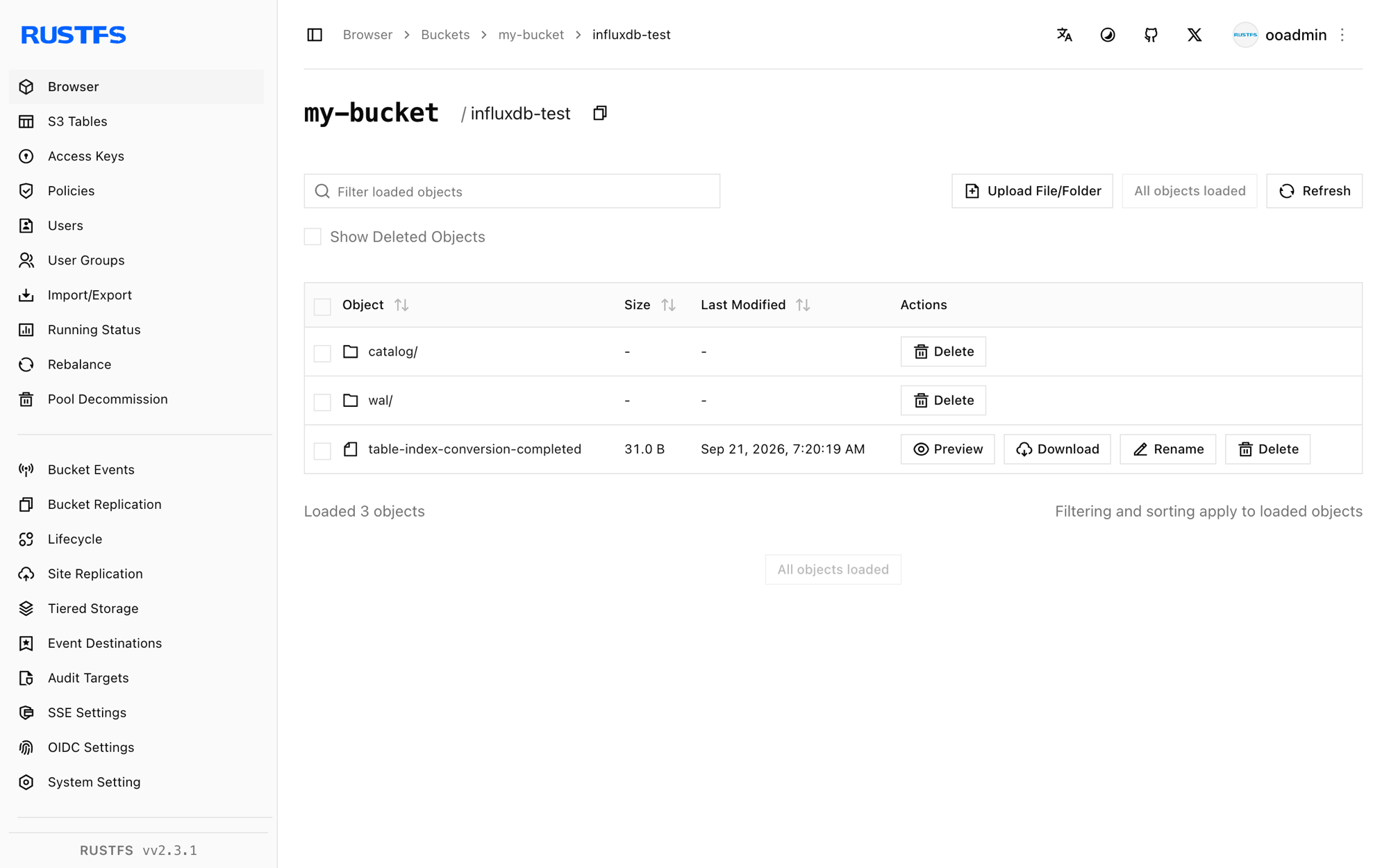
The catalog, the write-ahead log, and later the Parquet data files live under the node identifier prefix:
[2026-09-20 23:18:28]      105 B influxdb-demo/catalog/v3/snapshot
[2026-09-20 23:20:54]     1.45 KiB influxdb-demo/wal/00000000001.wal
[2026-09-20 23:20:19]       31 B influxdb-demo/table-index-conversion-completed
You can also browse the prefix in the RustFS Console:
Confirm persistence across a restart
Restart InfluxDB and repeat the SQL query:
docker compose restart influxdb
curl -sG "http://localhost:8181/api/v3/query_sql" \
  --data-urlencode "db=rustfs_demo" \
  --data-urlencode "format=json" \
  --data-urlencode "q=SELECT count(*) AS cnt FROM cpu_usage" \
-H "Authorization: Bearer <your-admin-token>"[{"cnt":30}]The count is unchanged because the catalog and WAL were replayed from RustFS — the object store is the persistence layer, exactly as in production topologies.
Stop or reset the stack
Stop the containers while keeping the RustFS data volume:
docker compose downTo delete the stored data and start from an empty RustFS volume, explicitly include --volumes:
docker compose down --volumesTroubleshooting
"the request was not authenticated" on every request
InfluxDB 3 Core requires the admin bearer token on API requests. Create it once with influxdb3 create token --admin and send it as Authorization: Bearer <token>.
"token name already exists" when creating the admin token
The node already has an admin token, and the value cannot be recovered. Delete the node prefix in the bucket (for example influxdb-demo/) while the container is stopped, start it again, and create the token fresh.
AccessDenied or 403 responses
Confirm the credentials in the Compose file match the RustFS credentials and that the create-bucket service completed successfully:
docker compose logs create-bucketConnection or certificate errors
--aws-endpoint takes a full URL; --aws-allow-http permits plain HTTP for the container-network endpoint. Inside the Compose network use http://rustfs:9000; from the host use http://localhost:9000.
Next steps
- Review S3 compatibility notes before adopting additional S3 operations.
- Create dedicated production credentials with Access Key Management.
- Follow the InfluxDB 3 Core documentation to connect telegraf or the write APIs as data producers.