
Apache Doris
Back up Apache Doris tables to RustFS through an S3 repository and restore them.
This guide connects Apache Doris — the real-time analytical data warehouse — to RustFS through an S3 backup repository. You will start an all-in-one Doris container, create an S3 repository pointing at a RustFS bucket, back up a table, drop it, and restore it from RustFS. The workflow was verified with apache/doris:all-in-one-4.1.3 and rustfs/rustfs-x86-musl:v2.3.1.
You need Docker. This deployment is intended for local integration testing, not production.
Architecture
The repository is a named S3 location under the doris-backups bucket. BACKUP SNAPSHOT uploads table metadata and tablet data files; RESTORE SNAPSHOT downloads them into a new table.
Start Doris and create the repository
Create the bucket first — Doris does not create buckets:
rc alias set rustfs http://<your-rustfs-endpoint>:9000 <your-access-key> <your-secret-key>
rc mb rustfs/doris-backups
Start the all-in-one container on the same Docker network as RustFS:
docker run -d --name doris --network oo-rustfs_default \
  -p 8030:8030 -p 9030:9030 apache/doris:all-in-one-4.1.3
Wait for the frontend to become healthy, then connect with the MySQL protocol (port 9030, user root, no password in the all-in-one image).
Create a test table with rows:
CREATE DATABASE rustfs_demo;
CREATE TABLE rustfs_demo.events
  (id INT, name VARCHAR(50))
  DISTRIBUTED BY HASH(id) BUCKETS 1
  PROPERTIES ("replication_num" = "1");
INSERT INTO rustfs_demo.events VALUES (1, 'doris-on-rustfs'), (2, 'backup-test');
Create the S3 repository, replacing the endpoint with the IP address of the RustFS container and both credential placeholders:
CREATE REPOSITORY `rustfs_repo`
  WITH S3
  ON LOCATION "s3://doris-backups/rustfs-repo"
  PROPERTIES (
    "AWS_ENDPOINT" = "http://<rustfs-container-ip>:9000",
    "AWS_ACCESS_KEY" = "<your-access-key>",
    "AWS_SECRET_KEY" = "<your-secret-key>",
    "AWS_REGION" = "us-east-1",
    "AWS_PATH_STYLE_ACCESS" = "true"
  );
Doris 4.1 resolves the bucket into the endpoint hostname even with AWS_PATH_STYLE_ACCESS enabled, so a hostname endpoint fails with UnknownHostException: doris-backups.rustfs. Using the container IP address forces path-style requests and works; SHOW REPOSITORIES confirms the repository registered with an empty ErrMsg.
Back up a table to RustFS
Take a snapshot of the table:
BACKUP SNAPSHOT rustfs_demo.demo_snapshot
  TO rustfs_repo
  ON (events);
The statement returns immediately; the backup job runs in the background. Watch its state:
SHOW BACKUP;Wait until State reaches FINISHED — the snapshot metadata and tablet data files are now objects in the bucket.
Verify the backup in RustFS
List the bucket:
rc ls rustfs/doris-backups/ -rThe repository stores a repository descriptor, the snapshot metadata, and the tablet files:
rustfs-repo/__palo_repository_rustfs_repo/__repo_info
rustfs-repo/__palo_repository_rustfs_repo/__ss_demo_snapshot/__meta.d50ecf9b...
rustfs-repo/__palo_repository_rustfs_repo/__ss_demo_snapshot/__ss_content/.../...dat...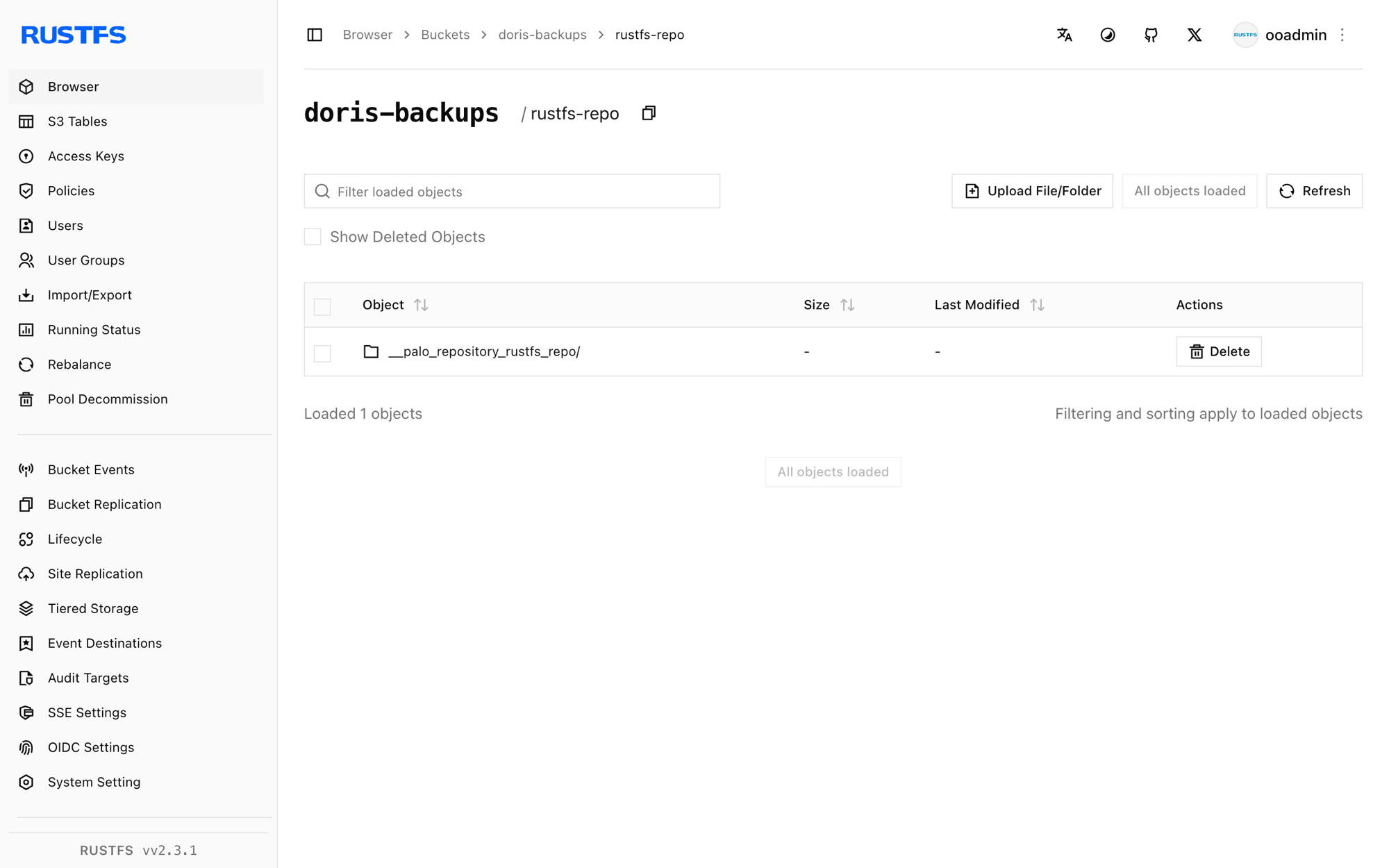
Restore the table from RustFS
Drop the table and restore it from the snapshot. The timestamp comes from the snapshot name shown by SHOW SNAPSHOT ON REPOSITORY rustfs_repo;:
DROP TABLE rustfs_demo.events;

RESTORE SNAPSHOT rustfs_demo.demo_snapshot
  FROM rustfs_repo
  ON (events)
  PROPERTIES (
    "backup_timestamp" = "2026-09-21-16-35-12",
    "replication_num" = "1"
  );
Wait for the restore job to finish and confirm the data:
SHOW RESTORE;
SELECT count(*) FROM rustfs_demo.events;2Stop or reset the deployment
Stop Doris while keeping the data:
docker rm -f dorisThe backup stays in the doris-backups bucket and can be restored into any Doris cluster that registers the same repository. To delete it, remove the bucket:
rc rb rustfs/doris-backups --forceTroubleshooting
UnknownHostException: doris-backups.rustfs when creating the repository
Doris is building a virtual-hosted hostname from the bucket and endpoint. Use the RustFS container IP address in AWS_ENDPOINT together with AWS_PATH_STYLE_ACCESS = "true", as shown above.
The backup stays in SNAPSHOTING for a long time
The backend uploads the tablet files. Confirm the backend is healthy (SHOW BACKENDS;) and can reach the endpoint; the all-in-one image needs a minute or two after start before both processes report ready.
Failed to create repository: ... file status
The bucket does not exist or the credentials are wrong. Create doris-backups with rc mb and re-check the access key pair.
Next steps
- Review S3 compatibility notes before adopting additional Doris operations.
- Create dedicated production credentials with Access Key Management.
- Follow the Doris backup and restore documentation to schedule periodic snapshots.